How to register and log in to Capitalxtend broker


If you plan to start trading with the CapitalXtend broker, getting to know the steps for registration, identity verification, logging in to the user panel, and the deposit and withdrawal methods is the first step. In recent years, thanks to offering services to Iranian users, supporting the MetaTrader 4 and 5 platforms, allowing trading on more than 350 instruments, and providing high leverage, this broker has become one of the well-known options among forex and CFD traders.
In this guide, we go through all the steps of signing up with CapitalXtend, logging in to your account, completing identity verification, opening a trading account, as well as how to deposit and withdraw funds, step by step and with practical tips, so you can start trading with this broker without any confusion.
Are there any restrictions for Iranians registering with Capitalxtend?
A review of the registration conditions at CapitalXtend broker shows that, regarding the status of Iranian users, there is a discrepancy between the information published in its official documents and the response from the broker's support team. In CapitalXtend's Risk Disclosure statement, Iran is included in the list of Restricted Jurisdictions, and it is stated that the company's services are not intended for residents of certain countries, including Iran. Legally, this means that the broker has excluded the provision of services to users residing in Iran in its official documents.
However, according to CapitalXtend's support team, Iranian users can currently register, complete identity verification and trade with this broker, and no restriction on opening accounts from Iran has been announced. Therefore, the current situation can be described as «no practical restriction at the time of review» but accompanied by «ambiguity in the official service framework».
Before opening an account, Iranian users should be aware that at international brokers, the terms of service may change based on the company's internal policies, changes in international regulations or sanctions-related requirements. For this reason, it is recommended that before depositing funds, you check the latest conditions for accepting Iranian users directly with the broker's support team and make sure about the deposit and withdrawal methods and the required documents.
Logging In to the Capitalxtend Website and App and Signing Up
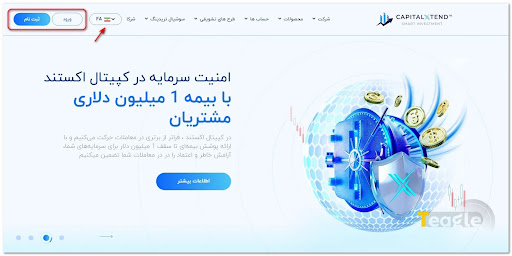
To sign in to the CapitalXtend broker, you need to go to its official website at capitalxtend.com .
Click the «Register» button.
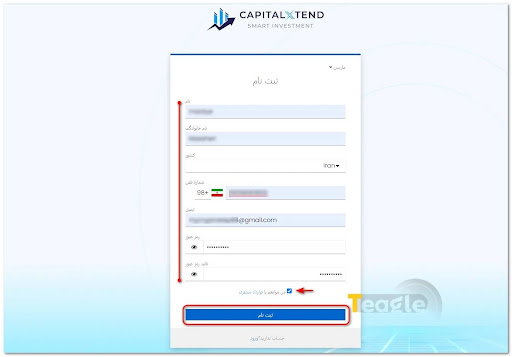
On the new page, carefully enter all the requested information, including your first and last name, mobile number, a valid email and a strong password, then tick the box agreeing to the terms and click the blue «Register» button.
Before confirming, it is recommended that you read the broker's Terms & Conditions and privacy policy in full, as they include clauses on fees, country restrictions and how potential disputes are resolved, and being aware of them is very important.
After registering, a verification link will be sent to you to activate your account. After clicking the link, select «Click here to proceed» so that your email is fully verified. You can now return to the website or app and log in with your email and chosen password.
How to Verify Your Identity at CapitalXtend Broker
After the initial sign-up, the KYC (Know Your Customer) step is required to fully activate your account and be able to withdraw funds. To do this, log in to your account and click «Verify your profile» on the left side of the page.
To complete identity verification (KYC) with the CapitalXtend broker, you need to provide two types of documents: proof of identity and proof of address. These documents are collected to comply with anti-money laundering (AML) rules and to confirm users' real identities. In some cases, the broker may also ask you for other documents for additional checks.
1. Proof of Identity
To verify your identity, you can upload one of the following documents:
- Passport
- National ID card
- Driver's license
The submitted document must be valid and unexpired, and its image must be uploaded in full, clear and in color so that all the information and corners of the document are visible.
2. Proof of Address
To verify your residential address, one of the following documents is usually accepted:
- A utility bill such as electricity, water, gas or internet
- Bank statement
- Other official documents showing your residential address
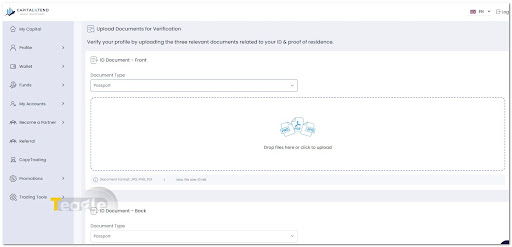
Note that under CapitalXtend's anti-money laundering policies, the bill or document provided must not be more than 6 months old from its date of issue.
Another important point is that CapitalXtend supports common image formats (JPG / JPEG, PNG) and PDF for uploading documents. The text of the documents must be fully legible and the file size must not exceed 5 MB. If the information registered in your account does not match the submitted documents or the image quality is not sufficient, CapitalXtend may reject the documents and ask you to send a new version or additional documents.
Reviewing and Opening Your Preferred Account at Capitalxtend
In general, CapitalXtend usually offers four types of live accounts, the details of which you can see in the table below:
|
Account type |
Approximate minimum deposit |
Spread from |
Trading platform |
Maximum leverage |
|
Standard |
~$12 |
2 to 3 pips |
MT4 |
Up to 1:5000 |
|
ECN |
~$50 |
1.2 to 1.6 pips |
MT4/MT5 |
Up to 1:5000 |
|
Pro-ECN |
~$100 |
From 0.0 to 0.2 pips |
MT4/MT5 |
Up to 1:5000 |
|
Platinum |
~$25,000 |
From 0.2 pips |
MT4 |
Up to 1:500 |
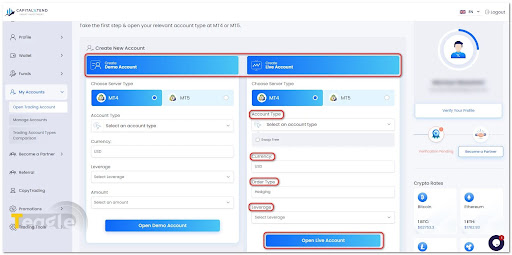
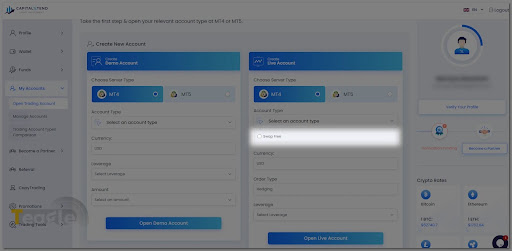
To open a trading account (either a Live account or a Demo account), simply click «My Accounts» in the left-hand menu of your user panel and then «Open Trading Account». You can now choose one of the account types depending on your style, trading strategy and available capital.
Islamic (Swap-Free) account conditions at CapitalXtend
In regular margin trading, holding a position for more than one business day incurs a swap fee (a type of interest based on the interest rate difference between two currencies), which from the perspective of Islamic jurisprudence is considered «riba» (usury) and is prohibited. An Islamic account removes this fee.
CapitalXtend has made things easy for its Muslim users: apart from the Platinum account, all of this broker's account types can be converted to Islamic (Swap Free). To add this feature to your account, all you need to do is tick the «Swap Free» box.
Funding Your Account and How to Deposit at CapitalXtend Broker
After registering, verifying your identity and opening a trading account, you need to fund your account to start trading. In the CapitalXtend user panel, simply select «Wallet» and then «Wallet Balance» from the left-hand menu. Clicking the blue «Deposit in wallet now» box takes you to a page that shows all the available deposit and funding methods.
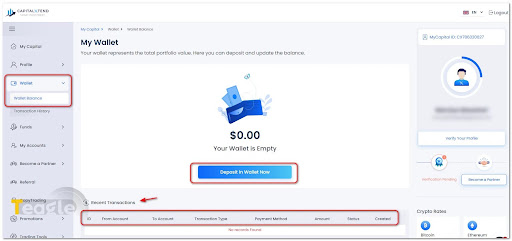
For more convenience, you can directly select «Funds» and then «Deposit Funds» to go to the deposit page.
Depending on the user's country of residence, CapitalXtend offers various deposit methods, the most important of which are:
- International bank cards (Visa and Mastercard)
- Bank wire (Bank Transfer)
- Local transfer (Local Transfer)
- Online banking gateways (Online Banking)
- Cryptocurrencies, including Tether on the TRC20 and ERC20 networks.
It is worth noting that most deposit methods at CapitalXtend are free of broker fees. However, when using cryptocurrencies, the blockchain network fee is paid by the user, and with some local or bank payment methods, the bank or service provider may charge a separate fee.
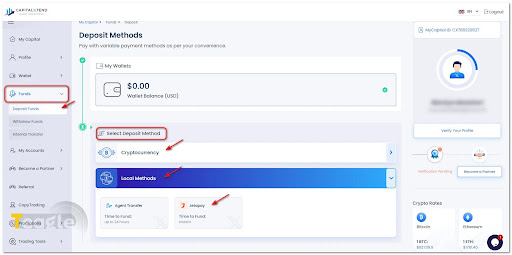
Deposit processing time for most methods is up to 24 hours; however, for online payments the final time depends on the bank or payment service provider, and for crypto transactions the blockchain network's confirmation speed affects the deposit time.
As you can see in the image, on some accounts the «JetaPay» option is also shown among the payment methods. This service acts as an intermediary payment gateway and makes the transfer process simpler. However, a review of CapitalXtend's official documents shows no mention of support for direct Rial deposits via Iranian bank cards .
Therefore, although some Iranian users use intermediary services to transfer funds, these methods fall outside the broker's official framework, and before using them you should make sure the service provider is reliable.
With that in mind, for Iranian users the most common and accessible way to fund an account is usually Tether (USDT).
Installing MetaTrader and Connecting Your Capitalxtend Account
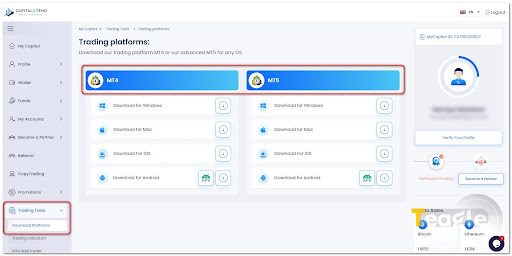
CapitalXtend offers trading through MetaTrader 4 and MetaTrader 5 on Windows, Android, iOS and the web version (WebTrader). After opening a trading account, all you need to do is install the platform of your choice and log in with your trading account details.
Step 1: Get your trading account details
Before installing MetaTrader, you need to have created an MT4 or MT5 trading account in your personal cabinet. After the account is opened, CapitalXtend provides the following details in your user panel and also by email:
- Trading account number (Login)
- Trading password (Trader Password)
- Server name (Server)
These details are required to connect the account to MetaTrader, and without them you cannot log in to the account.
Step 2: Download MetaTrader
Go to the «Download Platforms» section in your CapitalXtend personal panel and download the version that suits your device. This broker offers the following versions:
- MetaTrader 4 for Windows
- MetaTrader 5 for Windows
- MetaTrader 4 and MetaTrader 5 for Android
- MetaTrader 4 and MetaTrader 5 for iPhone and iPad
- The web version (WebTrader), which can be used through a browser without installing any software.
Step 3: Install the program
After downloading, run the installation file and follow the steps to the end. The installation process on Windows is fully automatic and is completed in just a few clicks. On mobile, simply install the app from Google Play or the App Store.
Step 4: Connect your CapitalXtend account to MetaTrader
After launching MetaTrader, from the «File» menu, select the «Login to Trade Account» option. Then enter the following details:
- Login: Trading account number
- Password: Trading account password
- Server: The server assigned to you when the account was opened.
Finally, click «Login» . If the details have been entered correctly, the connection to the server is established and your account balance, trading symbols and live prices will be displayed in MetaTrader.
Using MT4 WebTrader without installing software
If you don't want to install MetaTrader on your system, you can use the «MT4 WebTrader» version. Simply go to the «WebTrader» page, enter your account number, password and trading server, and click «Ok» . After logging in, you will have access to your charts, analysis tools and trades directly from your browser, with no need to install any program.
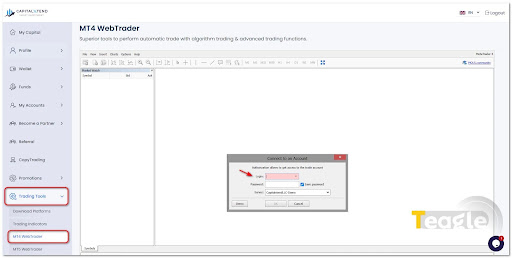
Keep in mind that your personal cabinet (Client Area) login details are not the same as your MetaTrader trading account details. To log in to MT4 or MT5, you must use the trading account number, trading password and server name you received after opening the account; otherwise you will get an «Invalid Account» or «Authorization Failed» error.
Tradable symbols at CapitalXtend and their conditions
CapitalXtend offers trading in a wide range of financial markets through contracts for difference (CFDs). In total, this broker provides users with more than 350 trading symbols, the most important of which are:
- Forex: major, minor and exotic currency pairs
- Precious metals: gold (XAU/USD), silver (XAG/USD) and some other metals
- Stock indices: leading indices from US, European and Asian markets
- Stock CFDs: shares of major international companies
- Energy: crude oil, natural gas and other energy commodities
- Cryptocurrencies: popular digital currencies including Bitcoin, Ethereum and altcoins as CFDs
One of CapitalXtend's features is offering leverage of up to 1:5000. However, the amount of leverage depends on the account type and the chosen symbol. For example, the «Platinum» account supports a maximum leverage of 1:500, and according to the broker, unlimited leverage (Unlimited Leverage) is available only for certain symbols such as major forex pairs, gold and silver under specific conditions.
It should also be noted that trading conditions are not the same for every symbol. Factors such as the minimum trade size (Minimum Lot), spread, commission, trading hours and required margin level vary depending on the market and account type. For this reason, before placing your first trade, it's best to check the specifications of each symbol in the «Contract Specifications» section on CapitalXtend's website or trading platform to learn the exact trading conditions.
How to Withdraw from CapitalXtend Broker
Withdrawals at CapitalXtend are made through the personal cabinet (Client Portal). Before submitting a request, you must have completed identity verification (KYC) on your account; otherwise, the withdrawal request will not be processed.
The withdrawal steps are as follows:
- Log in to your personal cabinet on the CapitalXtend website.
- From the «Funds» menu, select «Withdrawal».
- Specify the account or wallet you want to withdraw from.
- Choose your preferred withdrawal method and enter the requested amount.
- Review the withdrawal destination details and submit your request.
CapitalXtend supports various withdrawal methods which, depending on the user's country of residence, may include international bank cards (Visa and Mastercard), bank wire (Bank Transfer), local transfer (Local Transfer), online banking (Online Banking) and cryptocurrencies.
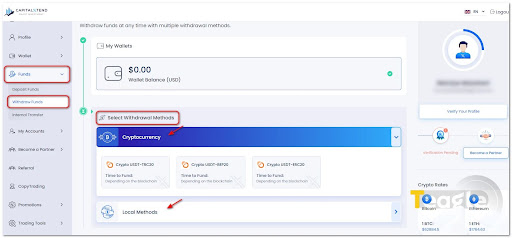
According to information published by the broker, most withdrawal requests are reviewed and approved within a maximum of 24 business hours; however, the final time to receive funds depends on the chosen payment method, the destination bank or the blockchain network's confirmation speed. Some withdrawal methods may also involve bank fees, payment service provider fees or crypto network fees.
It is worth noting that CapitalXtend's official page does not list any option for direct withdrawal to Iranian bank cards or Rial accounts. In practice, many Iranian users withdraw in crypto, especially Tether (USDT), and then convert their funds to Rial through domestic exchanges.
Articles related to the broker
User reviews

Newest
