Guide to registering and using FiboGroup broker



Entering the world of trading without a proper understanding of trading tools and platforms is like walking down an unknown path. FIBOGroup , as one of the reputable international brokers, is the choice of many traders for starting or expanding their activity in the financial markets. However, the first obstacle users face is often not the complexity of the market, but the registration process and working with the user dashboard.
In this guide, the tutorial has been laid out step by step, from creating a user account to logging into the dashboard and getting to know FIBOGroup's key sections. The goal is for you, as an Iranian user, to start your activity with greater clarity and confidence and, instead of trial and error, enter this path with a clear and structured view.
Accessing the official Fibo Group website in Persian and choosing a language
To use FiboGroup's services, you first need to go to the broker's main website at fibogroup.com In the top corner of the page there is a language drop-down, which is set to English by default. By clicking it and selecting Persian, you can switch the site to your preferred language and easily use its various sections.
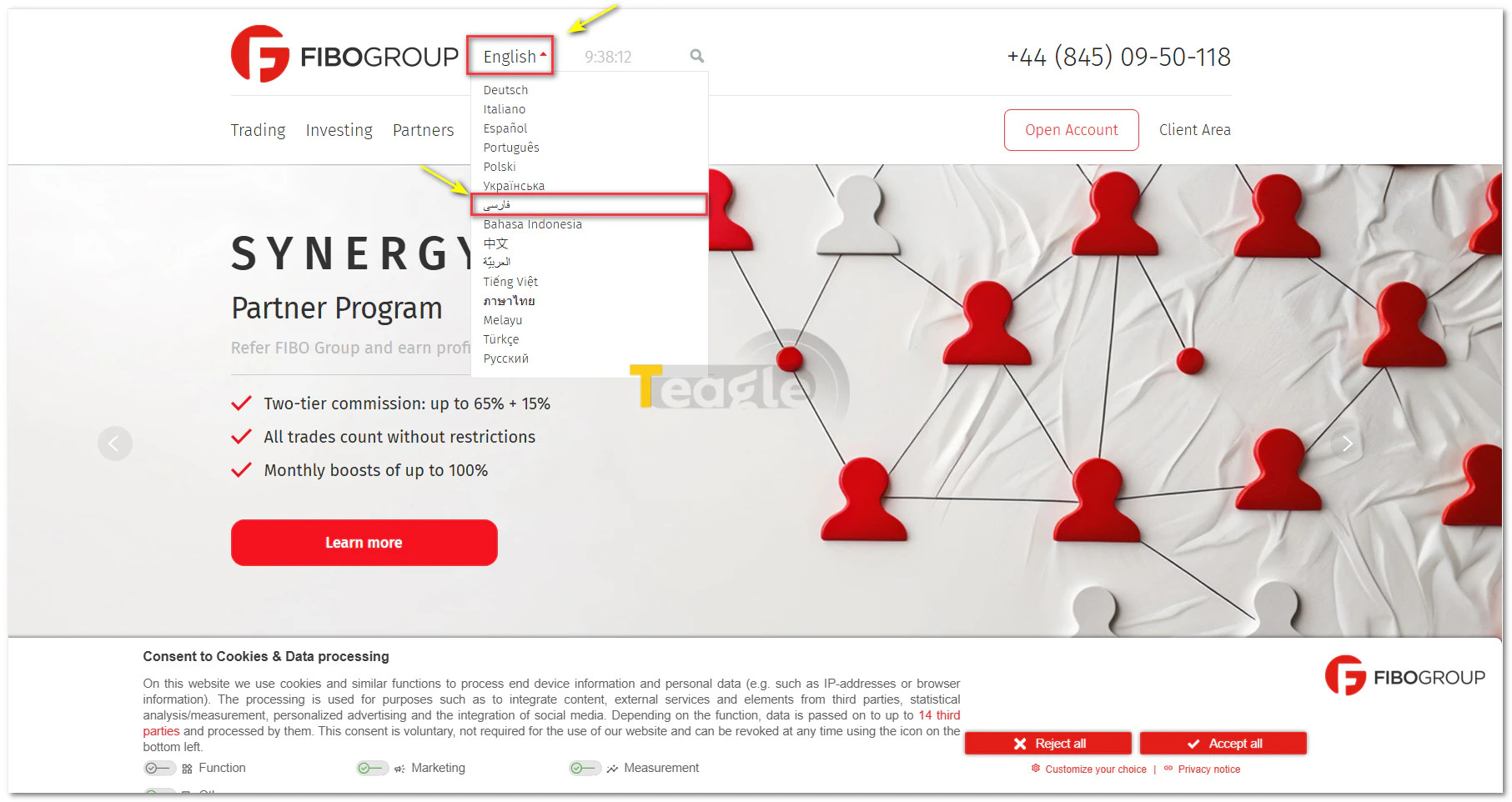
That said, to make access easier for Iranian users, a Persian version of the site is also available at the domain fg-persian.com . Below, this article explains the login and registration steps through this Persian portal step by step, so that getting started is clear and simple for Iranian users.
Steps to log in to the personal cabinet with username and password
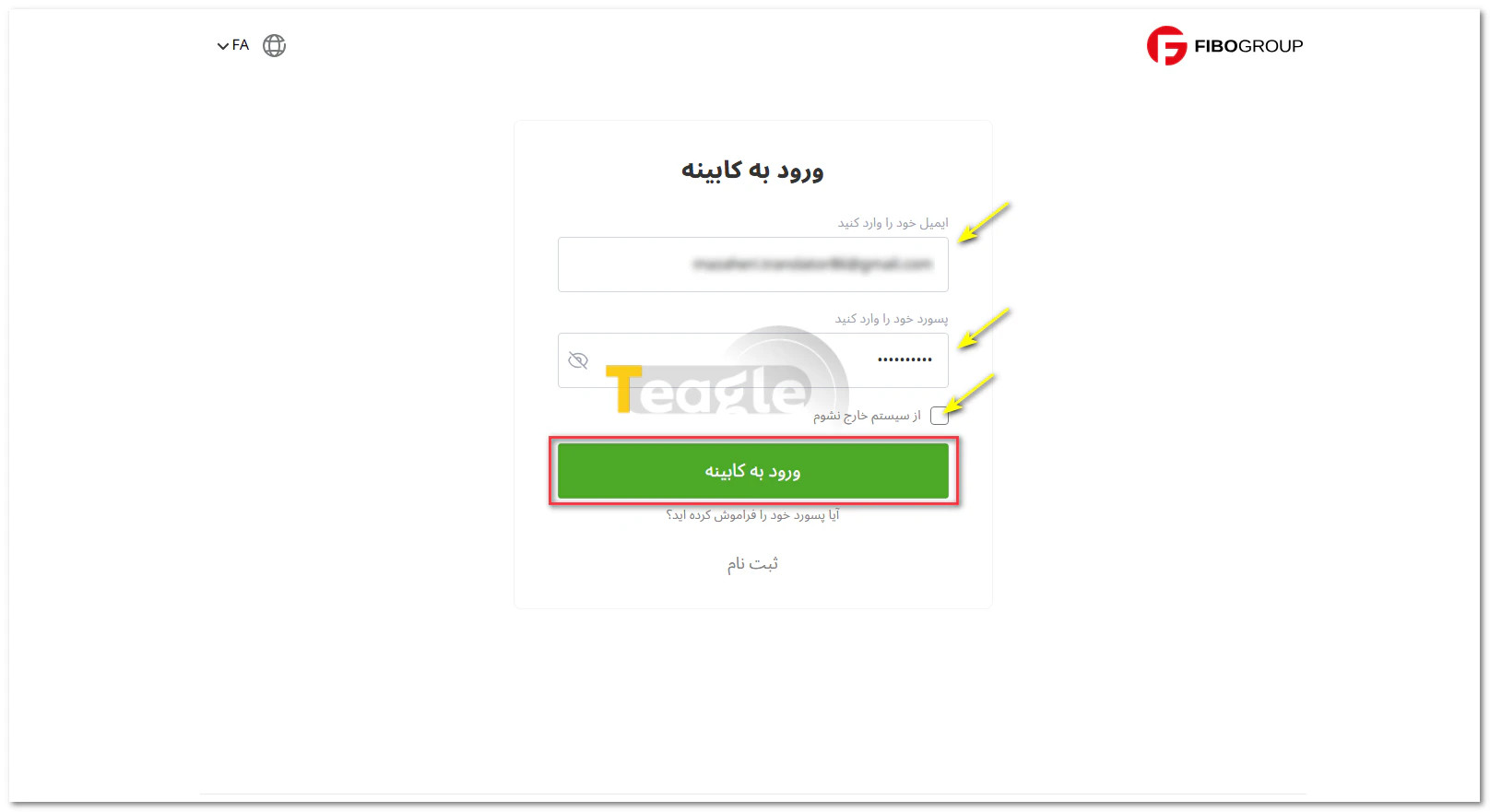
To log in to the FiboGroup personal cabinet, simply go to the broker's official website and, on the home page, select «Client Area» or «Personal Cabinet». In this section, enter your username (usually your registration email) and your password.
At the bottom, by ticking the box next to «Keep me logged in», your account will stay logged in until you log out through the user panel.
By clicking the login button, you will be taken to the user panel.
Note that FiboGroup's services are not available to residents of certain countries, including the United Kingdom, North Korea and the United States.
Step-by-step guide to registering with the Fibo Group broker and opening a trading account
If you don't have an account with the Fibo Group broker yet, you can easily open one in just a few minutes. Registering with FiboGroup and opening a trading account follows a clear, structured path that is completed through the broker's official website. The main steps are explained step by step below.
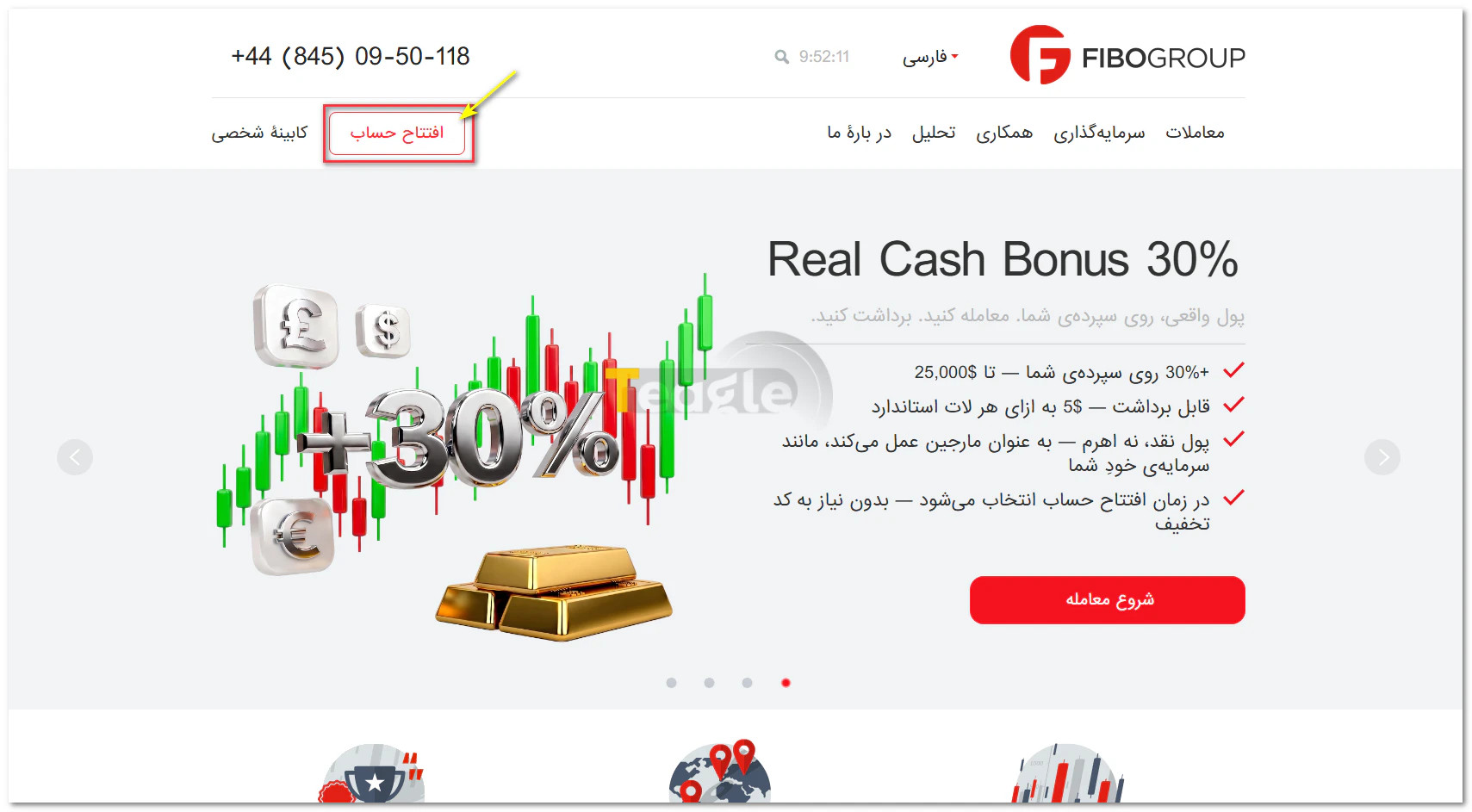
Step 1: Go to the Fibo Group website and click on Open Trading Account
First, visit the official FiboGroup website and click on «Open Account» to start the process.
Step 2: Complete the registration form with your email, phone number and country of residence
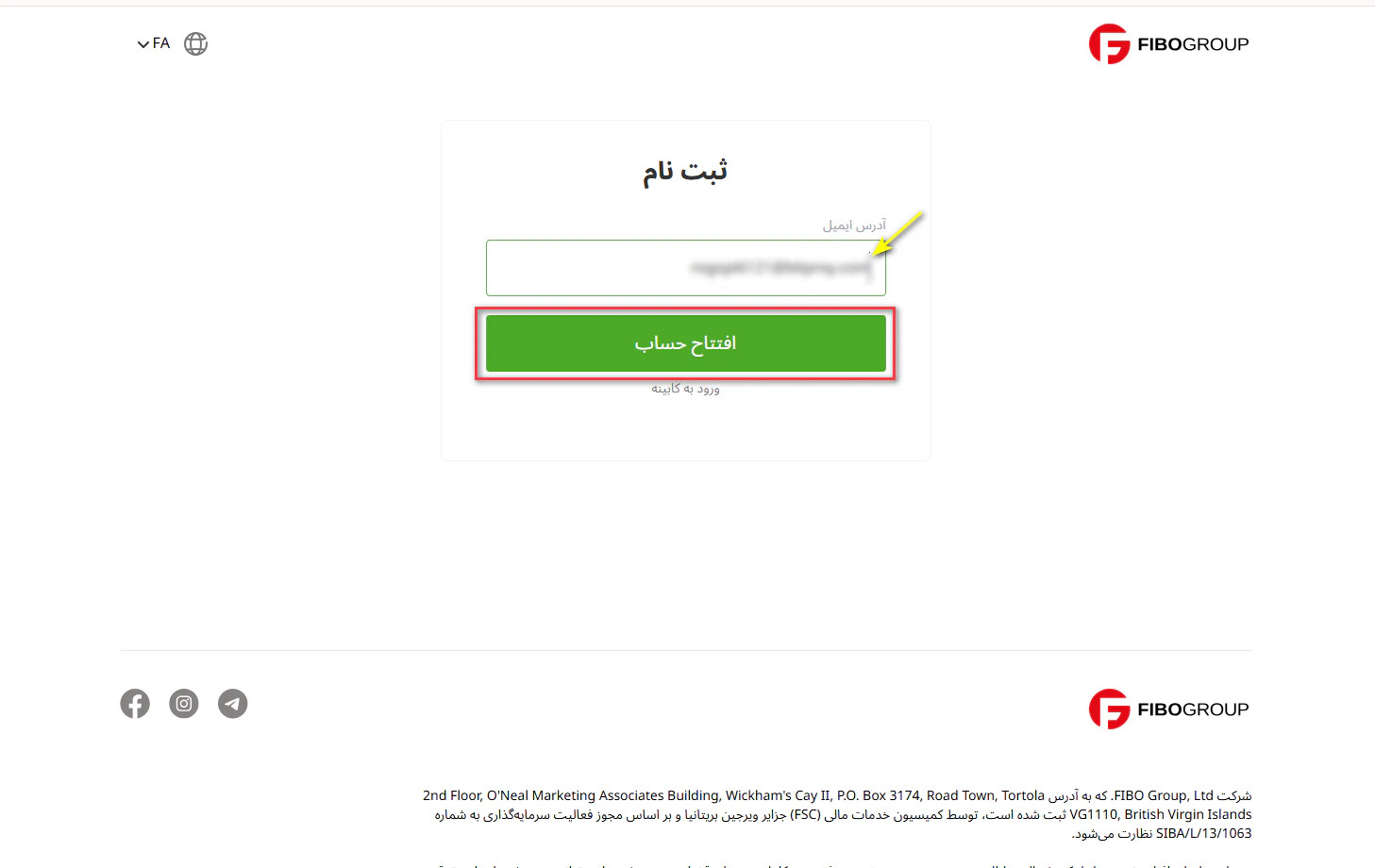
In this section, you need to enter your identity details and phone number. First, after entering your email address, click the green «Open Account» button.
Step 3: Verify your email via the link sent or a verification code
After submitting the form, you will receive an email containing an activation link, a username and a password. Click on «Verify your email» to be taken to the «Personal Cabinet» page. At this stage, you need to enter personal details such as your first name, last name, phone number and country of residence. Finally, by selecting «Save and Continue» you will move on to the next step.
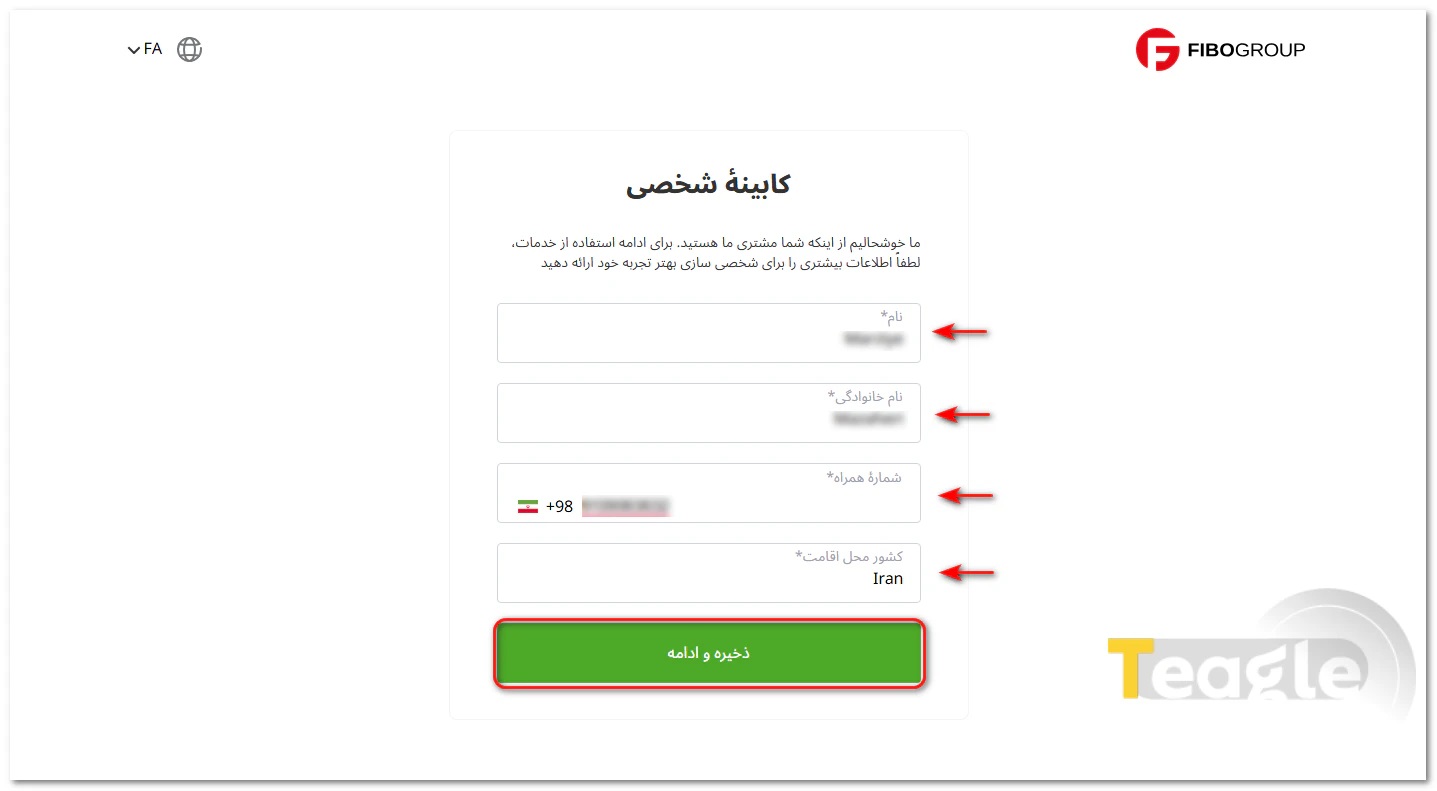
It's that simple: your user account with the FiboGroup broker has been created.
Step 4: Logging in to the Personal Cabinet with your username and password
After completing registration and receiving your login details, you can easily access your FiboGroup Personal Cabinet . Here, simply enter your username (usually your registration email) and password (the code received by email) in the «Personal Cabinet» section. This is where you can create demo or live accounts, connect to trading platforms such as MetaTrader and manage financial operations such as deposits and withdrawals.
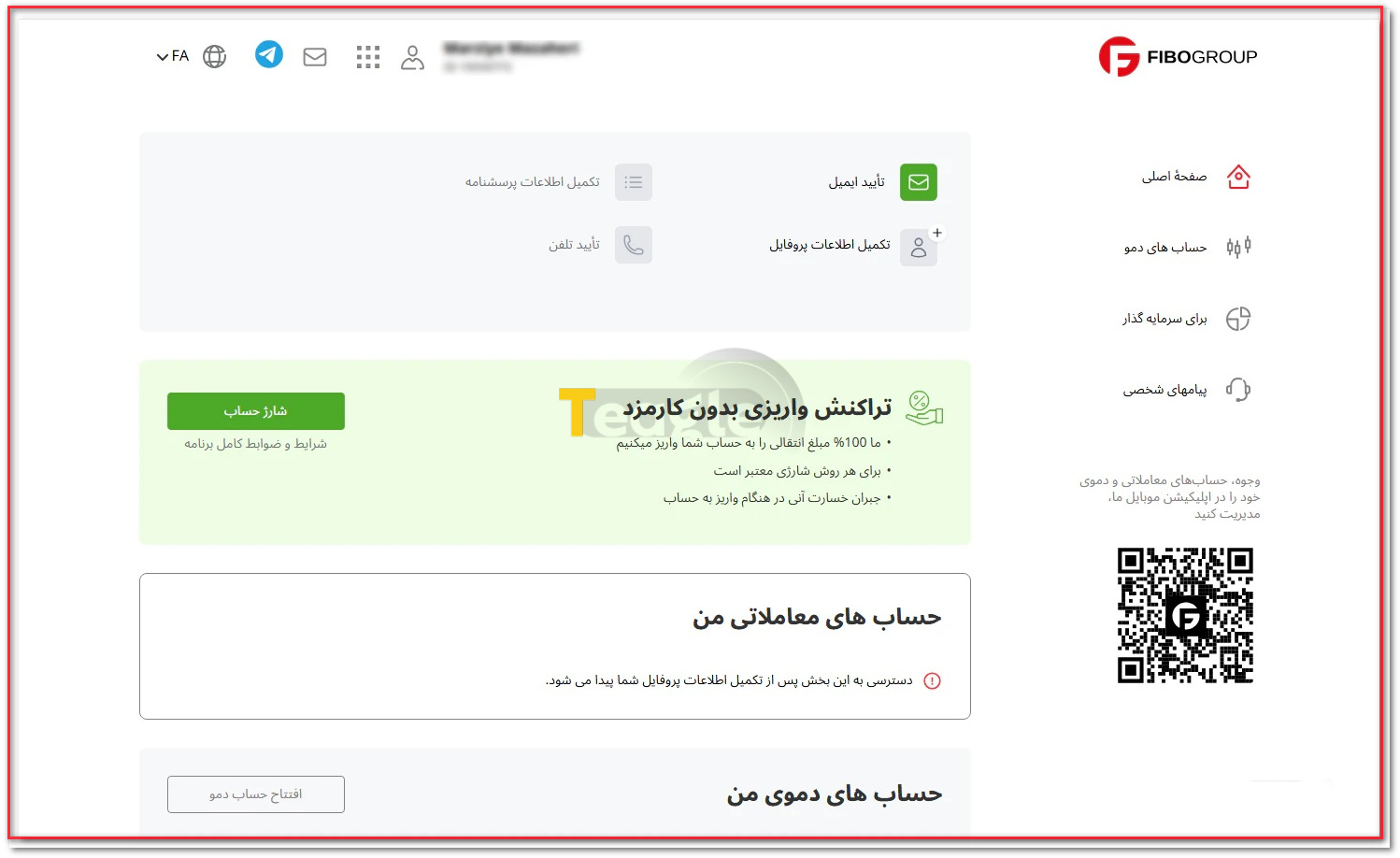
Important note: On your first login, be sure to change your temporary password and choose a strong personal password to keep your account as secure as possible.
Identity verification (KYC) at the Fibo Group broker and required documents
After signing up and logging in to your personal cabinet, it's time to complete the identity verification process, an essential step that keeps your account secure and lets you use the broker's services in full, especially withdrawals. To do this, simply go to the «Complete Profile Information» section. On this page, select the available options one by one and complete the steps in order. At this stage, you need to upload your identity documents and proof of residence.
This information includes personal details such as first name, last name, date of birth, nationality and tax ID . Next, you need to choose one valid identity document (passport, national ID card or driver's license) and enter its number. In addition, your residential details, including country, province, city, exact address and postal code , must also be entered. Providing these details helps the broker verify your identity and keep your trading account secure.
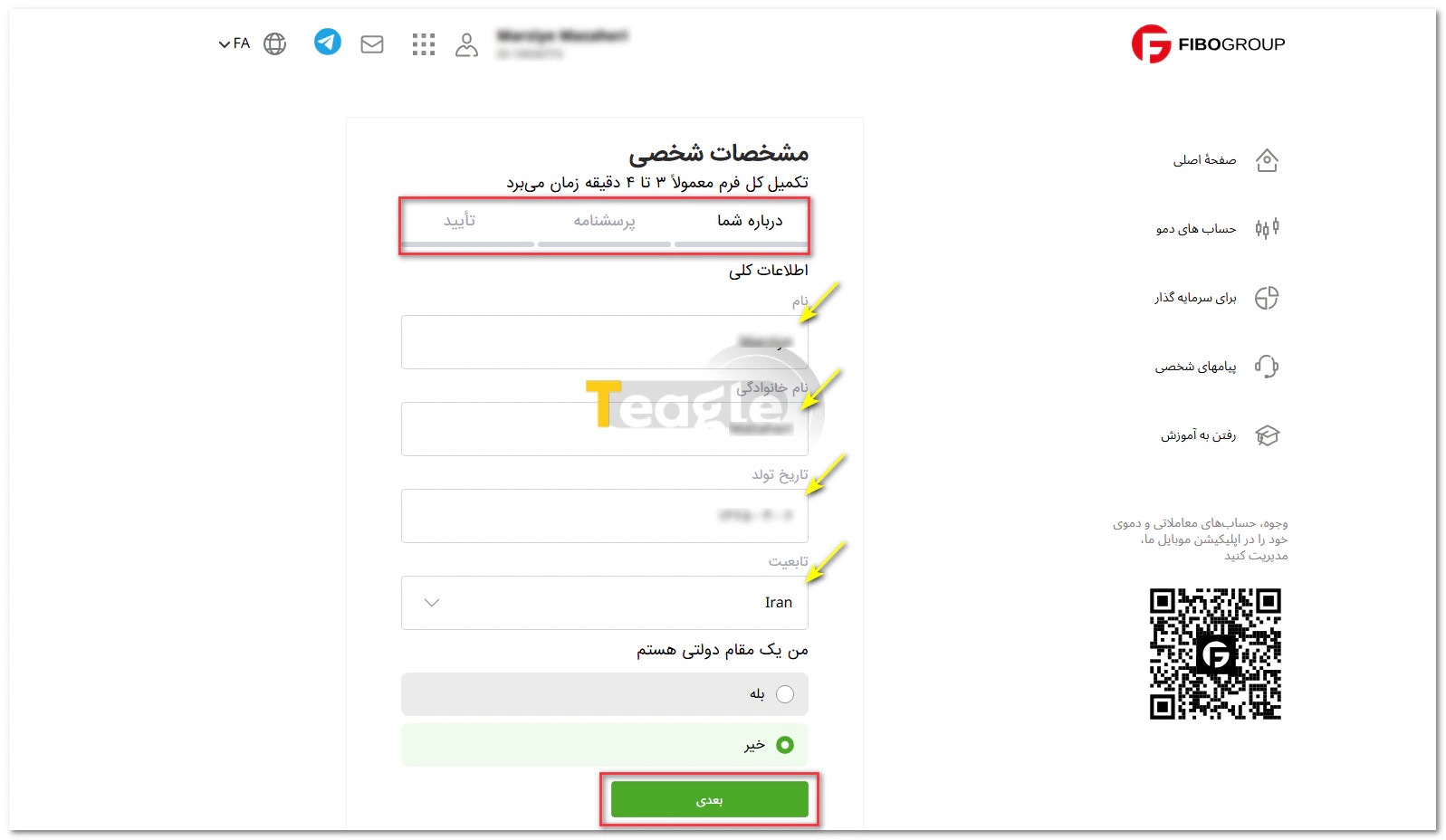
Once submitted, FiboGroup's specialists review your documents and, if they are approved, your account status will change to «Verified» . If anything is missing, you will be notified by email or through notifications in your personal cabinet.
Choosing an account type and opening an account at Fibogroup
To meet the different needs of traders, FiboGroup offers a diverse range of accounts. Each account has its own features, and your choice will depend on your trading style and the amount of capital you have:
- MT4 NDD: Order execution without a dealing desk, with direct access to market prices.
- MT4 Cent: Suitable for starting with small capital; allows trading in cent units with high leverage.
- MT4 NDD No Commission: Fast order execution with no commission, paying only the spread.
- MT4 Fixed: An account with a fixed spread for those seeking stable trading costs.
- MT5 NDD: The advanced NDD version on the MetaTrader 5 platform, with more features for analysis and trading.
- MT5 Cent: A cent account on MetaTrader 5, an excellent option for practice and starting with small capital.
- cTrader NDD: Direct order execution on the professional cTrader platform, with high speed and full transparency.
- cTrader Zero Spread: A special account with zero spread, suitable for scalpers and short-term traders.
- Islamic account (Swap-Free): Designed for traders who operate in accordance with Islamic Sharia principles; no overnight interest on open positions.
This variety of accounts lets you choose the best option to match your goals and trading style exactly, and enter the market with confidence.
Opening a demo account for risk-free learning
If you want to test your skills before moving to real trading, FiboGroup also offers the option of opening a demo account . To open a demo account, simply:
- On the main page of your personal cabinet, in the right-hand menu, click on «Demo accounts».
- On the new page, first choose one of the available platforms, namely MT4, MT5 and ctrader, according to your needs.
- Clicking on any of the platforms opens a list of different account types, which you should choose according to your trading strategy.
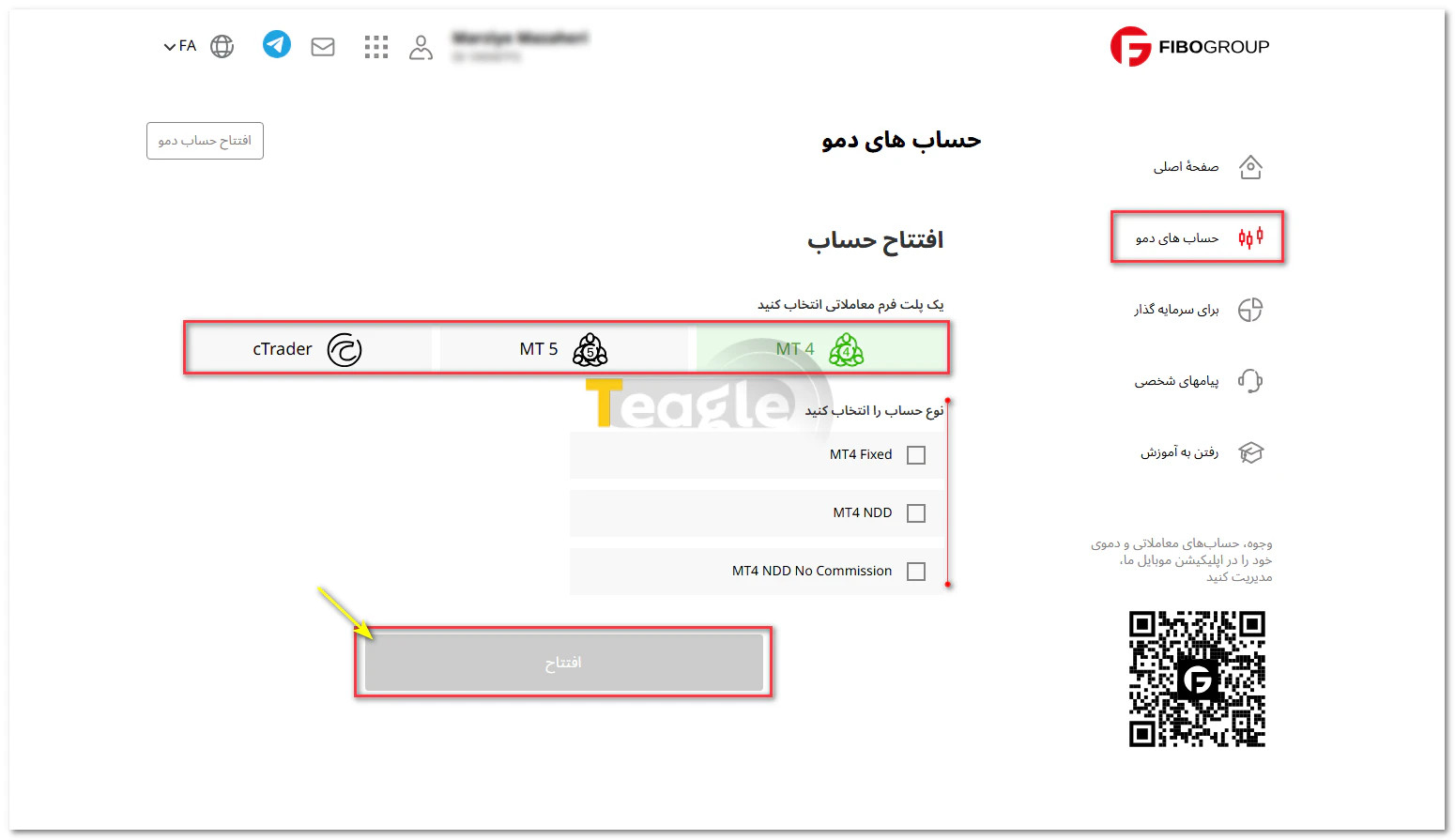
Finally, by clicking the «Open» button, your account will be created. You can now make the most of this opportunity to practice and get familiar with the trading environment.
Islamic account at Fibo broker (Swap-Free) and how to activate it
The FiboGroup Islamic account (Swap-Free) is designed for traders who want to carry out their activities in accordance with Islamic principles. In this type of account, overnight interest, or Swap is removed, and a fixed fee is charged weekly instead.
This feature is not activated automatically and requires submitting a request:
After registering on the website and completing identity verification, you log in to your personal cabinet. In this section, you need to submit a request to activate the Islamic account through the support section or by sending an email. Reviewing this request usually takes from a few minutes up to a maximum of 24 hours.
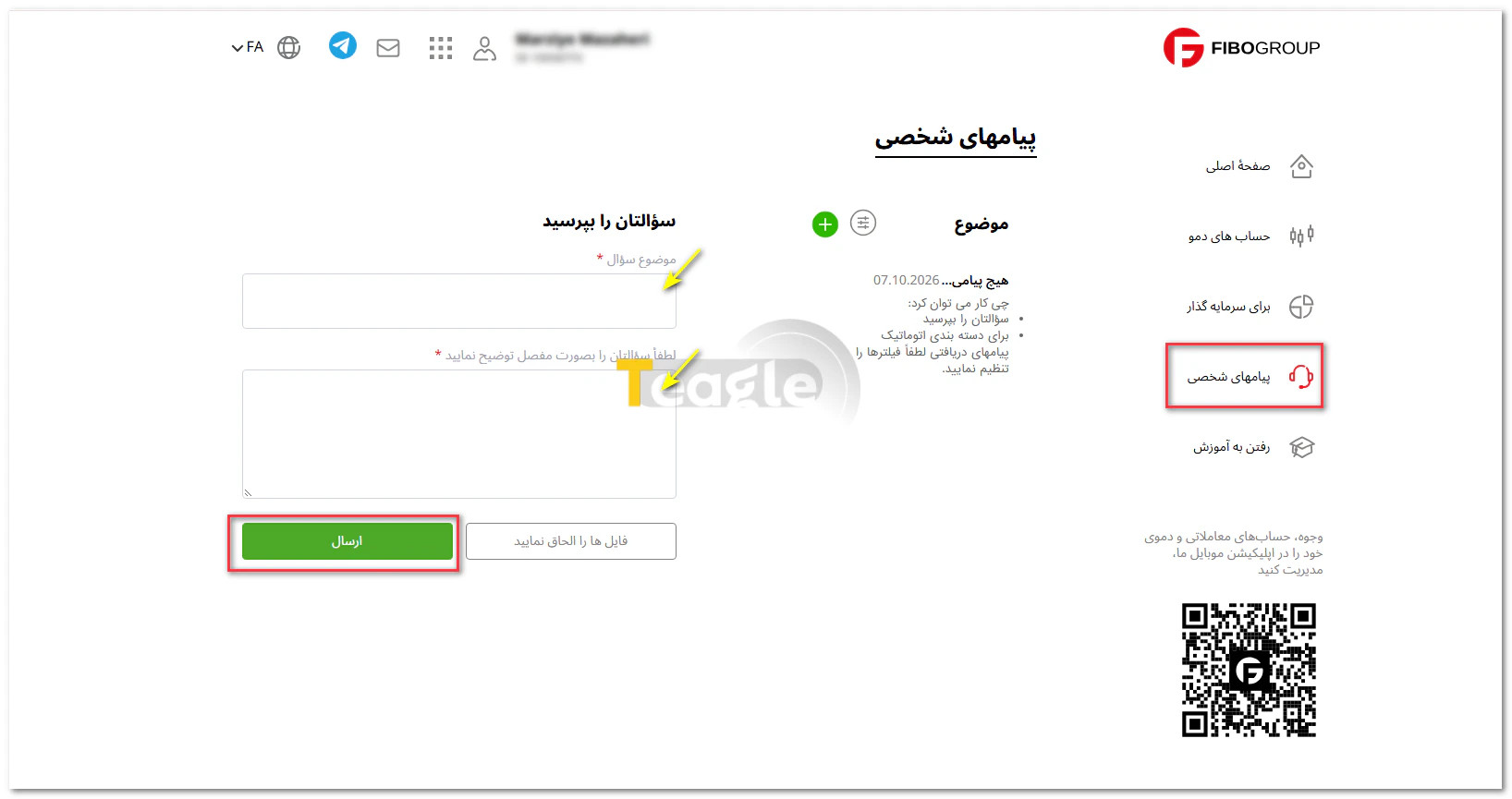
Although swaps are removed in the Islamic account, this does not mean trading is free. Instead, FiboGroup charges an alternative fee that varies depending on the trading symbol and may be significant on a weekly basis for some assets.
It should also be kept in mind that other trading costs, such as the spread, still apply. In addition, the broker has the right not to approve an Islamic account request or to cancel it under certain conditions.
Ultimately, choosing this type of account should be based on your trading style, because with some strategies the alternative fee may be higher than the regular swap cost.
Deposit and account funding methods at the Fibo Group broker
For Iranian users, depositing funds with FiboGroup broker comes down to three main routes, each with different speed, cost and conditions. Knowing these methods helps you pick the most suitable option for your situation and fund your trading account without confusion:
- Rial deposits via Iran Bourse Online,
- using TCPay
- and direct cryptocurrency transfer.
Below, I explain each method in practical terms.
How to deposit with Tether
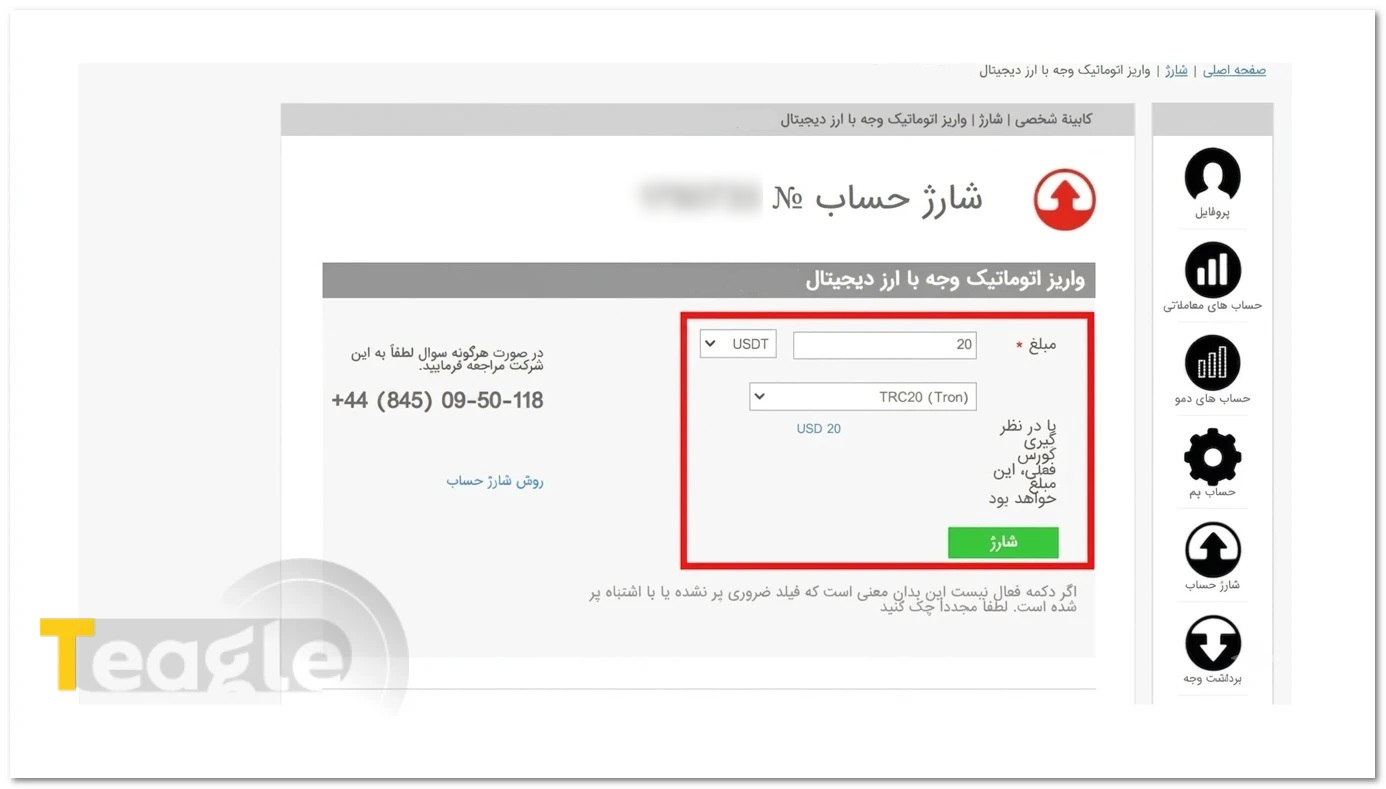
This method is fast, low-cost and reliable. To do this:
- Log in to your personal cabinet by entering your email address and password.
- On the cabinet's main page, tap «Deposit». Note that before doing this, you must have opened your trading account, and opening an account requires completing your personal information.
- Select the trading account you want.
- Enter the deposit amount in dollars.
- From the networks, select USDT – TRC20.
- Click the deposit option and then press the «Confirm» button.
- A wallet address will be shown to you. You have 15 minutes to send the amount from your wallet to this address.
- After sending, go to the deposit history section and check the transaction status.
3. Rial deposit: the simplest and most popular method for users inside Iran
Iran Bourse Online, as the broker's introducing partner (IB), enables Rial deposits and withdrawals via bank account or card. The minimum amount for each deposit or withdrawal with this method is the equivalent of 5 dollars, and a «Golden Rate» discount scheme has also been announced for it.
To do this, you must first sign up on the Iran Bourse Online website. Next, you deposit the Rial amount you want from your bank account to this company's account. After confirmation, your trading account is funded in dollars at a set conversion rate within a few hours.
Downloading and installing Fibo Group trading platforms
To start trading with FiboGroup, you first need to download and install the trading platform that suits you. This broker offers users three main applications—MetaTrader 4, MetaTrader 5 and cTrader—and provides detailed installation guides for each.
Simply go to the «Trading Platforms» section on the website or in your personal cabinet, choose the application you want, and download the version for your operating system (Windows, Android or iOS). Once you have the file, the installation steps are explained step by step in the broker's guide.
How to contact Fibo Group broker support
FiboGroup offers a set of fast and reliable contact channels to respond to users, so traders can easily get help at every stage—from installing the platform to deposits and withdrawals. The broker's support is available via live chat on the website (with Persian-language chat available), Telegram, dedicated Persian and international email addresses, and by phone (at 0950118 845 44+).
In addition, there is an active support section in the personal cabinet, and Iranian users who use the services of official representatives such as «Iran Bourse Online» can use their separate support for Rial deposits and withdrawals. This diverse range of contact channels has made FiboGroup one of the most accessible brokers for Persian-speaking users, with 24-hour guidance available five working days a week.
Withdrawing profits from the Fibo Group broker (step by step)
Withdrawing profits from FiboGroup is a simple and easy-to-understand process, as long as you complete the steps correctly and in order. The most important point is that withdrawals are only possible once your identity verification is complete. After your documents are approved, you can log in to your personal cabinet, choose a suitable withdrawal method and submit a request so that the dollar balance of your trading account is transferred to you in Rial or Tether form. Below, I explain all the steps one by one so you can withdraw your profits without any confusion.
- Go to the FiboGroup website.
- Log in to your personal cabinet with your email and password.
- From the main menu, click Withdrawal.
- Choose a withdrawal method (Rial, cryptocurrency or Perfect Money).
- After choosing the method, select the trading account you want.
- Enter the withdrawal amount and submit the request.
- A verification code will be sent to your email or mobile; enter it to finalize the withdrawal.
Frequently Asked Questions
Articles related to the broker
User reviews

Newest
