A guide to signing up and logging in to Orbex



Orbex is a well-known forex broker that provides a suitable environment for Iranian traders. The Orbex website is available in Persian, it has a fairly simple user experience and a wide variety of trading instruments, and its MetaTrader support and currency deposits and withdrawals have made it a much-searched name among Persian-speaking users.
\n\nIn this guide we review Orbex step by step and explain how to sign up, verify your identity, deposit and withdraw, the variety of trading instruments and how to connect the broker to a trading platform.
Checking whether Orbex is available to Iranians
The Orbex website is available in Persian for Iranian users at https://www.orbex.com/fa, and the domain https://orbexforex.com/ has also been set up so that Iranians can use all of the broker's features. The Persian domain serves under regulation such as Mauritius's FSC. Persian support via Telegram (from 8 am to 2 am) is one of the broker's strengths for Iranian users, allowing problems to be solved quickly.
\n\nRial and cryptocurrency (such as Tether) deposit and withdrawal methods, without any need for currency conversion, also make access easier. However, users need a VPN for some sections, such as viewing user reviews, to avoid possible filtering.
Entering the Orbex website and signing up
To sign up on the home page, you must use the Persian version of Orbex https://orbexforex.com/ :
\n\n1. On the home page, simply click the «Join» button.
\n\n
\n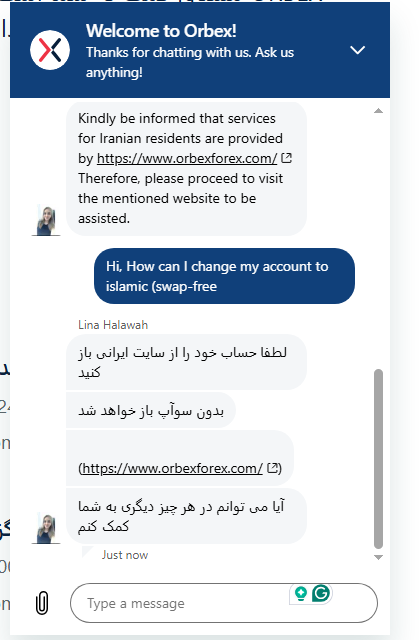
\n
\n
2. On the page that opens, you need to fill in the form with your personal details, such as first name, last name, email, country and phone number.
\n\n3. After submitting the form, you receive a confirmation email, and clicking its link activates your account.
\n\n4. You are then asked again for the email and password you set earlier, which you need to enter.
\n\n5. Another code is sent to your email, which you also need to enter to log in to your account.
\n\n6. Finally you enter the user panel, and the first step you must complete is «verification».
\n\n
\n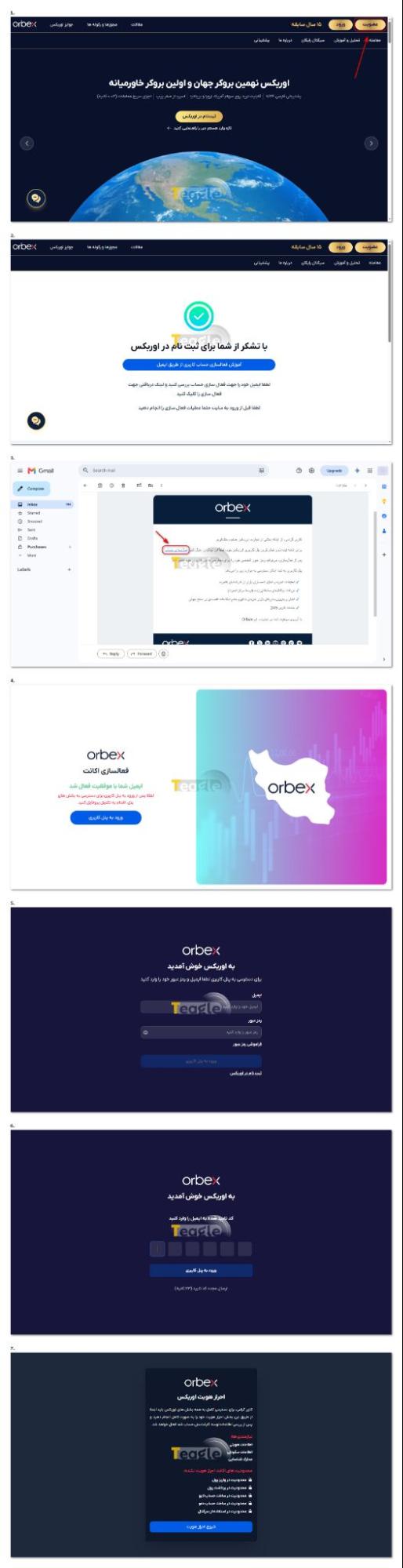
\n
How to verify your identity at Orbex and the required documents
\n\nVerification at Orbex is a mandatory step, and right after completing sign-up you will see a message asking you to complete your verification for full access to all parts of Orbex. After clicking the «Start verification» button, follow these steps:
\n\n1. On the page that opens, enter your identity details and full postal address and click the «Save and go to the next step» button.
\n\n2. On the new page, you need to upload one of the requested identity documents, a national ID card, passport or driving licence, and go to the next step. If you choose the national ID card, you need to upload both sides of it.
\n\n3. Finally, if your verification is successful, your account is activated and you can log in to your user panel.
\n\n
\n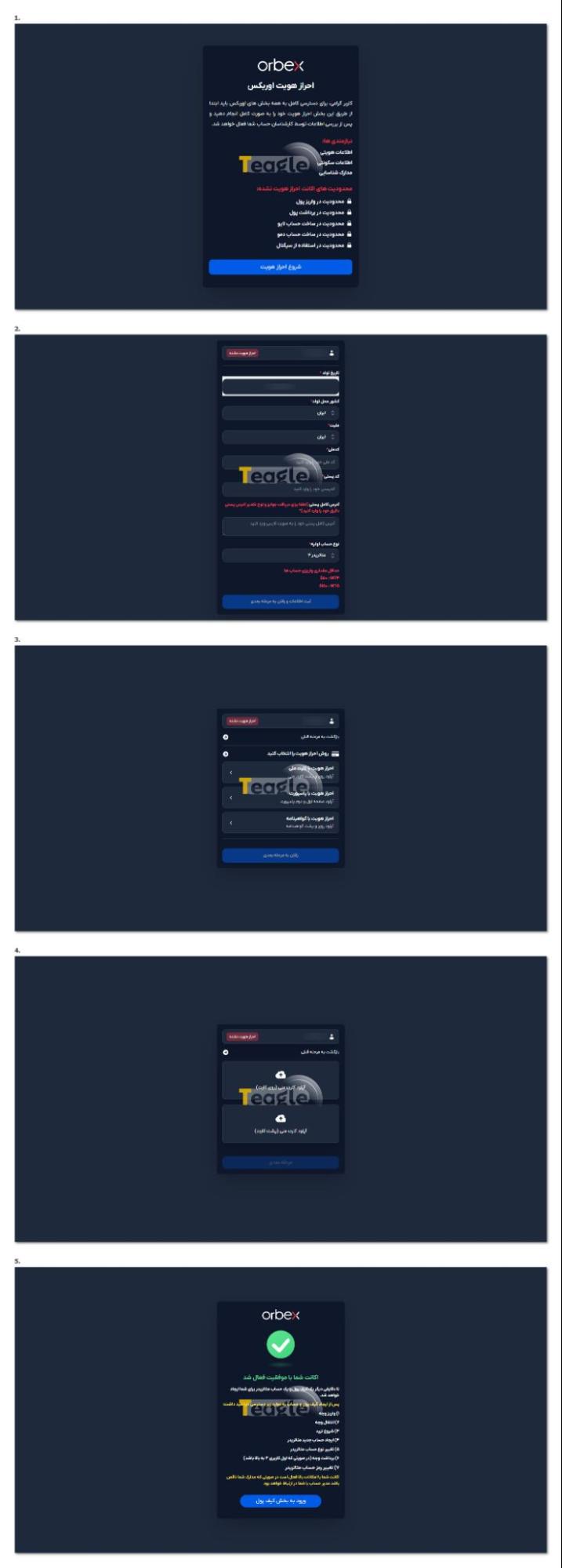
Opening an account with Orbex
As soon as you are verified and log in to your personal area at Orbex, a real account is created for you, whose general details you can see on your dashboard. You can also follow these steps to open an account with Orbex:
\n\n1. In your user panel, go to the live account section.
\n\n2. After choosing the platform type (MetaTrader 4 or MetaTrader 5), you need to choose your account currency and finally click the «Request a new live account» button.
\n\n3. Your request is registered, and if Orbex approves it, you will be informed by email.
\n\n
\n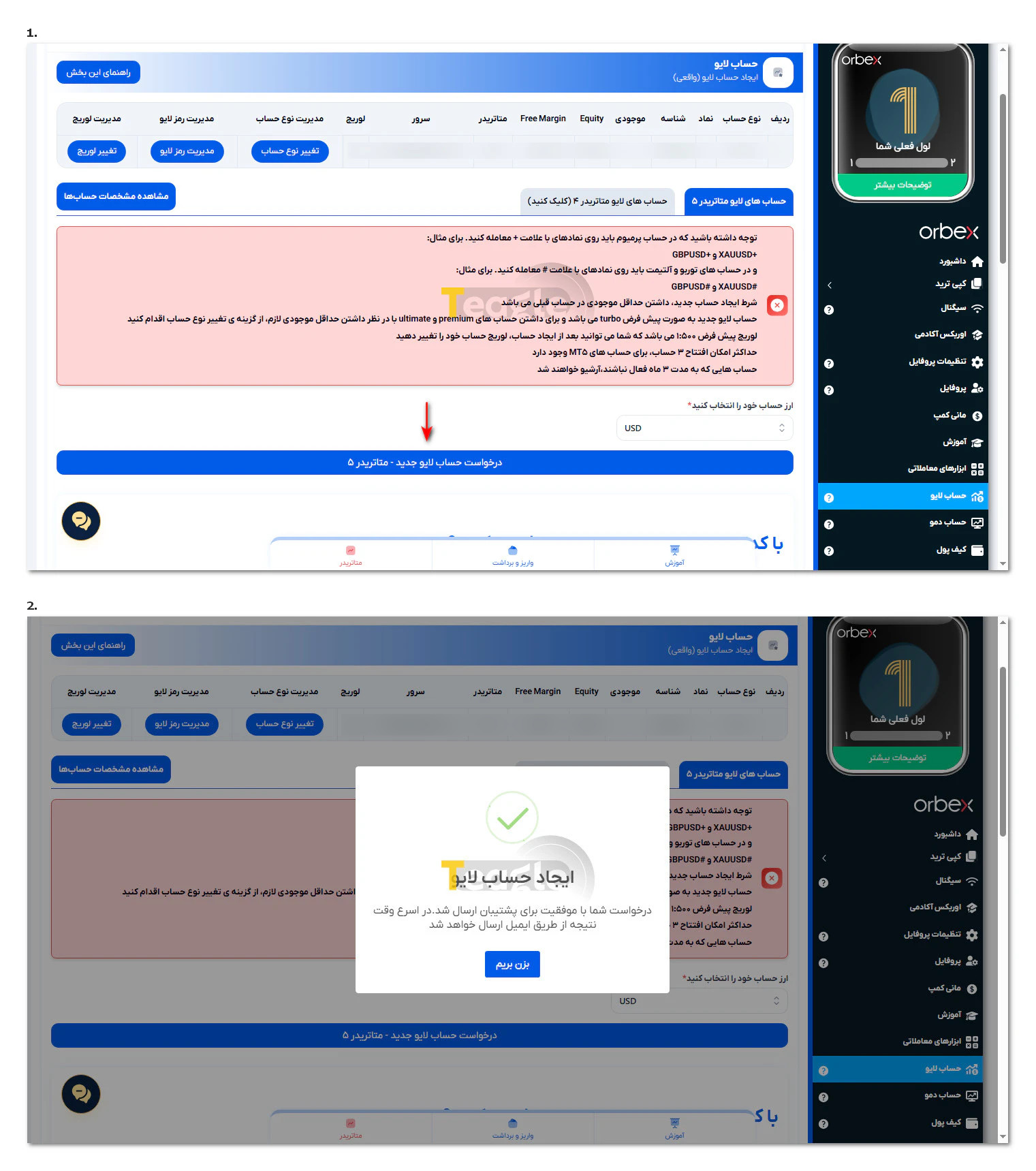
How to open an Islamic account at Orbex
\n\nAccording to our inquiry with Orbex support, all its accounts are offered swap-free. So opening an Islamic account at Orbex is meaningless, because your account is opened as Islamic by default.
\n
\n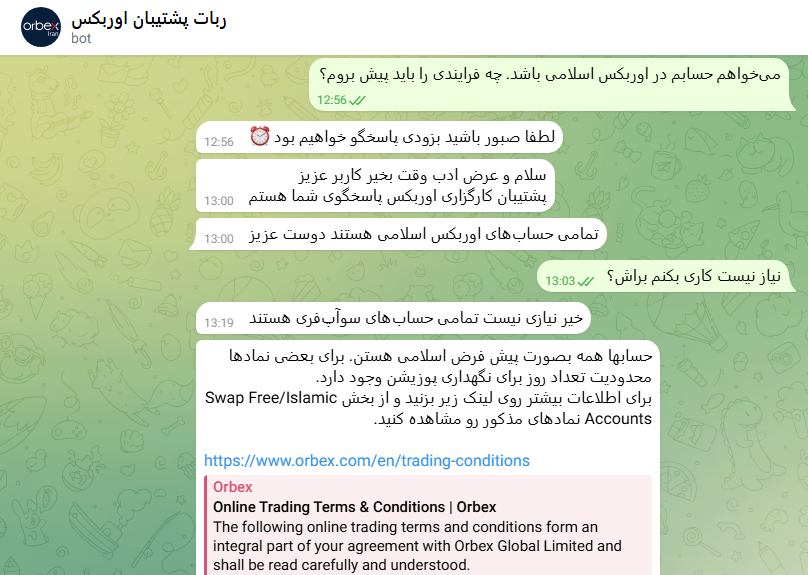
\n
\n
How to deposit into and fund an Orbex account
To deposit into and fund your Orbex account, follow these steps:
\n\n1. From your dashboard, go to the «Wallet» section, or choose «Deposits and withdrawals» at the bottom of your dashboard.
\n\n2. In the wallet, click «Deposit».
\n\n3. Here you need to choose the deposit method; three methods are available: crypto, TopChange and FarsiChange.
\n\nFor TopChange and FarsiChange, you first need to open an account with these exchangers. Clicking one of the TopChange or FarsiChange exchangers in your Orbex user panel takes you to your user page at that exchanger, where you can make your deposit. For how to transfer from the exchanger to Orbex, see this article .
\n\n
\n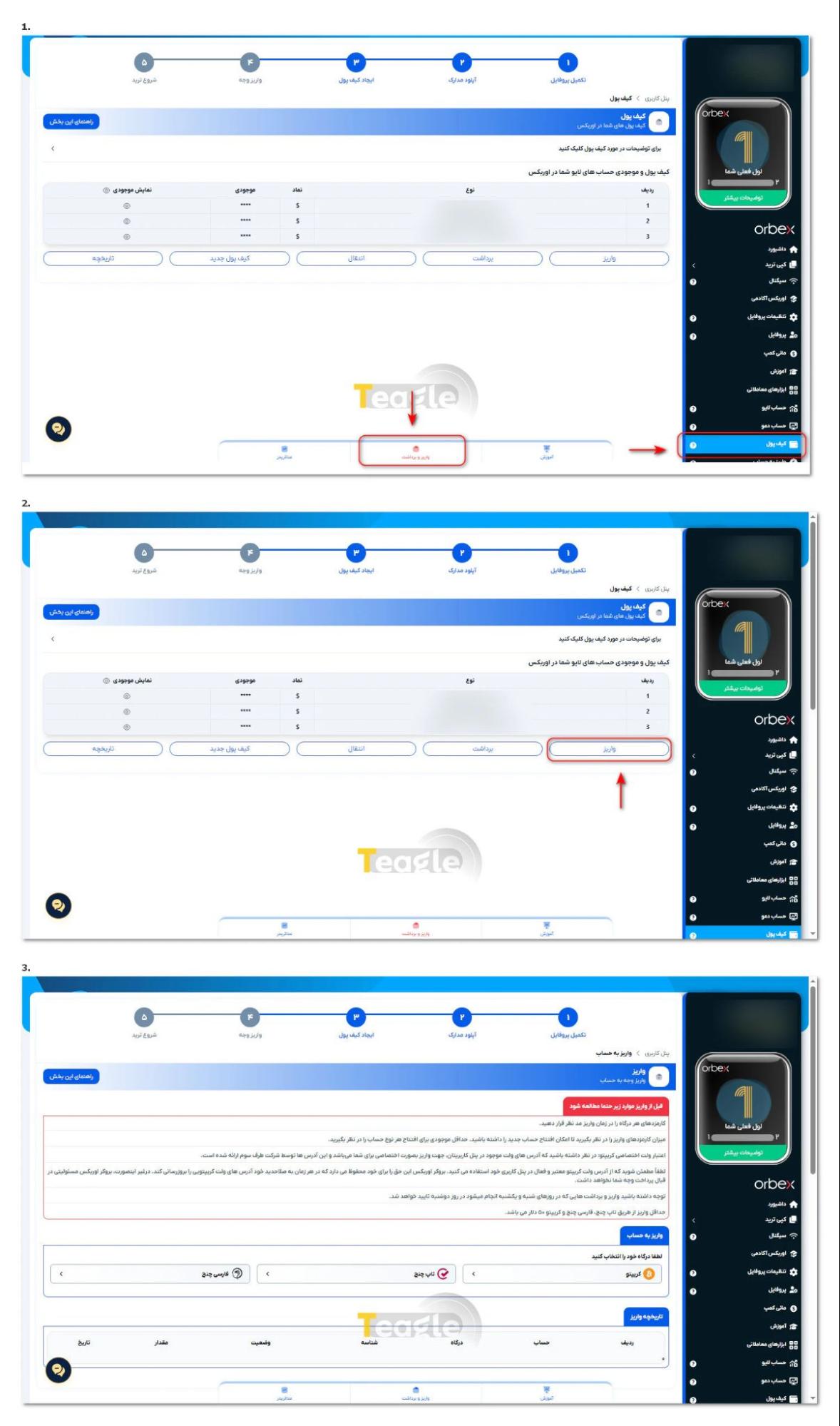 With the crypto method, you first need to choose one of the two gateways, Tether on the TRC20 network or Tether on the BEP20 network, then enter the deposit amount (minimum $50) and accept the rules shown to you as in the image. After accepting, you are taken to a page where you need to confirm your email and name, and finally a wallet address is given to you, through which you can deposit Tether into your Orbex account.
\n
\n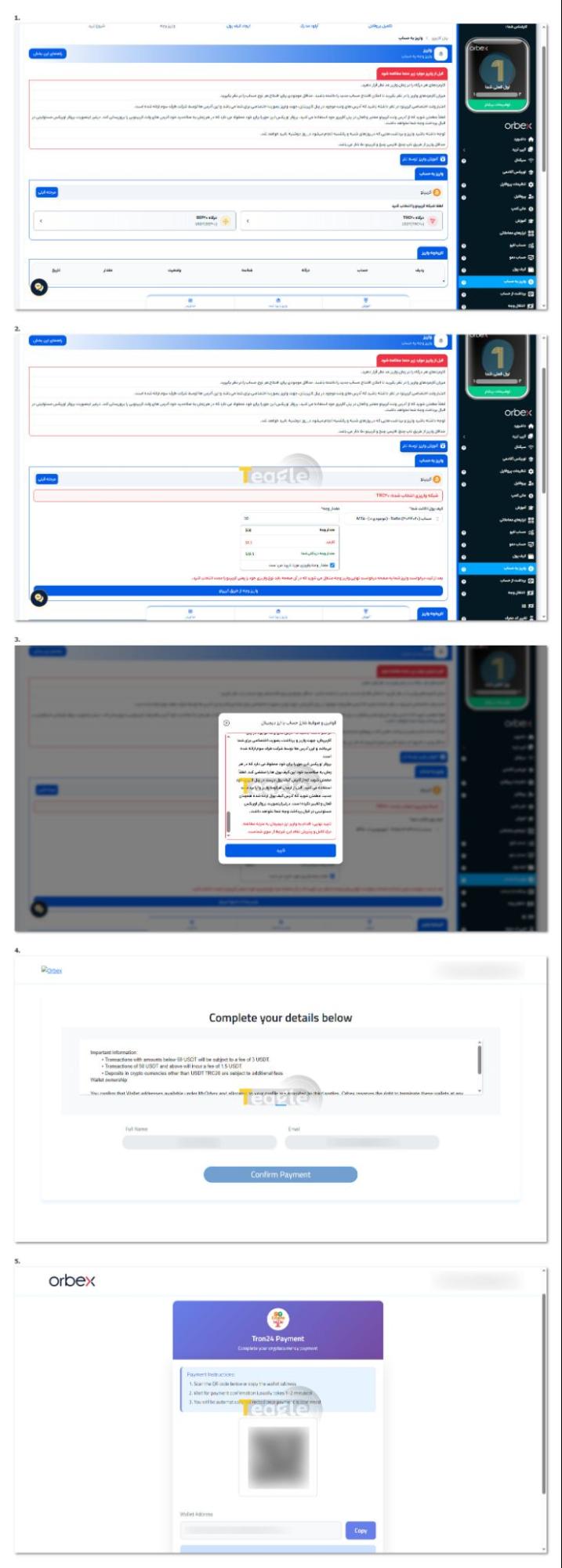
Downloading MetaTrader 4 and 5 and connecting an Orbex account
Orbex supports the popular MetaTrader 4 and 5 platforms. Users can download Orbex for Windows or mobile directly from the Orbex website. An Android version is also available.
\n
\n
\n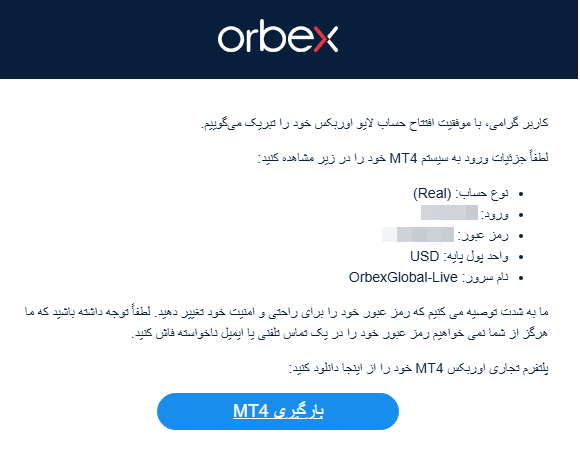
\n
After installing, simply enter the trading account details emailed to you to connect to Orbex's servers. This step is effectively installing Orbex and getting ready to trade. The MetaTrader platform provides full analysis, trading and account management. For a complete guide to connecting your account to MetaTrader 4 and 5, see this article .
\n\n
\nA guide to starting copy trading at Orbex
\n
\n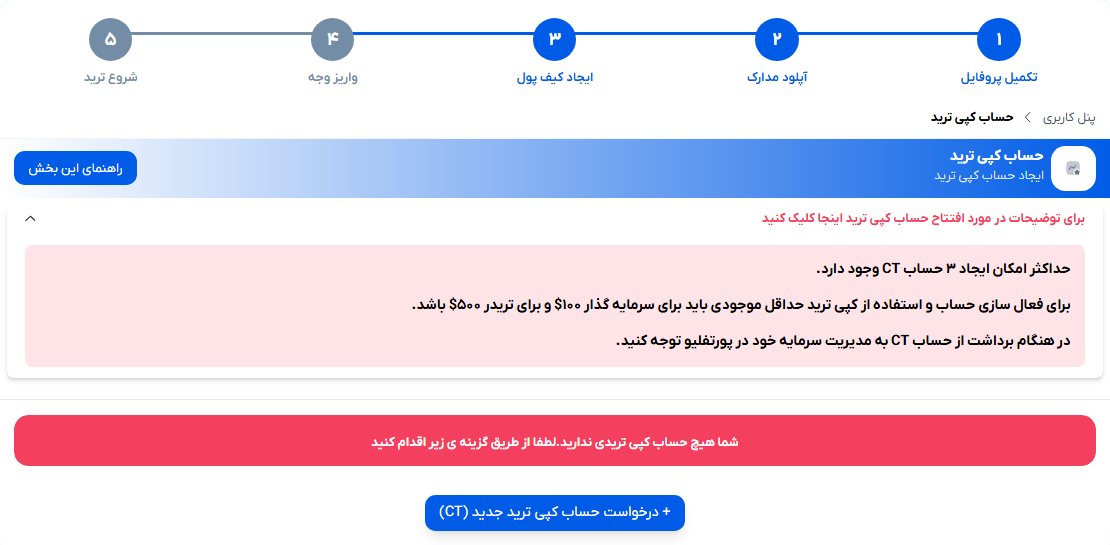
To start copy trading at Orbex, log in to the panel, choose the copy trade section (in the right-hand menu of the panel), click Open CT account and choose «Request a new copy trader account». Remember that:
\n\n- \n
- You can create a maximum of 3 CT accounts. \n
- To activate the account and use copy trading, the minimum balance must be $100 for an investor and $500 for a trader. \n
- When withdrawing from a CT account, pay attention to your capital management in the portfolio.
\n \nHow do I connect my Orbex account to TradingView?
\n\nTradingView is known as a powerful analysis platform, and many traders prefer to do their analysis there. Although an Orbex account cannot be connected to TradingView, users can use the available workarounds to analyse on TradingView and execute trades on Orbex's MetaTrader. In general, for a guide to connecting an account to TradingView, see this article .
\n \n
Instruments and assets tradable at Orbex and their conditions
With about 340 instruments, Orbex offers a good variety of trading instruments. Forex currency pairs, precious metals, indices and energies are among the tradable assets. For example, the oil and Dow Jones instruments at Orbex are among the popular options with traders.
\n\n\n\n
| \n Trading instruments \n | \n \n Number \n | \n \n Example or description \n | \n
|---|---|---|
| \n Forex \n | \n \n 47 \n | \n \n Major pairs, minor pairs and more \n | \n
| \n Commodities \n | \n \n 14 \n | \n \n Gold, silver, platinum \n | \n
| \n Shares \n | \n \n 251 \n | \n \n US, UK and European shares \n | \n
| \n Indices \n | \n \n 11 \n | \n \n NAS 100, SPX500 and more \n | \n
| \n Crypto \n | \n \n 10 \n | \n \n Major coins \n | \n
\n
Each instrument's trading conditions, including spread, leverage and trading hours, can be seen in the user panel. Knowing these conditions helps traders choose a more suitable strategy and manage their trading risk.
\n\n
Closing a trading account at Orbex
If a user decides to stop trading, they can close their trading account at Orbex. To do so, all open trades must first be closed and the account balance brought to zero. A request to close the account is then submitted through the user panel or by contacting support.
\n\nIt is recommended that all withdrawals be completed before closing the account to avoid problems later. The process is usually not complicated, but it requires following specific steps.
Articles related to the broker
User reviews

Newest
