Trendo Broker Registration and Trading Tutorial: A Step-by-Step Guide


Entering the financial markets and earning income in dollars holds a lot ofappeal for beginnerand intermediate traders. However,choosing a secure, fast platform suited to the conditions of Iranian users has always been one of themain concerns. Trendo broker (Trendo) has become one of thepopular options by offering integrated services, an easy user interface and strong Persian-language support. In this article, we intend totake a completely practical, step-by-step look at how to work with Trendo broker from creating an account to placing your first trade, so that your path to becominga successful trader becomes smoother.
Trendo Broker Website for Iranian Registration
To start working with any broker, the first step is finding its official and legitimate address. Trendo previously had 2 domains for providing its services, but according to the broker, its only legitimate website is available at Trendo.com and its old domain at Fxtrendo.com also redirects users to the new site. So it can be said that, unlike many platforms that use several subdomains to get around restrictions, Trendo has tried to offer just one main domain for its services. This can be a sign of the stability and strong credibility of the Trendo forex broker.
A very important and appealing point for Iranian users is access to the website and platform via the national internet. Given internet disruptions, the Trendo FX broker's development team has optimized its infrastructure so that, most of the time, users can easily log in to their user panel and manage their trades without needing IP-changing software, even on the national internet. This is a great advantage for avoiding delays in opening or closing trading positions.
Downloading and Logging In to the Trendo App
One of the differences between Trendo broker and its competitors is the development of its own proprietary trading platform. Instead of using older platforms such as MetaTrader, Trendo has designed a proprietary, user-friendly application for its users. Whether you want to trade on mobile or are looking to download Trendo broker for Windows, you can use the Trendo application. To download and log in to the Trendo application, follow the steps below:
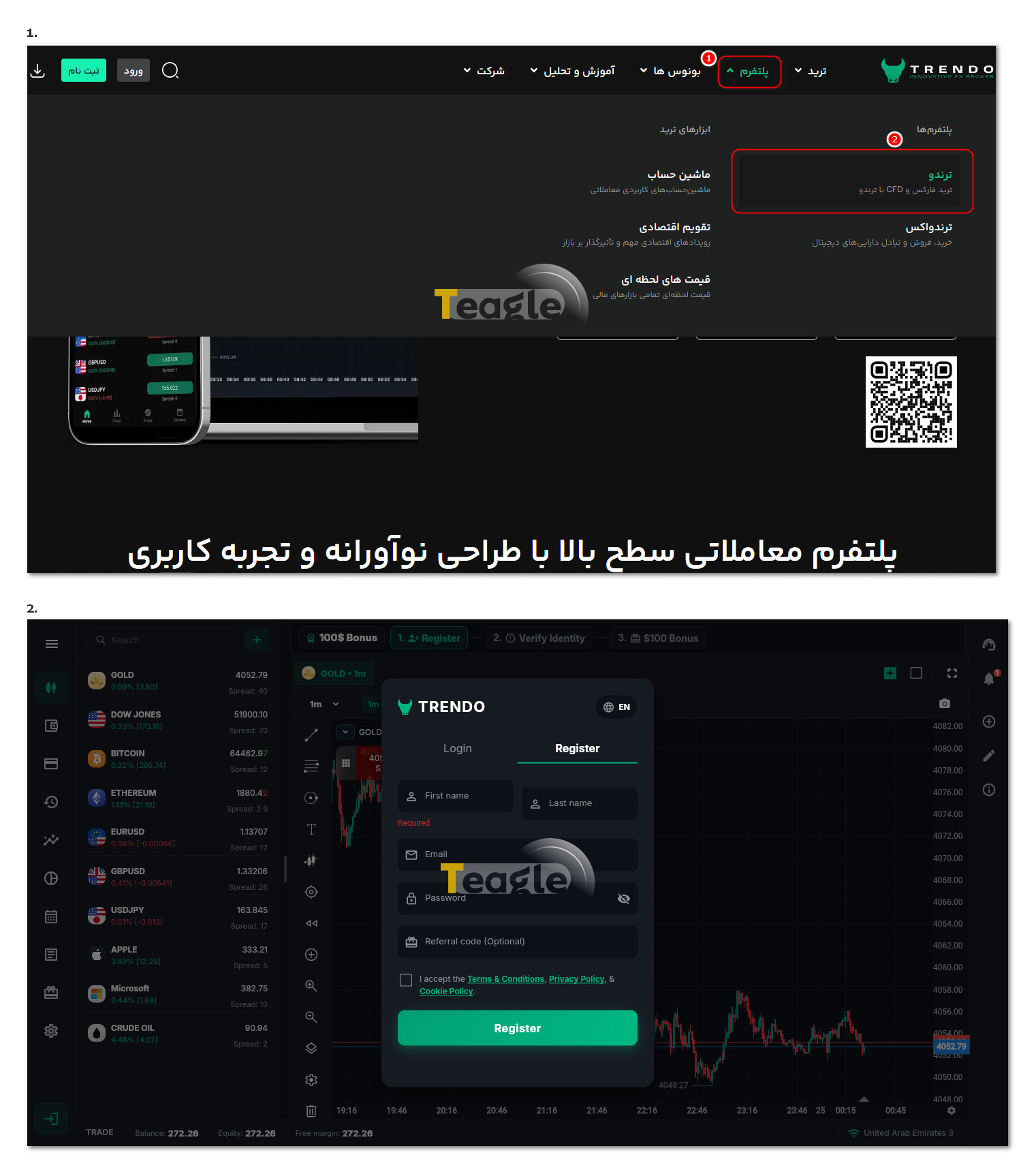
1. Go to the official website, click on «Platform» in the menu at the top of the page, and select «Trendo» from the «Platforms» section.
2. The page that opens provides a general overview, and depending on your device, you can download the Android version, the iOS version or the Trendo broker program file for Windows. If you prefer not to install anything, you can also use the Trendo web version. The table below contains the download links for Trendo's proprietary platform:
|
Trendo proprietary platform |
|
|
Download the Trendo app from the Mac App Store, MacBook version |
|
3. After downloading and installing the Trendo broker app, or logging in to the web version of the Trendo app, you need to enter your first and last name along with your email and password to register with Trendo. You can then use the features of this application.
It is worth noting that Trendo broker also offers another application called Trendo X, whose only difference from the Trendo app is that symbols are backed by Tether and displayed in an exchange-like format.
Registration and Identity Verification at Trendo Broker
To get started, Trendo broker has made registration and identity verification very simple for Iranians, and you can easily complete this step with domestic ID documents. Document verification is usually done as quickly as possible by the Persian-speaking support team. Follow the steps below:
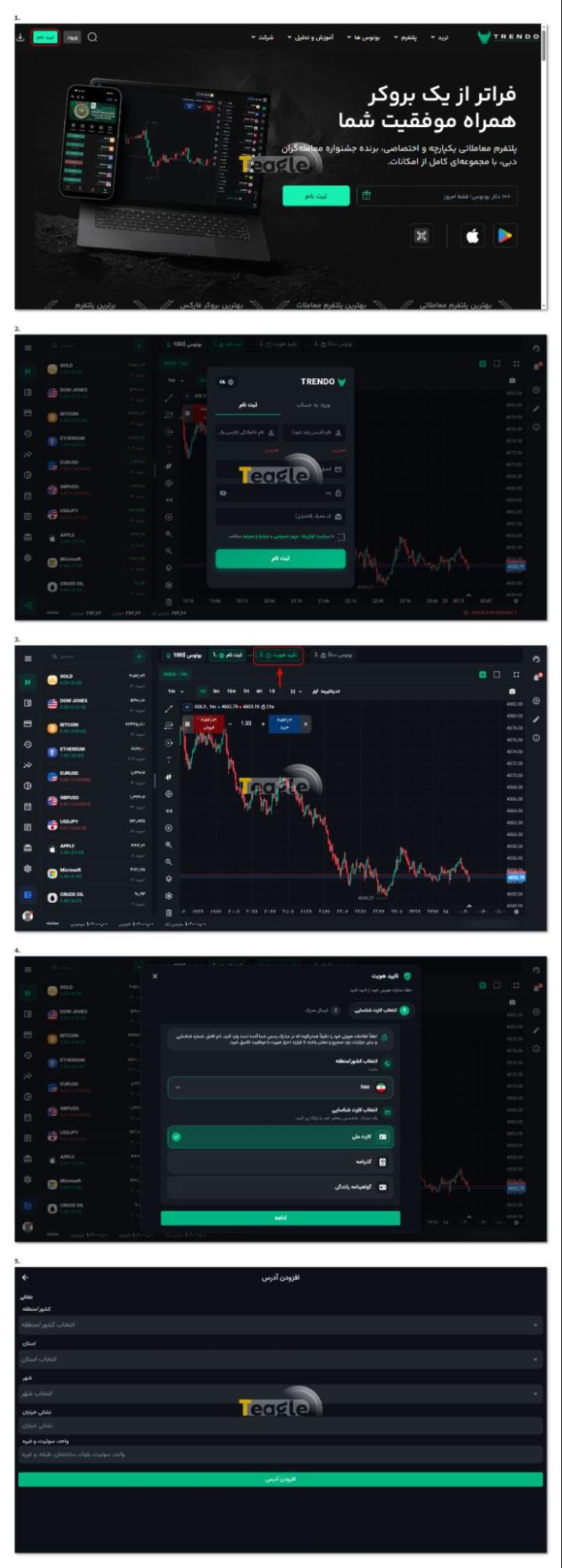
1. Go to the official website and click the «Sign Up» button.
2. Set the language of the opened form to Persian, enter the requested information, including first name, last name, email and password, and click «Sign Up» to complete your registration.
3. On the page that opens, you will see the trading environment of the Trendo app. To verify your identity, find the «Identity Verification» option in the profile section, or in the user profile section of the app, and click on it.
4. On the page that opens, you need to upload one of the requested ID documents (national ID card, passport, driver's license) and click «Continue».
5. In the next step, you must enter your full address, and finally your identity verification will go under review; once it is completed, your verification is done.
Opening a Real ECN Account at Trendo Broker
At many brokers, too many account types confuse beginners; but Trendo broker has changed this approach. At this broker, you deal with just one ECN live account.
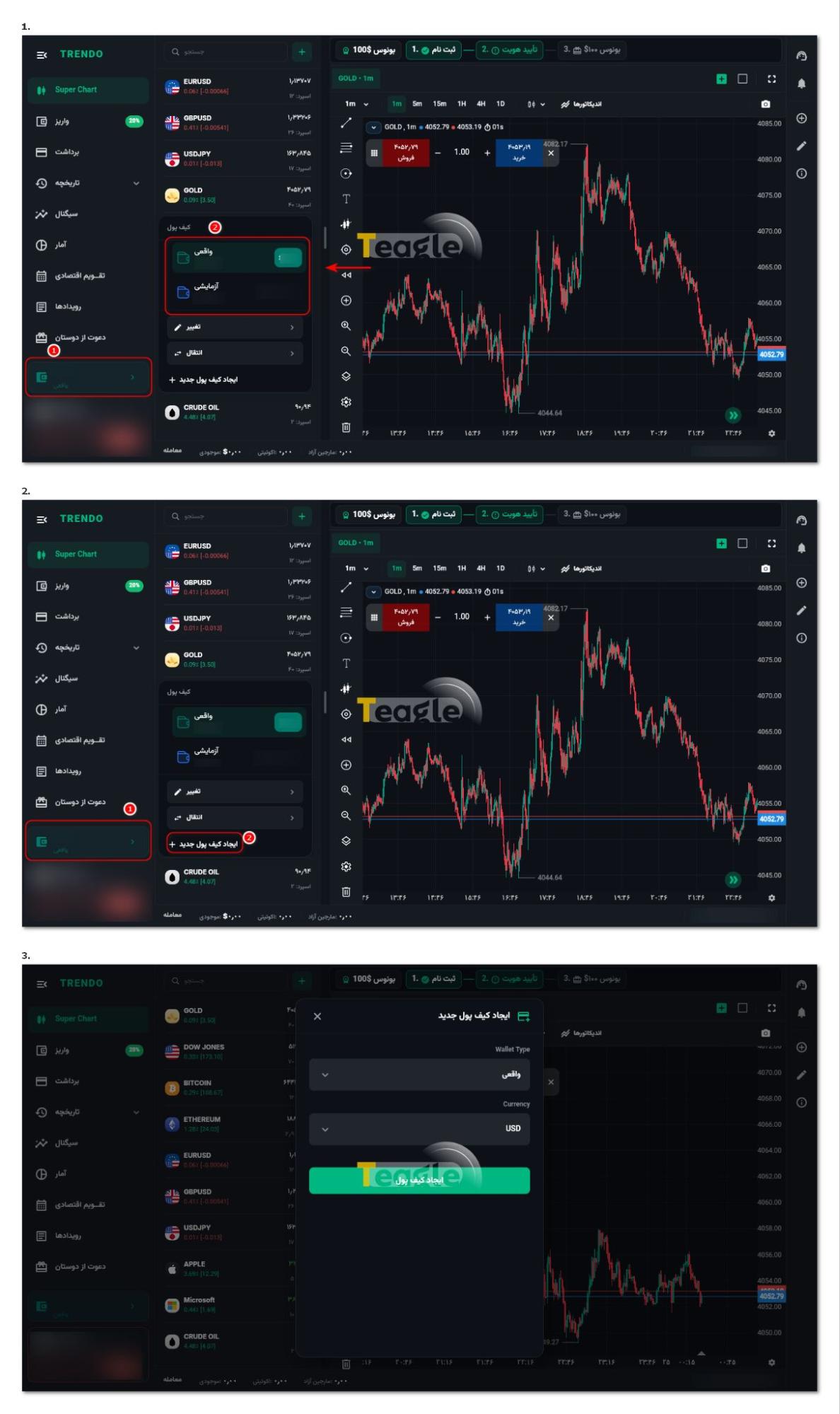
It is worth noting that when you first register, a demo account and a live account are opened for you by default, which you can see via the wallet icon in your user panel. But to open an account with Trendo broker, follow these steps:
1. Click the wallet icon and click the «Create new wallet» option
2. In the window that opens, you need to select your account type along with the account's base currency and click the «Create wallet» option to have the account opened for you.
Requirements for opening an Islamic account with Trendo broker
If, for religious reasons or because of long-term trading strategies, you do not want to pay overnight interest (swap), Trendo lets you convert your live account to an Islamic (Swap-Free) account. Trading conditions on the Islamic account are no different from a regular account, and no hidden fees are deducted from you. To activate it, you must have completed identity verification. Then, through online support, you submit a request to activate an Islamic account. After your information is reviewed, Trendo broker's support will switch your account to Islamic, swap-free mode.
How to Use Trendo's Proprietary Trading Platform
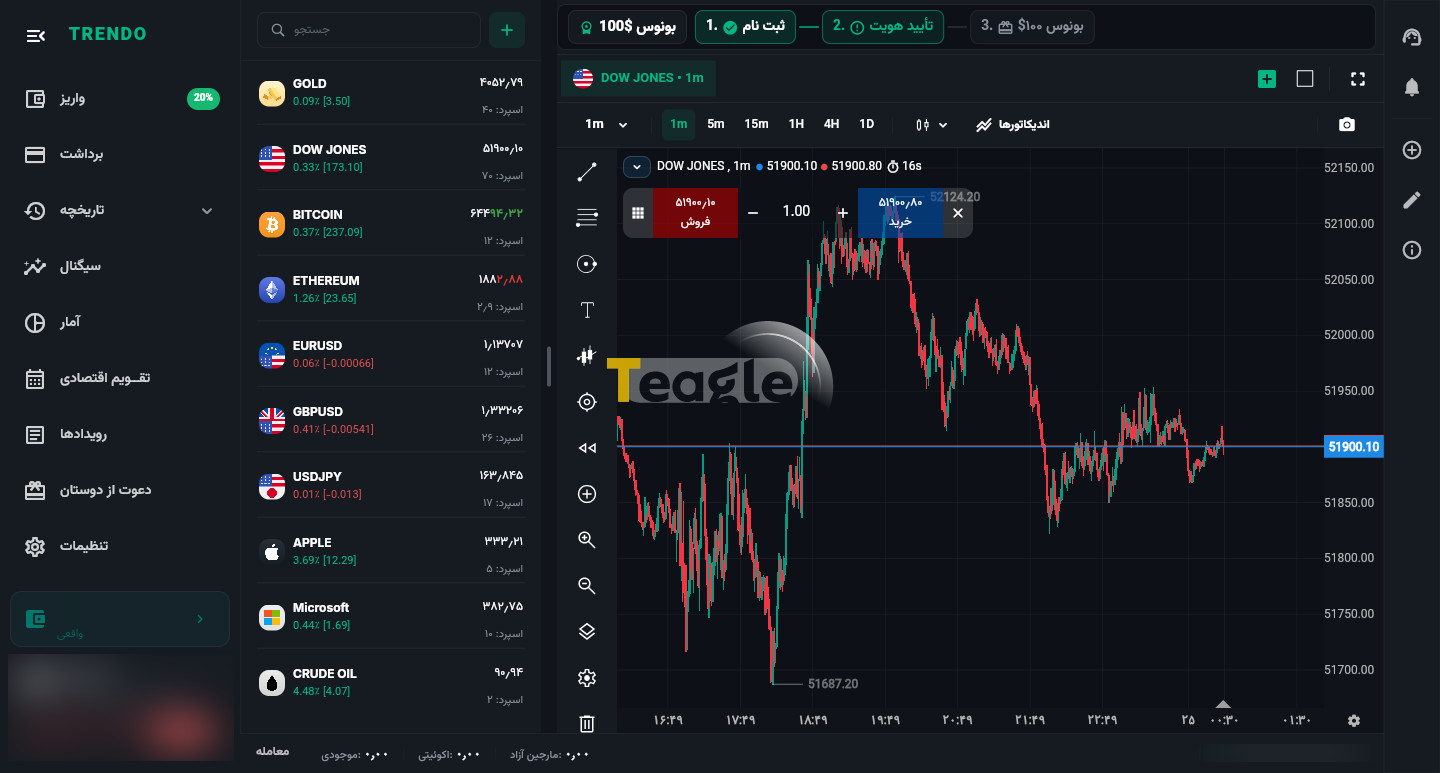
When it comes to learning how to work with the Trendo broker, getting to know its proprietary platform comes first. This software, which serves as both the user cabinet or dashboard and the trading environment, is designed so that even if you have no experience with trendo forex, you can master it in just a few hours. In this environment, high-quality price charts, multi-window settings and a variety of indicators are available to you completely free of charge; features that are usually paid on other platforms. Clicking on any symbol opens its chart. You can use the toolbar to draw trend lines and perform technical analysis. Next to the chart are the Buy and Sell buttons. By setting the trade volume (lot), take profit (TP) and stop loss (SL), you can easily open your position. Features such as the economic calendar, history, signals, etc. are also available from this same section.
Trading Symbols, Depositing and Starting to Trade at Trendo
The Trendo broker forex trading platform gives you access to a wide range of assets, including forex currency pairs, digital currencies (cryptocurrencies), gold, oil and even shares of major international companies. To start trading, you first need to fund your account.
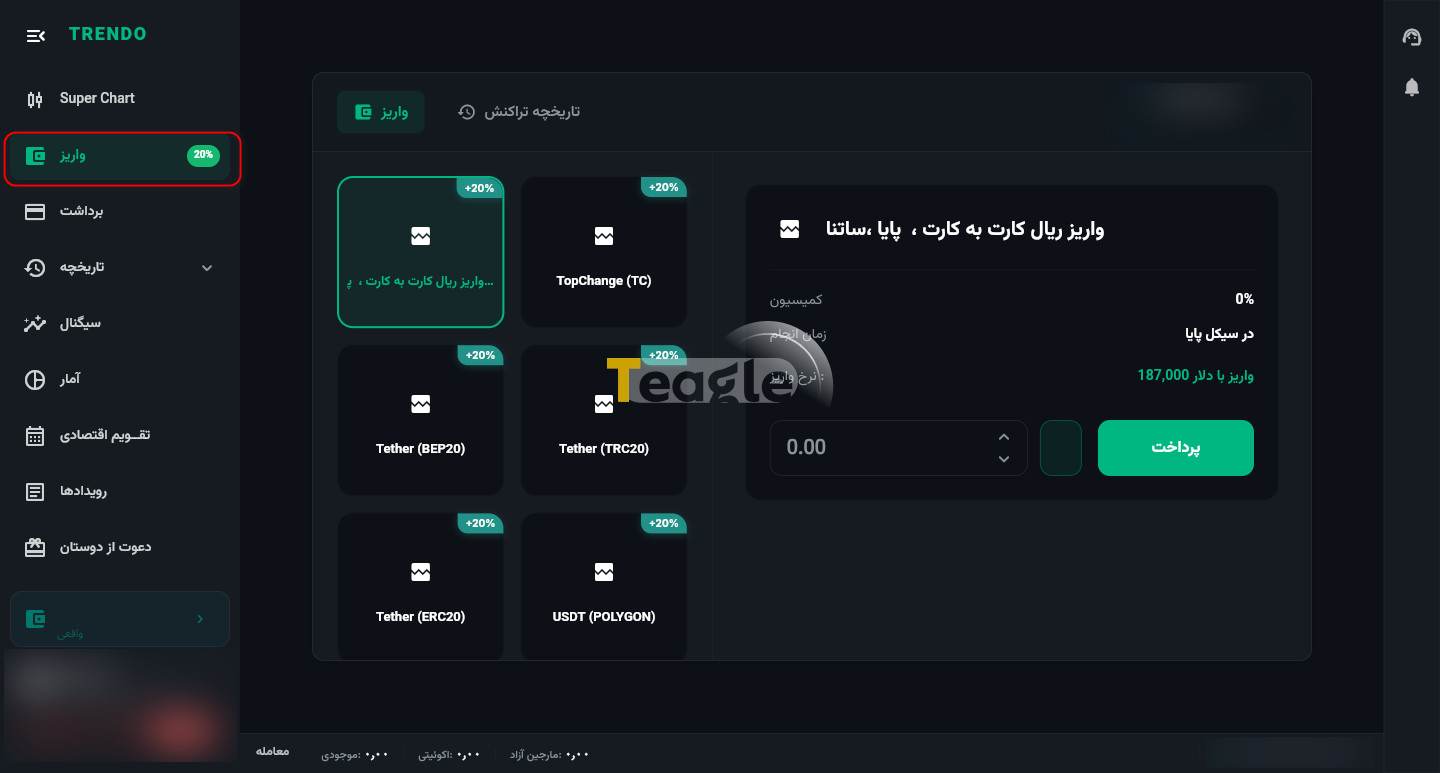
At Trendo broker, no commission or fee is charged on deposits. You can fund your account using direct Rial gateways, TopChange or digital currencies (such as Tether) and start your first trade. To deposit and start trading at Trendo, follow the steps below:
1. In your user panel, go to the «Deposit» section.
2. Choose the payment method (for example, online Rial deposit or Tether), enter the requested amounts and then click the «Pay» button.
For a Rial deposit, enter the equivalent dollar amount and, after connecting to the bank gateway (with a card in your own name), complete the payment. Your account will be funded instantly. With the digital currency method, after entering the desired amount, copy the given address into your wallet or exchange and transfer the cryptocurrency.
How to Withdraw from Trendo Broker
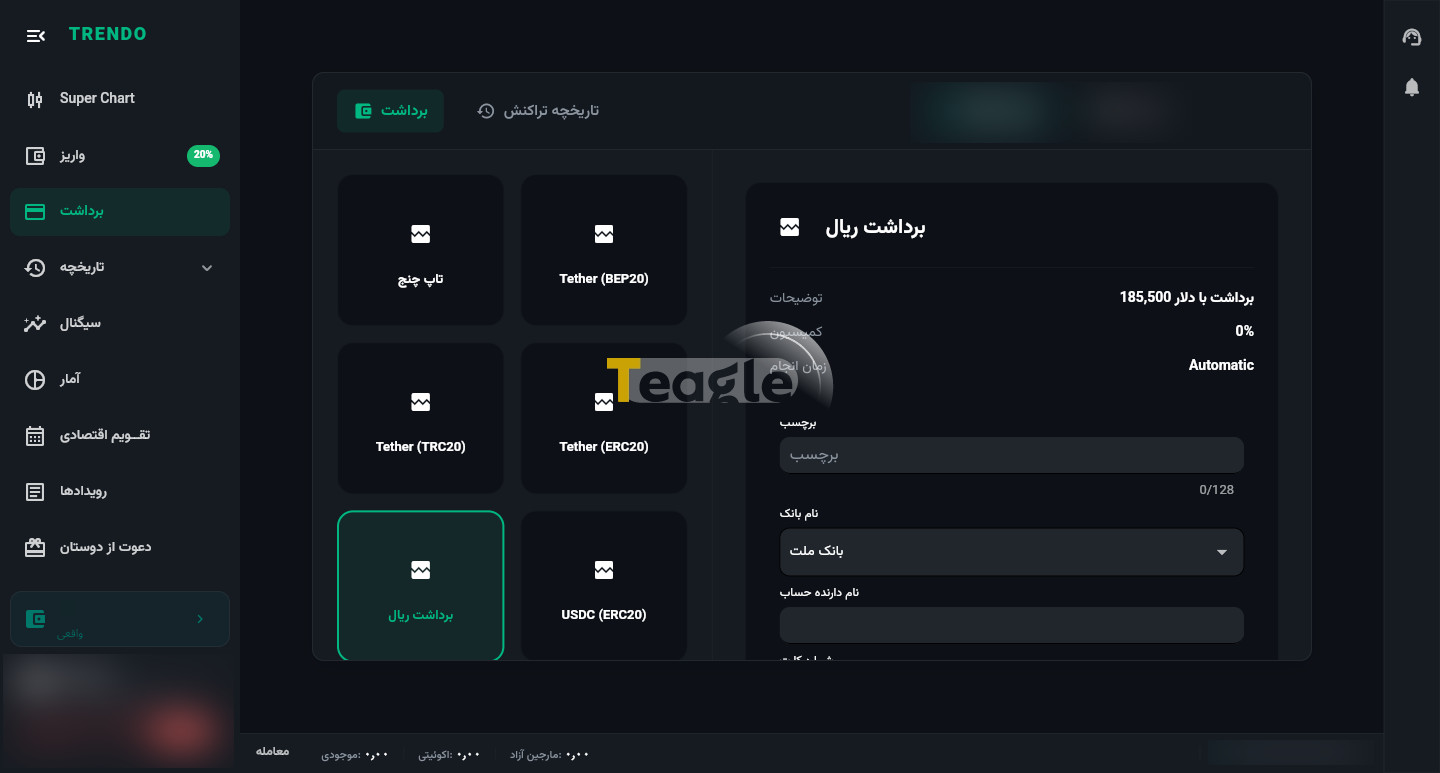
Trendo broker has designed its withdrawal process to be very transparent, secure and fast. To withdraw funds, your identity verification must be completed. Also, under international financial regulations, you usually have to use the same method you used to fund your account for withdrawals as well.
1. Go to the «Withdrawal» section in the app or on the website.
2. Choose the withdrawal method (Rial, Tether or TopChange).
3. Enter the desired amount and your account or wallet details accurately, and submit your request.
Rial and Tether withdrawals are usually credited to your account as quickly as possible (depending on business hours).
Frequently Asked Questions
Articles related to the broker
User reviews

Newest
