Guide to Using and Registering with WM Markets Broker



Among reputable global brokers, the name Windsor Brokers comes up often, but it is not available to Iranian users. Even so, to keep its offshore markets, and especially its Iranian users, this broker provides services under the name WM Markets. In this article, we walk you step by step through registering with Windsor Brokers and cover everything from the broker's Persian website to opening an account, identity verification, Rial deposits, the personal cabinet and withdrawals. If you are looking for a comprehensive tutorial in plain language, stay with us to the end of this article.
WM Markets Broker Persian Website
The website of Windsor broker, which works with Iranian users under the name WM Markets, is available via this link . Its user interface is designed entirely in Persian so that beginner and semi-professional users can work with it without any trouble. On this site, you can access various sections such as registration, tutorials and market news. For example, the homepage includes a simple menu that leads directly to registration with Windsor broker and highlights the Windsor account opening options.
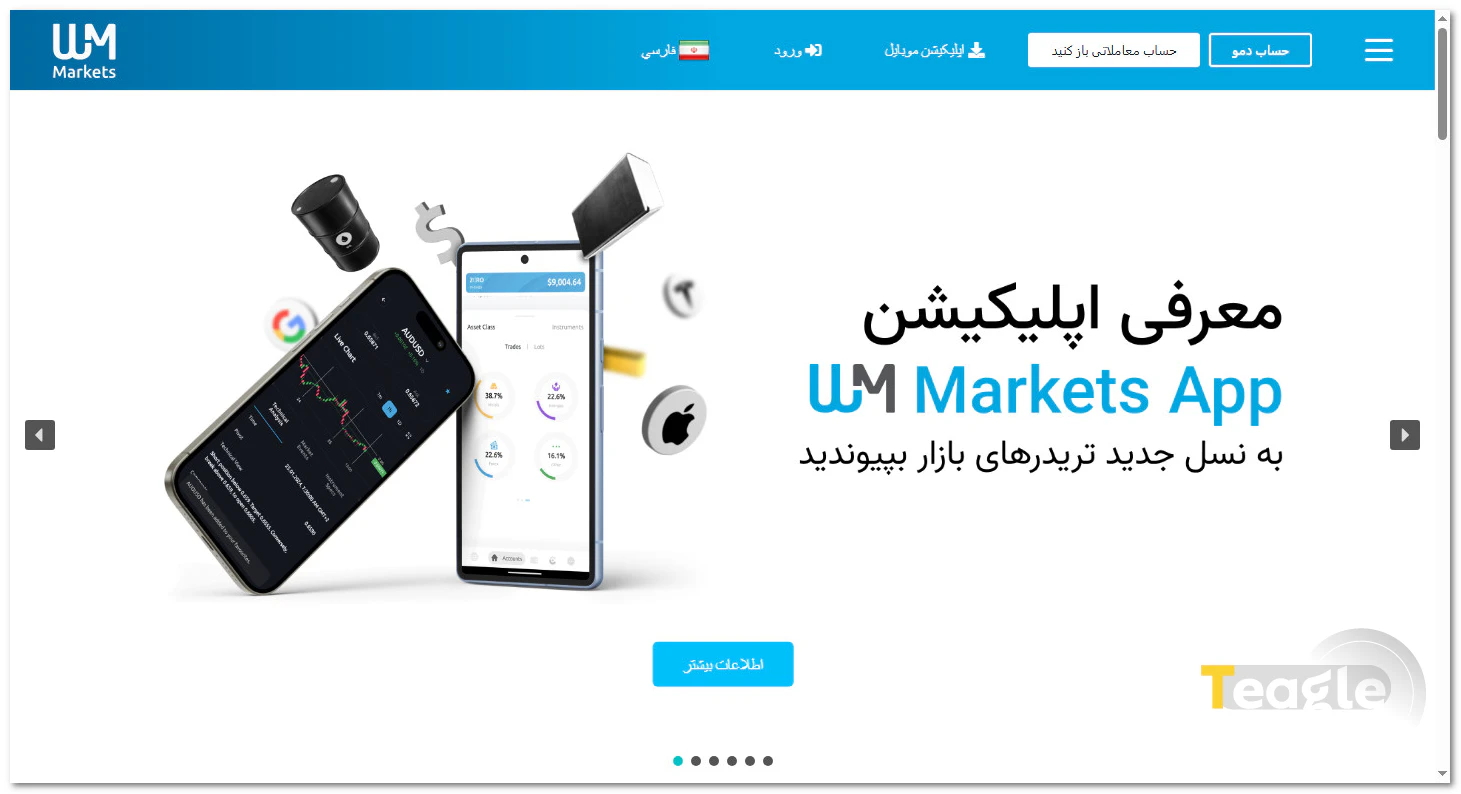
In addition, Iranian users can access the Windsor client cabinet through this site and monitor their account status. The site's security is ensured by SSL protocols, and its loading speed has been optimized for internet connections in Iran.
How to Download and Install the WM Markets Broker App
For trading, WM Markets broker uses its own trading app in addition to the well-known MetaTrader 4 and 5 platforms. To download the app, click on the Download Mobile App section in the header of the broker's website, or click the hamburger menu, select Trading Platforms, and choose the platform you want based on your needs.
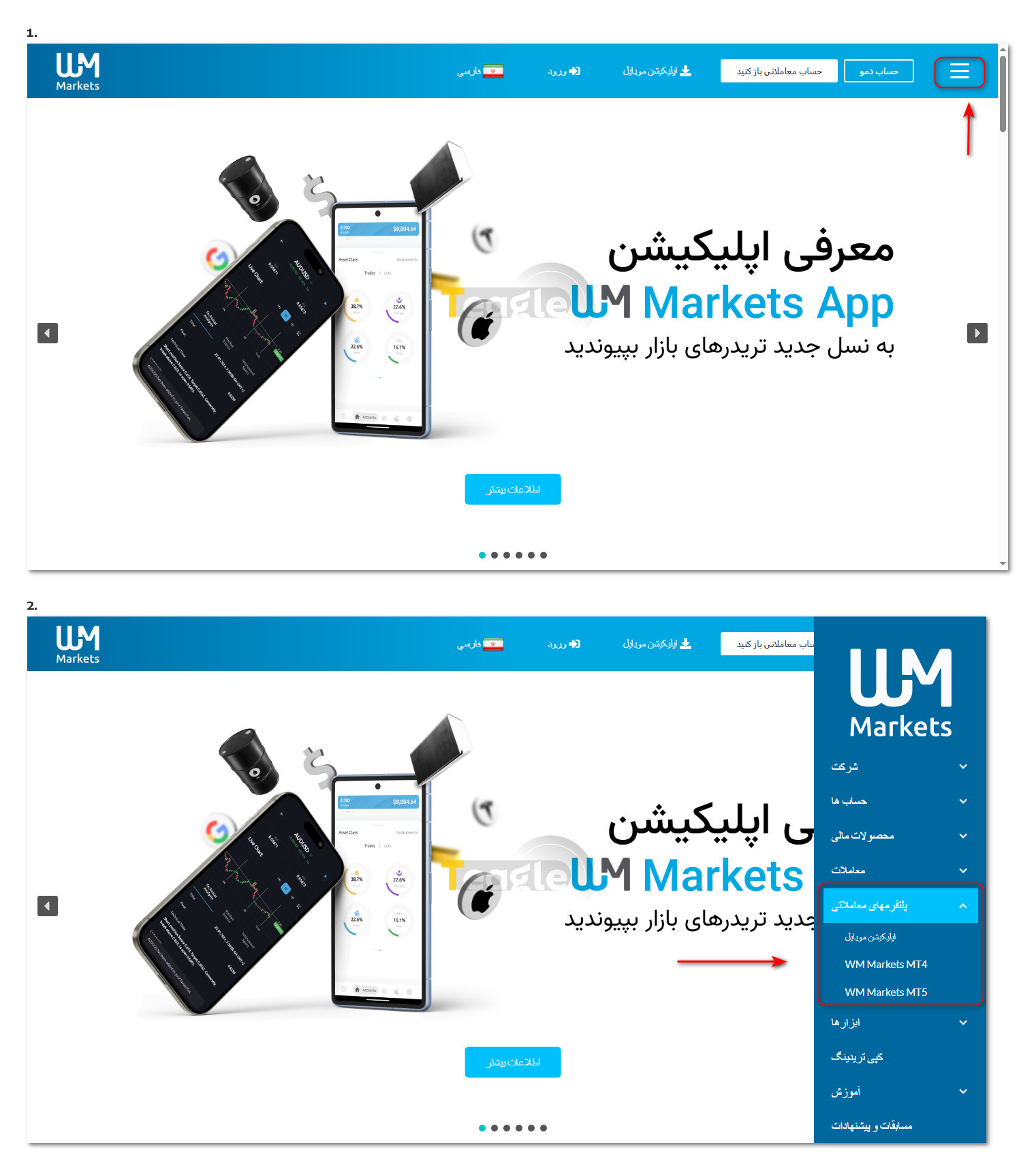
The download and installation process is also very simple and does not require any special technical knowledge. After installation, simply enter your trading account details to connect to the market.
|
Software name |
Download |
|
Meta Trader 4 WM markets |
https://en.wmmarkets.com/trading-platforms/wm-markets-mt4/ |
|
Meta Trader 5 WM markets |
|
|
(Mobile version) WM Markets |
https://en.wmmarkets.com/wm-markets-mobile-app/ |
How to Register and Log In to WM Markets Broker (Formerly Windsor)
In this section, we provide an illustrated, step-by-step guide to registering with Windsor broker for beginners. To get started, simply visit the Persian WM Markets website, click the «Open a trading account» option to register with Windsor broker, and enter the requested information in the «Registration» section. In the registration form, you need to enter basic information such as your country, first and last name (in Latin letters), phone number, email address and a strong password.
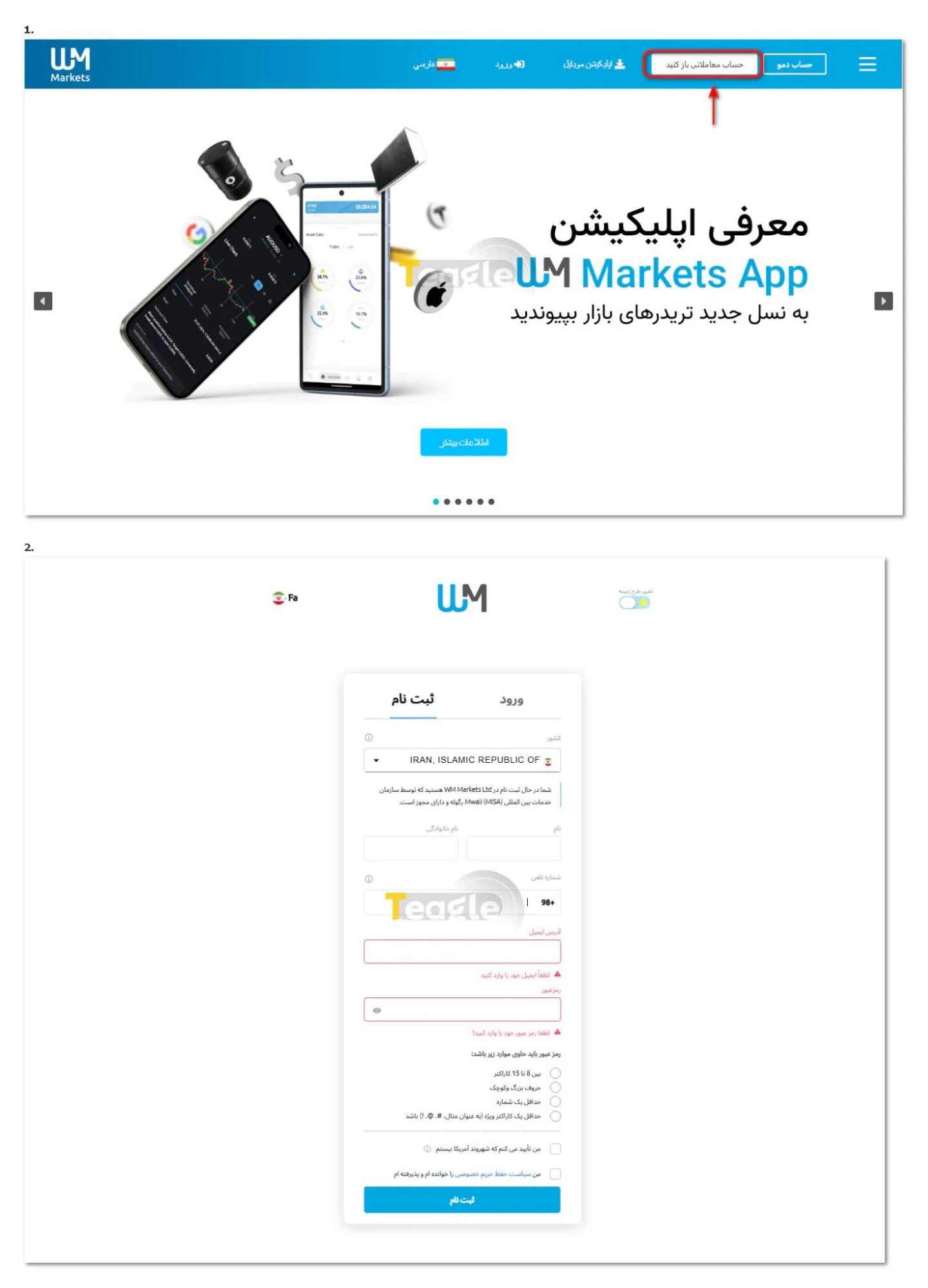
This step doesn't take long, and after creating your user account you can complete your login to your Windsor account. At this stage, an email is sent to verify your email address, containing a verification link. After logging in, you will have access to the user panel, or Windsor cabinet, which is the management center for all your activities with the broker.
Identity verification at WM Markets broker
To start investing, you must complete your profile and your identity verification right at the first stage. To carry out the verification process, click the «Complete your profile» button on the cabinet page.
After entering your personal information and title, on the next page you must enter your address in English, and then an investor information questionnaire asks about your source of income. On the trading estimate page, you are asked for your forecast of your upcoming trading volume so that your trading approach can be determined.
Finally, you must read the client account agreement, the trading terms and the terms and conditions of the loyalty program, confirm your agreement with their provisions and click the Finish button.
.webp)
Opening an Account and Logging In to the WM Markets Personal Cabinet
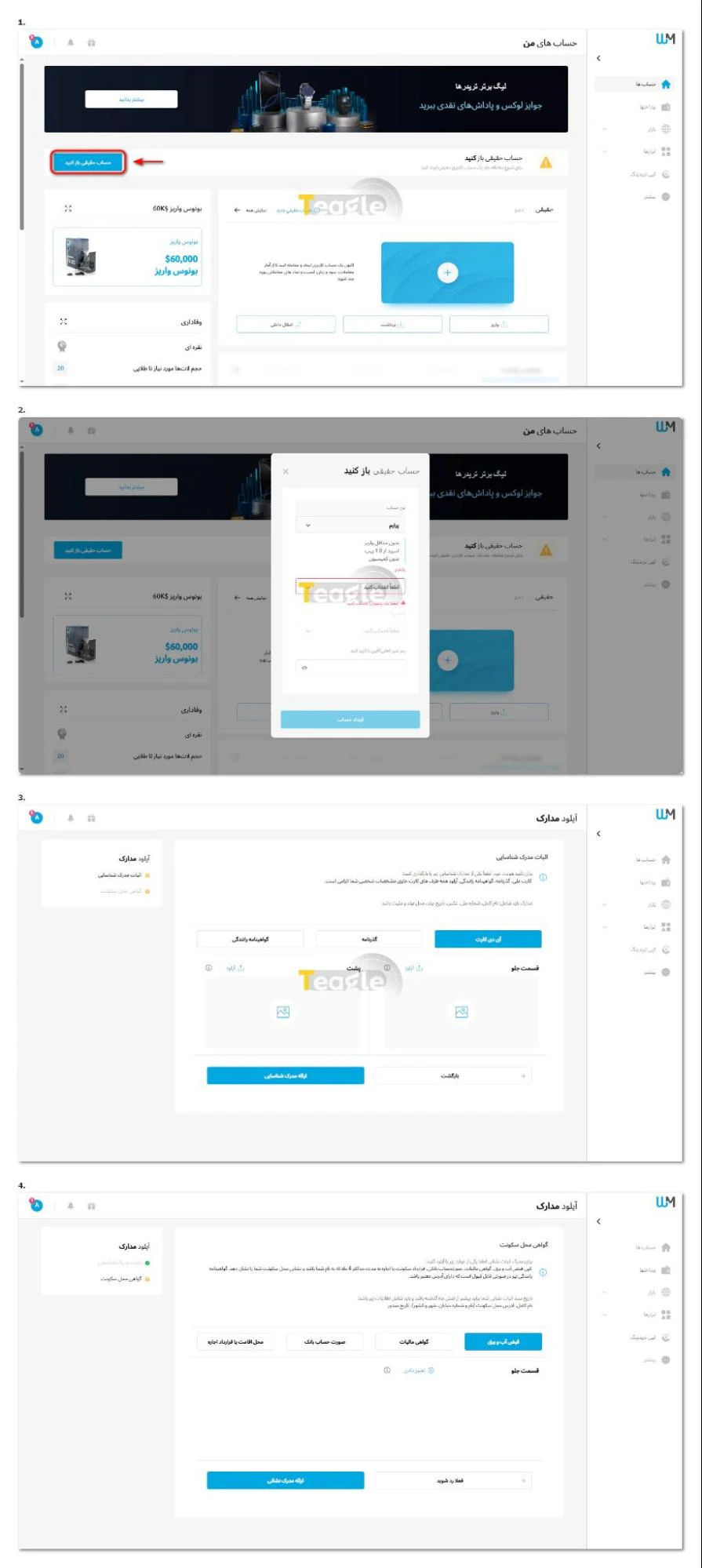
After registering and verifying your identity, when you log in to the Windsor (WM Markets) client cabinet, you will see the «Open a Real Account» option; click it to open an account.
After setting your account conditions, you must enter the user account password you set during registration. Note that after the account is created, you will be directed to a page where you must upload one of your identity documents, such as your national ID card, passport or driver's license, and then upload your proof of residence as well. Finally, once the submitted documents have been processed, you can use your account.
How to open an Islamic account at WM Markets
The WM Markets broker offers an Islamic (swap-free) account , but you should know that the Islamic account at Windsor broker is available on any of the broker's Prime accounts, and swap is fully removed only on major currency pairs and gold.
After opening an account, you must submit a request to activate the Islamic account through your personal cabinet titled “Request to convert account to Islamic” (Islamic Account Request) and state your MetaTrader account number. If there are no issues, within less than 24 business hours you will receive an email confirming that your account status has been changed to Swap-Free.
Funding Your Account and Rial Deposits at WM Markets Broker
Account funding and deposits at WM Markets broker are designed for Iranian users with a variety of Rial and cryptocurrency methods. To fund your account, follow the steps below:
1. In your personal cabinet, click «Deposit».
2. On the page that opens, you can select the cryptocurrency deposit method and make a deposit with a minimum amount of 20 dollars.
Carbon exchange and Tourist currency exchange are also available as WM Market agents for Rial payments.
3. On the page that opens, select the cryptocurrency you want, enter your wallet address and tick the option confirming that the wallet address belongs to you.
4. Finally, once you copy the broker's wallet address into your wallet, the deposit processing begins.
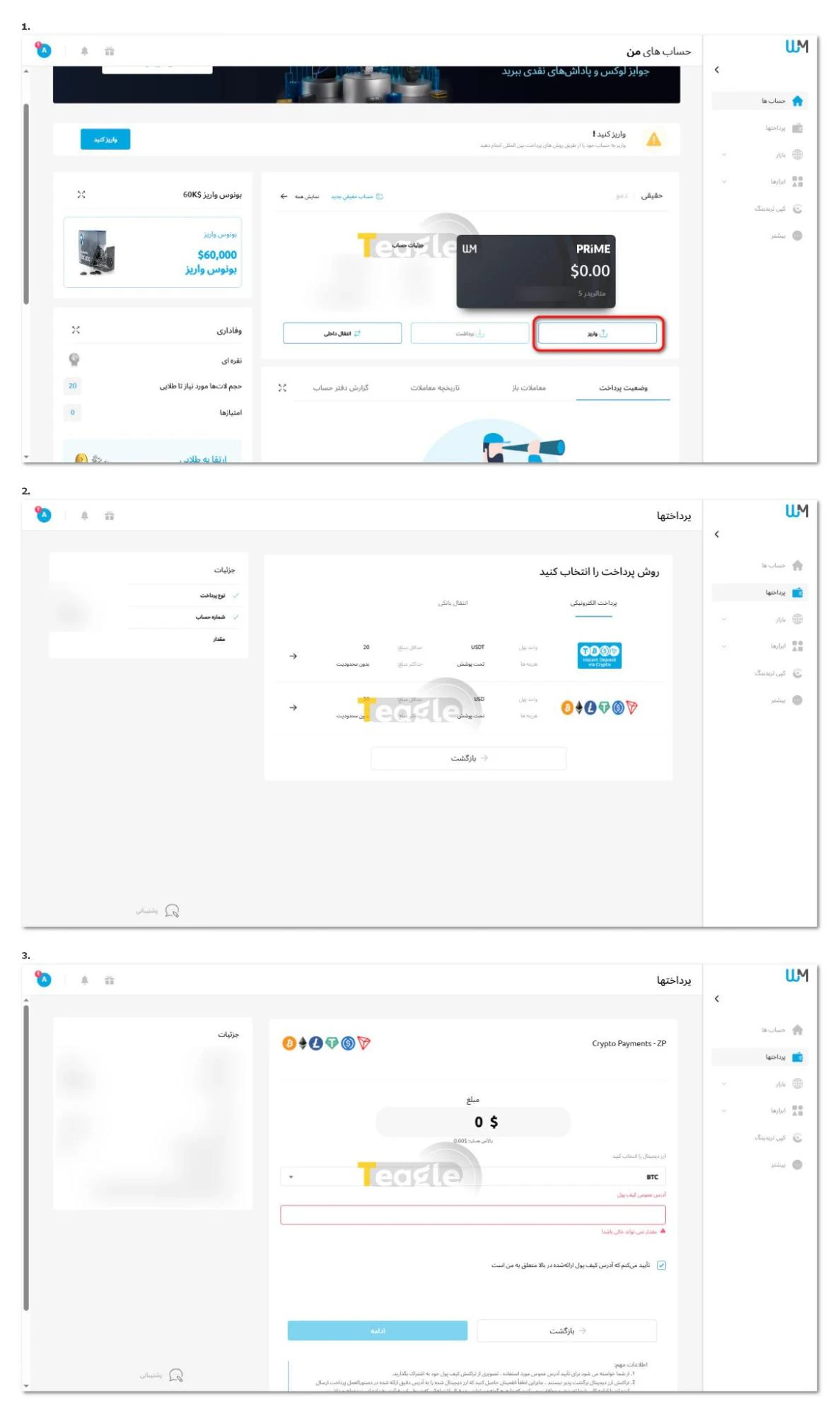
For Rial deposits, follow the steps below:
1. Contact the broker's support: First, get the WhatsApp number of the intermediary exchange from WM Markets support.
2. Register with the intermediary exchange: Send information such as your first and last name in Latin letters, broker account number, email and an image of your ID document.
3. Get the rate and payment amount: Based on the dollar amount you want, the exchange announces the Rial rate and the final amount on WhatsApp.
4. Rial deposit: After confirming the amount, transfer the funds to the account specified by the exchange.
5. Send the receipt: Send a clear image of the payment slip or receipt to the exchange.
6. Trading account funding: According to the article, if the steps are completed during working hours, the account is funded by 3 o'clock the same day at the latest. Also, deposits from a third-party account may result in the funds being returned.
For more information on how to make Rial deposits to WM Markets broker, see this article .
Tradable assets at WM Markets and their conditions
In reviewing Windsor broker's assets section, you can see that this broker offers a good variety of instruments. Each asset has its own trading conditions, including spread, leverage and trading hours. This information can be viewed on the broker's website and within the trading platform. This broker offers various assets including forex, metals, commodities, indices, bonds, stocks, gold funds and cryptocurrencies, each of which has different spreads depending on market conditions and trading time. The variety of assets, such as the Dow Jones symbol at Windsor or S&P 500 allows users to choose the right market for their strategy without having to use several different brokers.
How to Connect Your WM Markets Broker Account to Trading Platforms
After creating a trading account, the next step is connecting it to a trading platform. To do this, simply launch MetaTrader or the Windsor app and enter your account details.
These details include the account ID, password and trading server, which are both emailed to you and visible in the Windsor client cabinet. Connecting the account usually goes smoothly, and if an error occurs, the broker's support provides the necessary guidance. This step allows users to start trading in practice. For a step-by-step guide to connecting a broker account to the MetaTrader 4 and 5 platforms, refer to this article .
How to Connect WM Markets Broker to TradingView
For users interested in professional analysis, connecting a broker to TradingView is an advantage. However, it should be noted that this service is not available at WM Markets (Windsor), and users can only trade through the MetaTrader 4 and 5 platforms.
How to Withdraw from Your WM Markets Broker Account
Withdrawals, especially Rial withdrawals from a Windsor account, are just as simple as deposits. Simply go to the (Withdrawal) section in your personal cabinet and choose your preferred withdrawal method. Note that you must withdraw using the same method you used to deposit. In other words, if you deposited via crypto, you must withdraw the same way. Once the broker's finance team approves the request, the Rial equivalent of the requested amount is deposited into your bank account. This process may take 1 to 3 business days.
Articles related to the broker
User reviews
'%3e%3cpath%20d='M17%200H0V1.05566H17V0Z'%20fill='%234B4B4B'/%3e%3cpath%20d='M8.43767%206.55469H0V7.61035H8.43767V6.55469Z'%20fill='%234B4B4B'/%3e%3cpath%20d='M8.43767%203.27734H0V4.33301H8.43767V3.27734Z'%20fill='%234B4B4B'/%3e%3cpath%20d='M8.43767%209.83398H0V10.8896H8.43767V9.83398Z'%20fill='%234B4B4B'/%3e%3cpath%20d='M12.7445%206.71353L9.85449%204.02685L10.6591%203.27734L11.9455%204.47553C12.1578%204.67215%2012.4451%204.78249%2012.7445%204.78249C13.0439%204.78249%2013.3311%204.67215%2013.5435%204.47553L14.8298%203.27734L15.6345%204.02685L12.7445%206.71353Z'%20fill='%234B4B4B'/%3e%3cpath%20d='M12.7445%2011.0006L9.85449%208.30871L10.6591%207.56445L11.9455%208.76264C12.1578%208.95926%2012.4451%209.06963%2012.7445%209.06963C13.0439%209.06963%2013.3311%208.95926%2013.5435%208.76264L14.8298%207.56445L15.6345%208.30871L12.7445%2011.0006Z'%20fill='%234B4B4B'/%3e%3c/g%3e%3cdefs%3e%3cclipPath%20id='clip0_9931_2952'%3e%3crect%20width='17'%20height='11'%20fill='white'/%3e%3c/clipPath%3e%3c/defs%3e%3c/svg%3e)
Newest
