Complete guide to registering and trading with XS Trades (XStrades) broker



Working with the XStrades broker seems simple, but because of the ambiguities surrounding this broker, and even the shadow of the XS broker hanging over it, the process may not go smoothly for you. What you are reading is a step-by-step guide covering everything from registration and identity verification to funding your account, trading, and withdrawing funds. The aim of this guide is to familiarize you with the main processes of the XStrades broker without technical complexity and with a focus on the needs of Iranian users.
Signing in to the XS website and how to register
To start learning how to work with the broker XStrades, the first step is to visit this broker's official website and create a user account. The registration process at XS Trades is designed so that even beginner users can complete it easily. Follow the steps below:
1. After entering the site, select the registration option (Register) and enter basic information such as your name, email and country of residence. A confirmation email will then be sent to you, and by clicking on it, your user account will be activated.
2. In your user account, you need to fill out a questionnaire covering your financial information, and finally, you will have access to your user account.
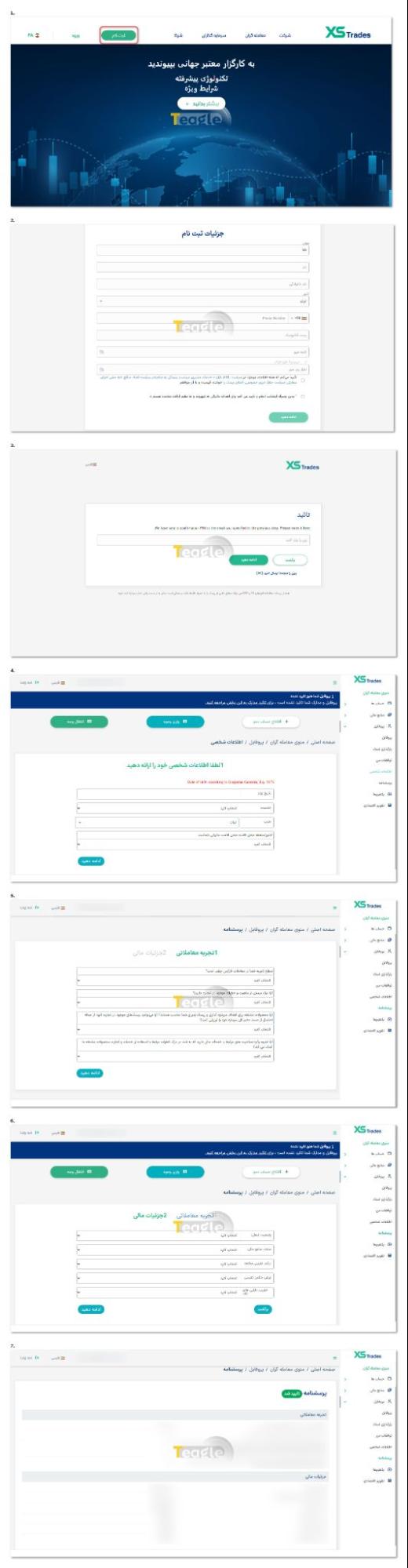
The important point is that trading is not yet possible at this stage, and your account must go through the next steps as well. The initial registration is only for creating a profile, and the rest of the process includes choosing the account type and verifying your identity. We recommend that you complete the identity verification process before any errors occur and before making any deposit.
Requirements and documents needed for identity verification
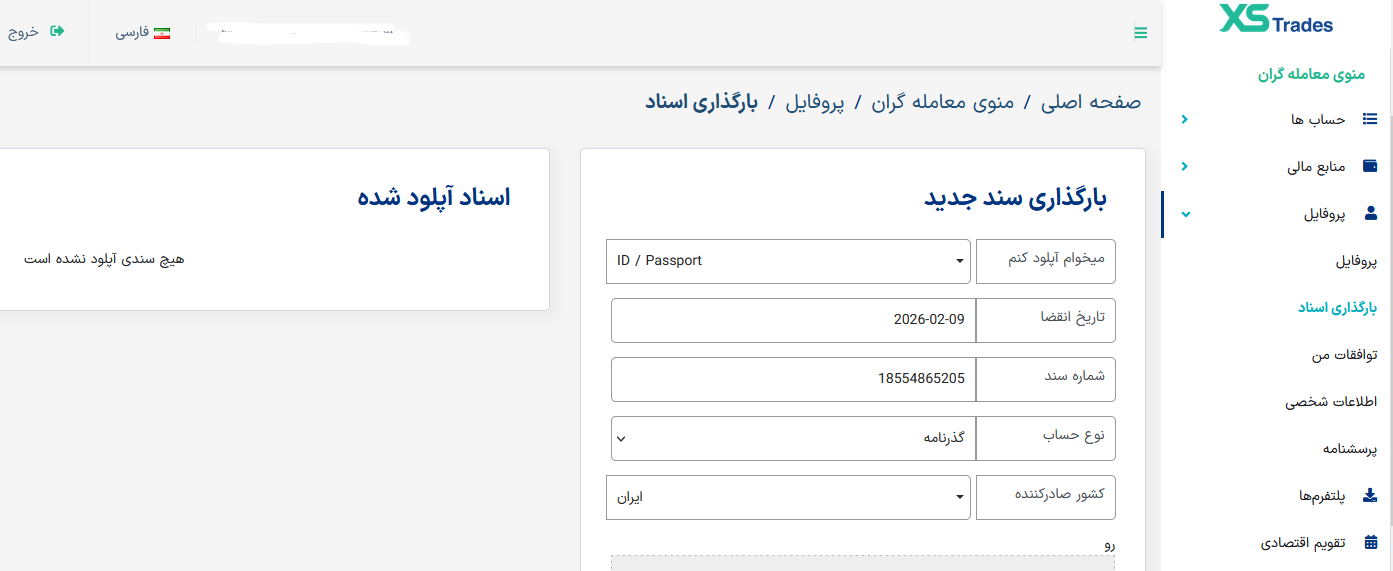
For identity verification, you need to upload your national ID card or passport. To access this section, select the document upload option from your user menu, enter the requested information including the expiry date, document number, etc., and finally upload images of the front and back of your document.
Choosing and opening a trading account with XS Trades broker
After identity verification, it's time to choose a trading account. XS Trades broker offers several types of trading accounts, and traders should choose the right one based on their chosen platform, capital, trading experience and needs. Information about each account's conditions, such as the minimum deposit or trading features, is shown in the user panel, and for more details you can see «Review of XS Trades broker account types XStrades».
Opening a trading account is done online without complicated steps. After choosing the account type, its details are registered and your trading account is activated. This is the account that will later be connected to the MetaTrader trading platform.
The account details are also sent to your email.
To open an account with XS Trades, follow these steps:
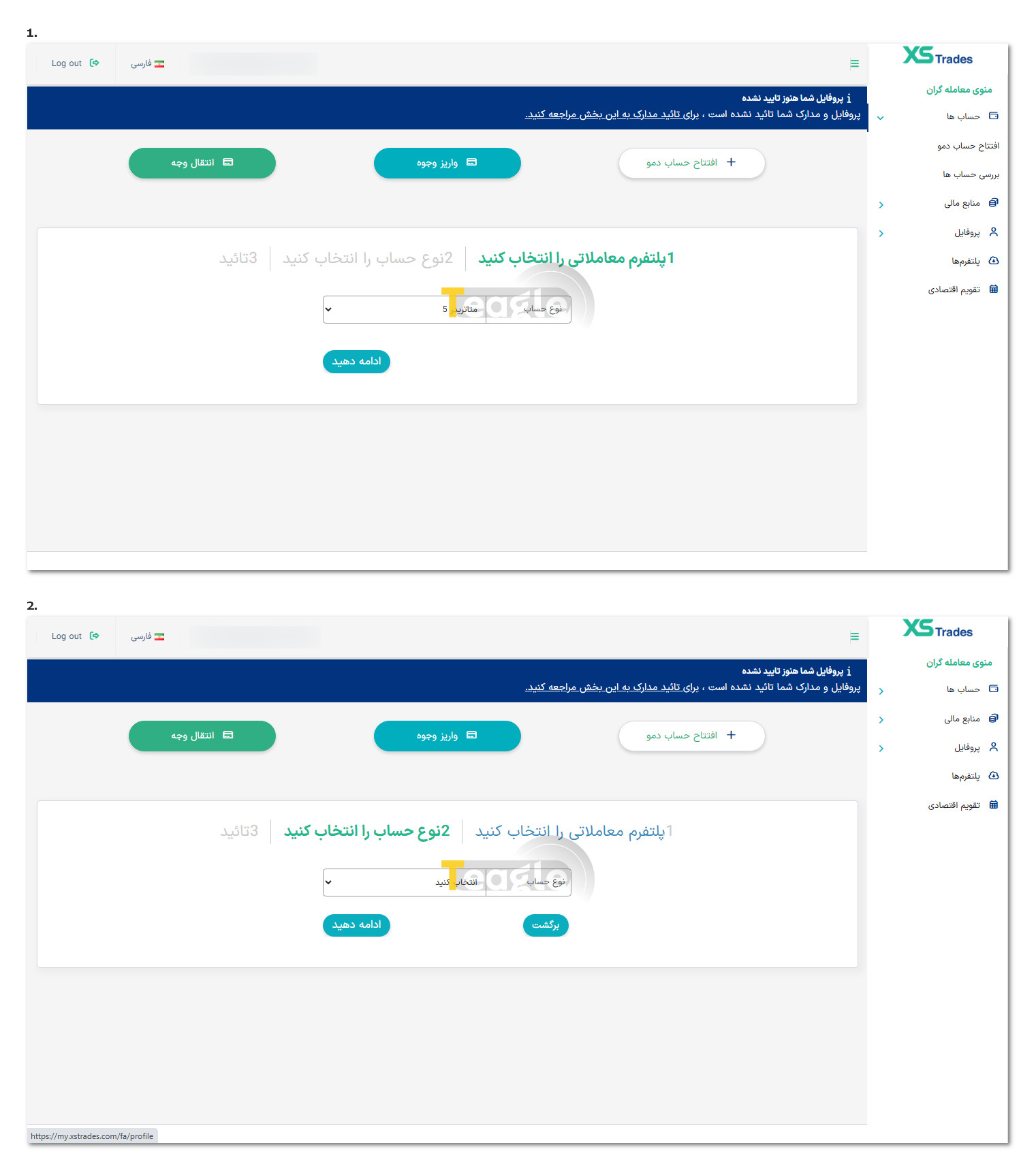
1. Log in to your user panel and, in the Accounts section, click «Review Accounts».
2. In the window that opens, choose your trading platform from MetaTrader 4 and MetaTrader 5.
3. Then select the account type and click Continue. If you haven't completed identity verification, you will be stopped at this step. Otherwise, your account will be opened, and you can use your account details to connect it to your chosen trading platform.
How to open an Islamic account with XS Trades
If you're also looking for an Islamic or swap-free account, XS Trades broker offers this option for users who don't want to pay overnight interest. To activate an Islamic account, you first need to open a regular trading account and then submit a request to convert it to an Islamic account. This request is usually made through the user panel or by contacting support.
After the request is submitted, the account conditions are reviewed and, if approved, your account is switched to Islamic mode. In this type of account, overnight interest is not charged on trades, but all other trading rules still apply. Knowing about this option is an important part of learning how to work with XStrades broker for Iranian users.
How to fund your trading account and deposit to XS Trades broker
XS Trades broker offers various deposit methods, and users can choose the option that suits their circumstances. The deposit process is carried out from within the user panel in the Funds section, and after selecting a payment method, the user goes through the specified steps. After opening an account, follow the steps below to deposit funds:
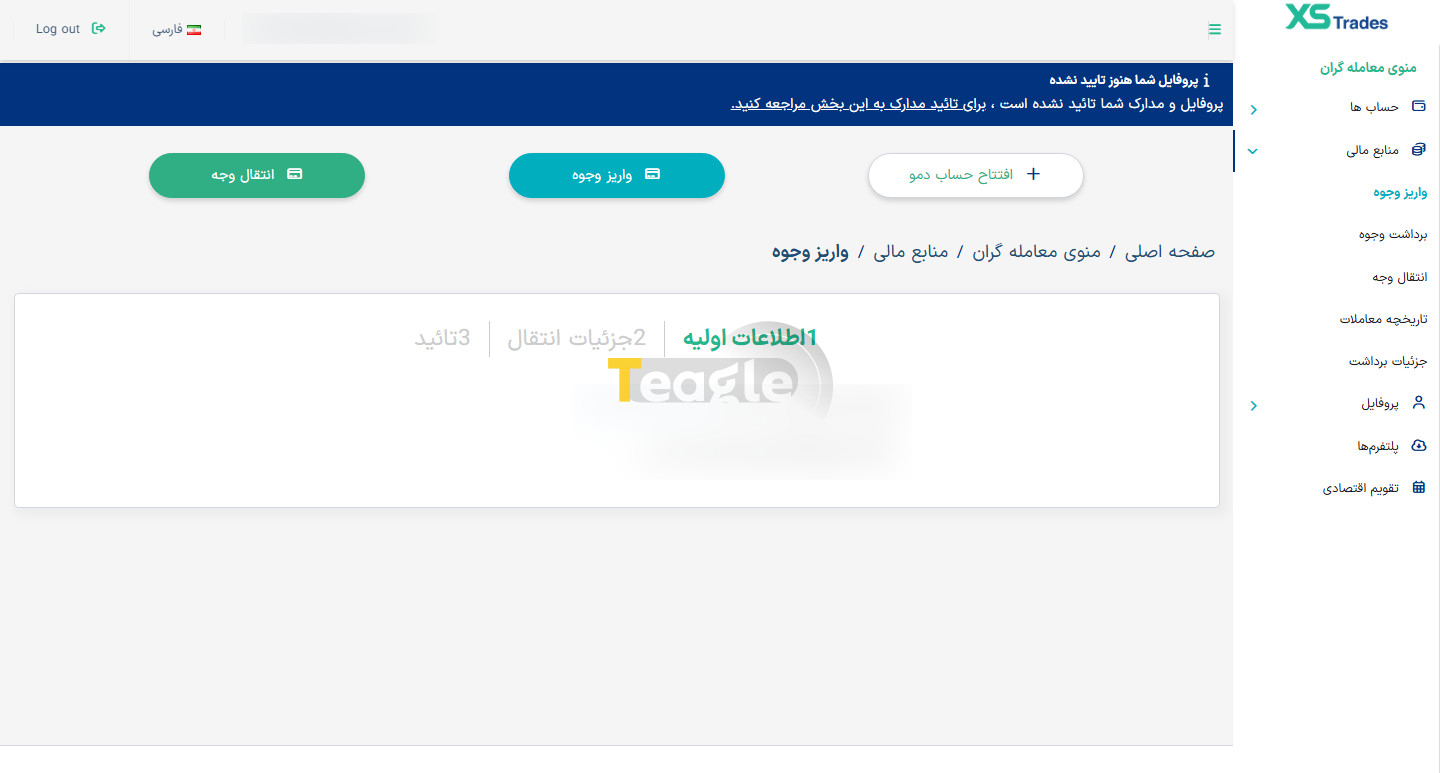
1. Log in to your user panel and, in the Funds section, select the «Deposit Funds» option.
2. Select the transfer details and transfer method, and finally confirm it.
3. Once the deposit is made, the trading account balance is updated and you can start trading.
The time it takes to fund the account varies depending on the chosen method. At this stage of the XStrades broker tutorial, users are advised to review the conditions of each payment method and the minimum amount required before depositing, so they can start their activity with a clearer picture.
Installing and connecting XS Trades broker to MetaTrader trading platforms
After opening and funding your account, the next step in the XStrades broker tutorial is installing and connecting to the MetaTrader trading platform. MetaTrader is one of the most popular trading applications in the world and offers extensive features for analysis and trading. XStrades supports both MT4 and MT5, and users can install these applications on a computer, laptop or mobile phone. To install, simply go to the Platforms tab in your personal cabinet and download whichever version of MetaTrader suits your needs.
In short, to connect you just need to enter your account details, including the account number, password and the server provided by the broker. Once you enter this information, your account is connected to the platform and you can view charts, place buy and sell orders and manage your trades. The MetaTrader interface is simple, and even beginners can make use of its tools with a little practice. For a complete guide on how to connect the broker to MetaTrader, click this link .
Which trading symbols can be traded with XStrades broker?
XStrades offers a diverse range of trading symbols across its different accounts. These include major and minor currency pairs, precious metals, stock indices and some other assets. The variety of symbols allows traders to implement different strategies in line with the markets they are interested in.
Before trading any symbol, it is best to check its conditions, such as spread, trade volume and market hours. The table below shows the exact details of the symbols for each account.
|
cent |
standard |
elit |
classic |
||
|---|---|---|---|---|---|
|
Shares |
× |
700 |
× |
× |
US, EUR, HK shares |
|
Indices |
× |
11 |
11 |
11 |
|
|
Metal |
2 |
6 |
6 |
6 |
XAGUSD |
|
Energy |
× |
3 |
3 |
3 |
USOILK, UKOILK |
|
Crypto |
× |
8 |
8 |
8 |
|
|
Currencies |
45 |
42 |
42 |
42 |
|
|
Commodities |
× |
× |
× |
× |
|
|
Futures |
× |
× |
× |
× |
Unspecified |
How to withdraw funds from your XS Trades broker account
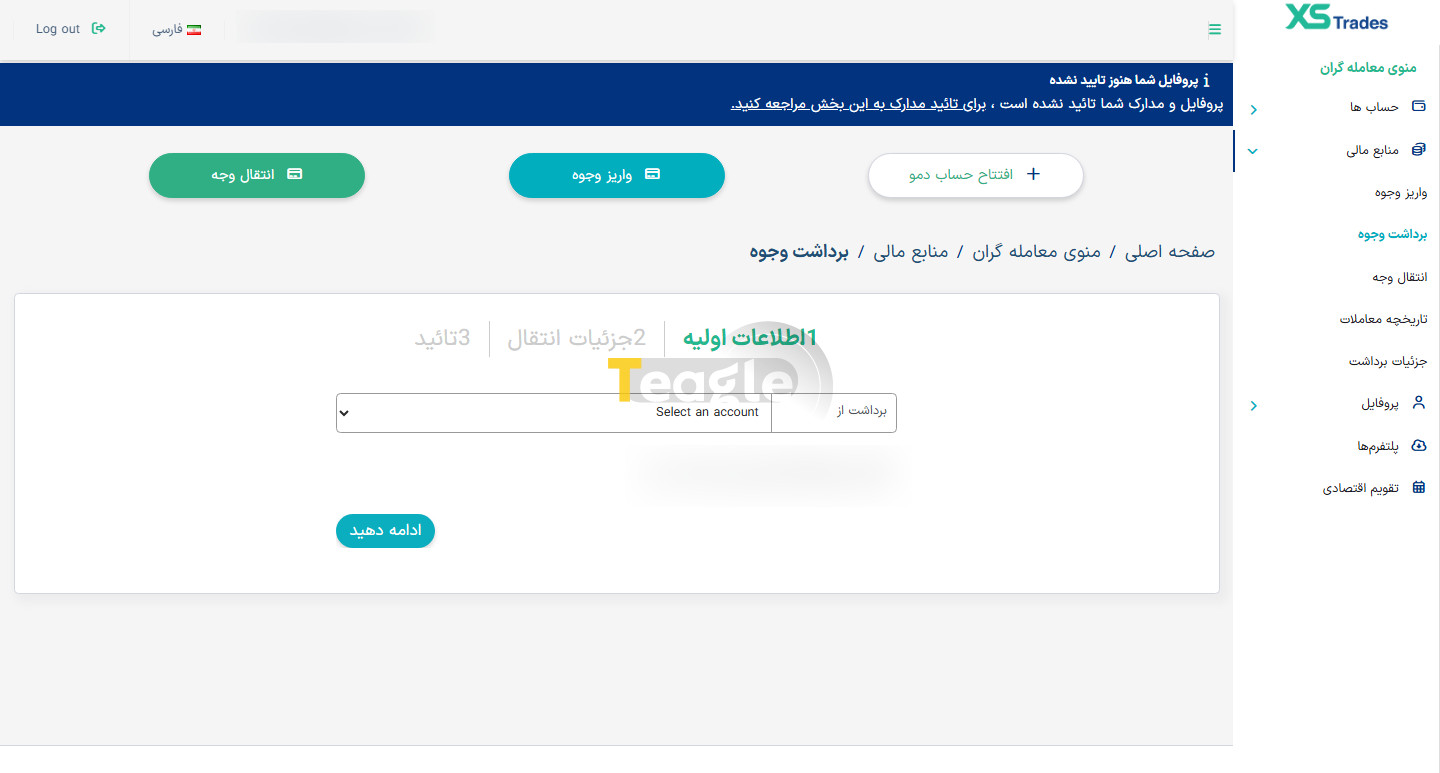
Withdrawing funds is one of the most important and critical steps in the trading process. To withdraw from the XS Trades broker, you need to log in to your user panel and select the withdrawal option. Withdrawals are usually made via the same method used for the initial deposit to ensure account security.
After the request is submitted, the broker's finance team reviews and processes it. The withdrawal time varies depending on the payment method, but it is usually completed within a few hours to a few business days. Note that completing the identity verification process is the main requirement for withdrawing funds, and without it, transferring your balance is not possible.
Guide to requesting support from XS Trades broker
While using the broker, you may run into a question or problem. XStrades broker provides several ways for users to contact the support team. Users can submit their requests through the user panel, by email or via online chat.
To get a fast and accurate answer, it is best to describe your issue in full detail. Support is not available 24 hours a day, but the broker tries to respond to all requests as quickly as possible. Knowing the contact methods and the response process is an important part of learning how to work with XStrades broker and makes for a better user experience for traders.
FAQs about registering and working with XS Trades broker
Articles related to the broker
User reviews

Newest
