
How to Deposit to an FxPro Broker Account via Zipay and Crypto for Iranian Users

Author
Admin
Published
 2026/07/09
Updated
2026/10/25
Reading time
2 دقیقه


For an Iranian trader, the first challenge of entering the global market begins the moment they need to move their capital from inside Iran to a foreign broker's account. Banking restrictions, sanctions and international regulations make this step far more complicated than it appears.
FxPro (FXPro) has for years been one of the brokers used by Iranian traders, and the ways to deposit into it can vary depending on each person's circumstances. In this tutorial, we walk through two common routes, ZiPay and crypto, step by step so you can fund your FXPro account with the least hassle.
Why isn't a direct Rial deposit to FXPro possible?
Many international brokers, including FXPro, cannot receive funds directly from Iranian bank accounts. The main reason lies in the Iranian banking system's restricted connection with global financial networks, international sanctions and anti-money laundering (AML) rules.
As a result, Iranian users usually cannot fund their trading account with a domestic bank card or a direct Rial transfer. In practice, many traders have to use alternative methods such as intermediary payment services or cryptocurrencies like Tether (USDT).
Deposit methods to FXPro for Iranian users
According to information published by the broker, users can normally fund their account using methods such as bank wire, credit and debit cards, e-wallets (such as Skrill and Neteller), local payment methods and the FxPro internal wallet. However, given the restrictions we mentioned, Iranian users usually rely on two main routes to deposit into their FXPro account:
|
Deposit method |
Description |
Suitable for |
|
ZiPay or TCPay (intermediary Rial payment) |
Converting Rial into the required currency and transferring it to the broker account via the payment service |
Users who want the simpler Rial route |
|
Crypto (such as Tether) |
Direct transfer of the digital asset to the broker's crypto wallet or account |
Traders familiar with cryptocurrency |
Both methods can be useful, but they differ in speed, cost, risk and the level of user control, which we will review below. It should be noted that at the time of writing, all Rial deposit routes at the FxPro broker are disabled and this content has been compiled solely to familiarize you, our dear users, with the general process of funding an account on this platform.
How to deposit to an FXPro account with crypto
In recent years, cryptocurrencies have become one of the most important tools for moving money for users in countries with financial restrictions. Tether (USDT), thanks to its roughly stable value against the US dollar, is considered the most popular option for transferring capital to brokers.
The main advantage of this method is that it removes many banking restrictions and offers fast transfers. To deposit to your FXPro account with crypto, simply follow the steps below one by one:
- Log in to your account at the broker.
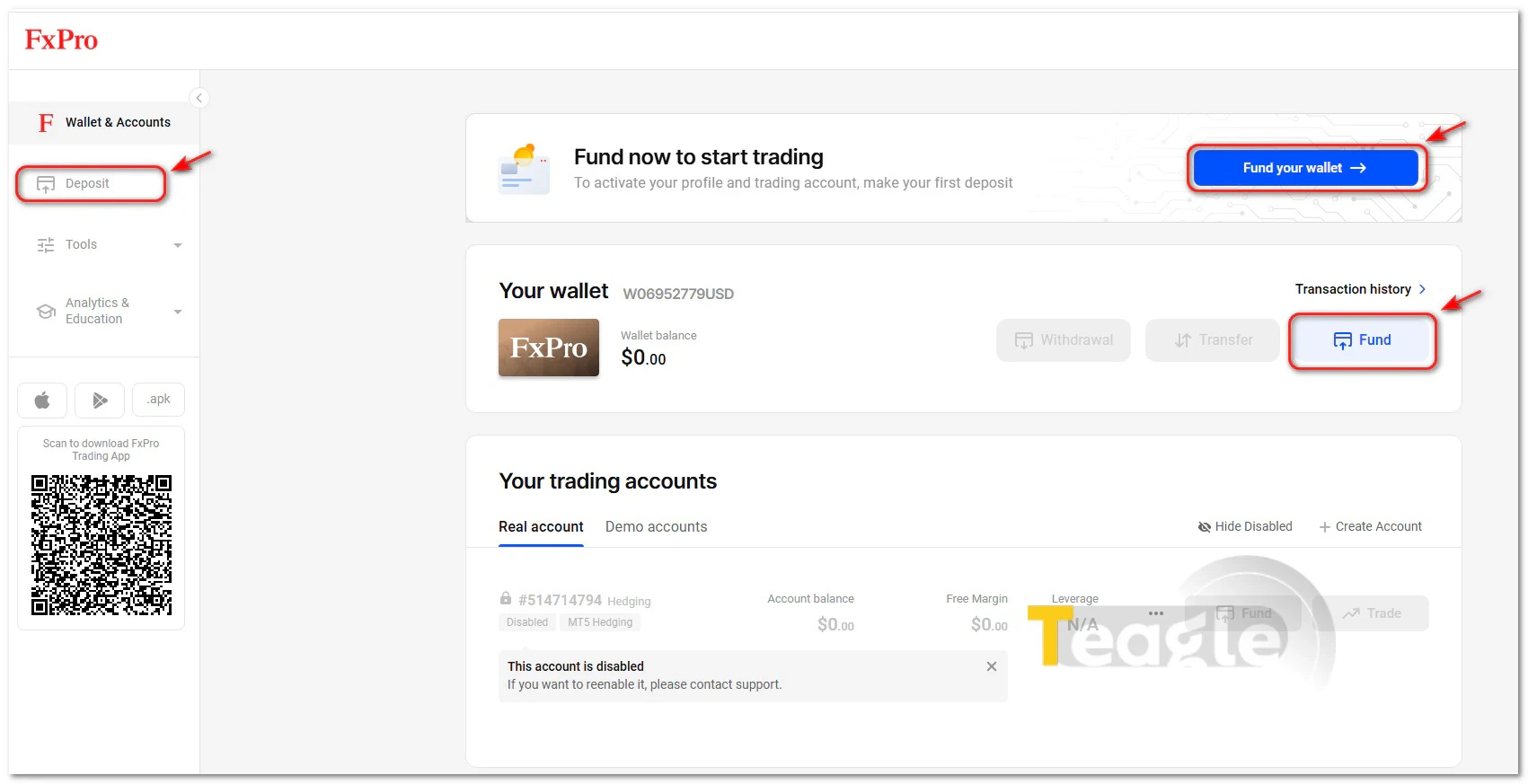
- In your personal cabinet, clicking any of the «Deposit», «Fund» or «Fund your wallet» options shown in the image will take you to the deposit page.
- From the cryptocurrencies available as payment methods, select the one you want.
-
It is worth noting that for Iranian users, networks with low fees—such as Tron (TRC20) or BNB Smart Chain (BEP20)—are usually more cost-effective, since they offer fast transfers and much lower transaction fees than networks like Ethereum.
- After selecting the cryptocurrency and network, FXPro displays a dedicated wallet address for the deposit. You can copy this address or enter it in your wallet by scanning the QR Code.
- In your crypto wallet (for example Trust Wallet or a domestic exchange), enter the desired amount and set the FXPro address as the recipient address. Then confirm the transaction.
- Once sent, the transaction enters the network confirmation stage. Confirmation time varies depending on the network
- As soon as the transaction is confirmed on the blockchain, FXPro detects it and the deposited amount is automatically added to your trading account. This step usually takes less than a few minutes, and there is no need to send a receipt or follow up manually.
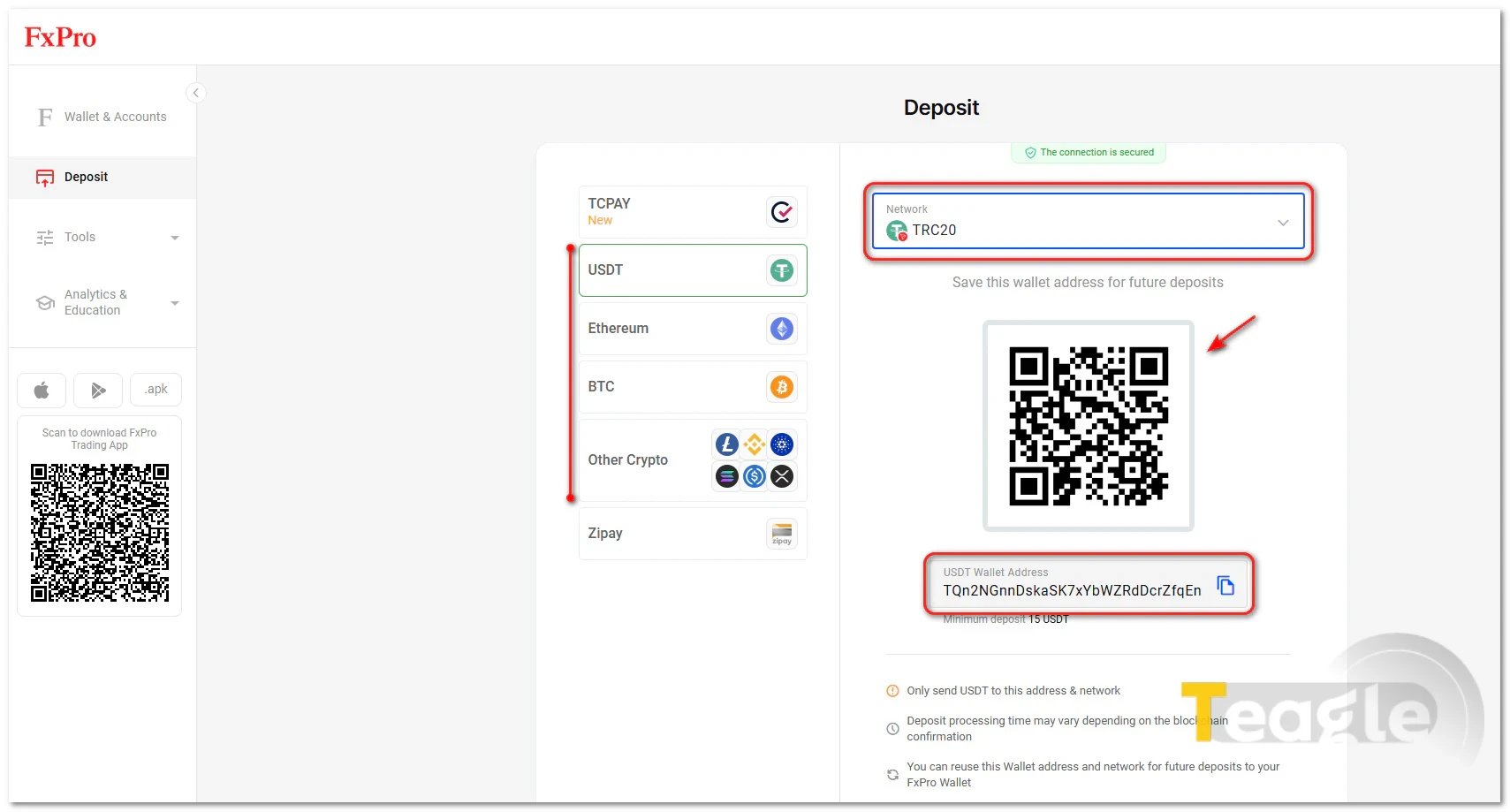
Note that FXPro sets a specific minimum deposit amount for each asset. For example, if you want to send Tether to this broker, you must deposit at least 15 units. This figure is 0.0122 units for Ethereum and 0.0005 units for Bitcoin.
How to deposit to FXPro via ZiPayZiPay (zipay) is an intermediary payment service that lets Iranian users convert Rial payments into currencies usable with international services. Such services have gained attention because Iranian users have limited access to international credit cards like Visa and Mastercard.
With this method, the user first pays the desired amount in Rial, and the intermediary service carries out the transfer of funds to the broker. The main advantage of this method is a simpler process for people who have no experience with cryptocurrencies or digital wallets.
To get started, you first need to create an account on ZiPay. This step involves entering basic information such as your email and phone number and creating a password.

After creating the account, ZiPay asks users to complete the required identity information. This usually includes first and last name, date of birth, country of residence and contact details. In its «Anti-Money Laundering and KYC» section, the platform stresses that verifying customers' identity is part of its security system and is essential for protecting transactions.Once your identity is verified, your account is activated and you can use ZiPay's payment services. You can now log in to your user panel at the FxPro broker, click the «Deposit» option and, to fund your account, select ZiPay as the payment method.
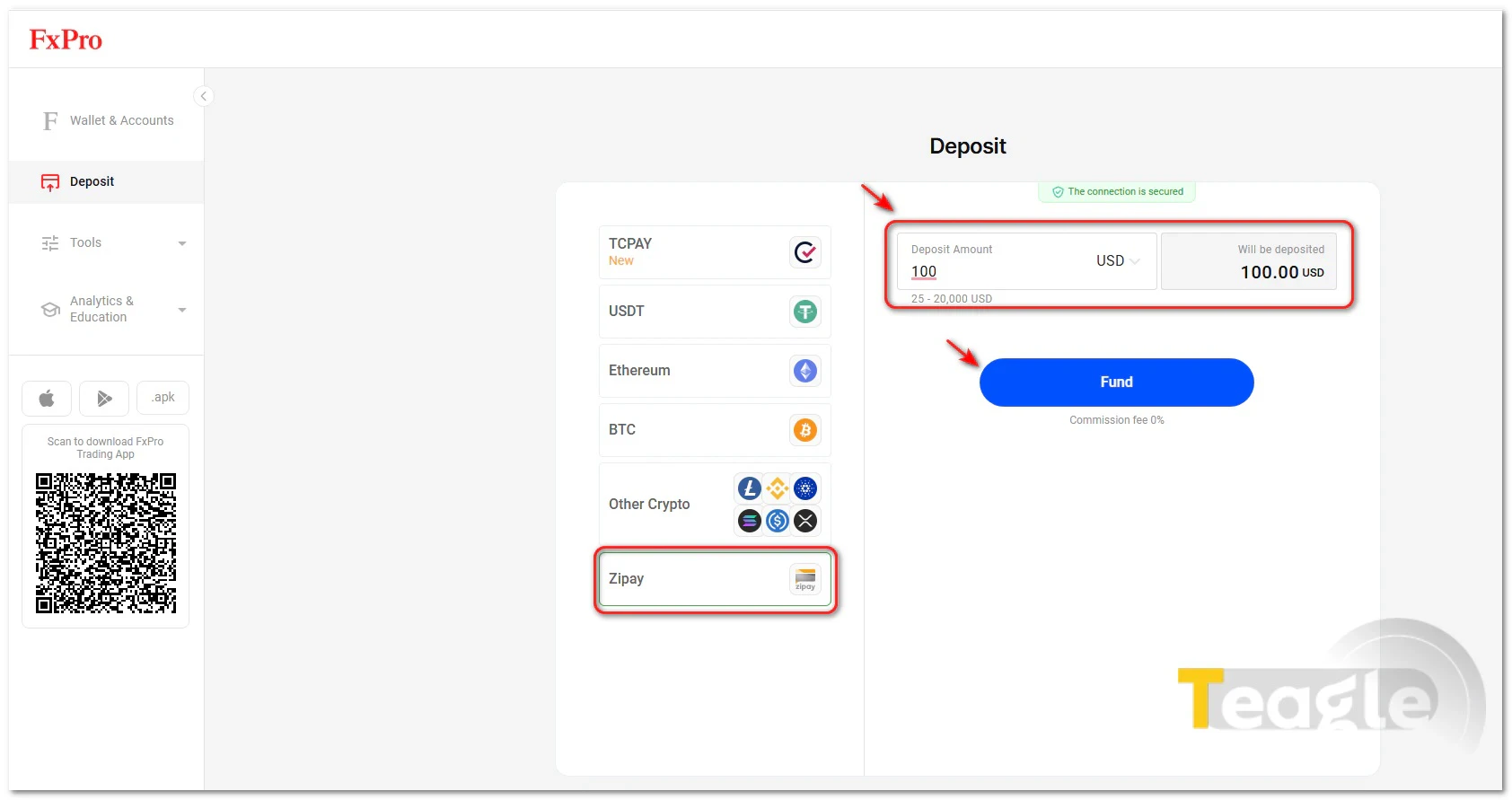
Enter the desired amount in the designated field and click «Fund». Note that the minimum and maximum deposit with this method ranges from $25 to $20,000.On the new page, after entering your ZiPay account email and password, a six-digit verification code will be sent to you. Enter the code in the relevant field and wait for confirmation.
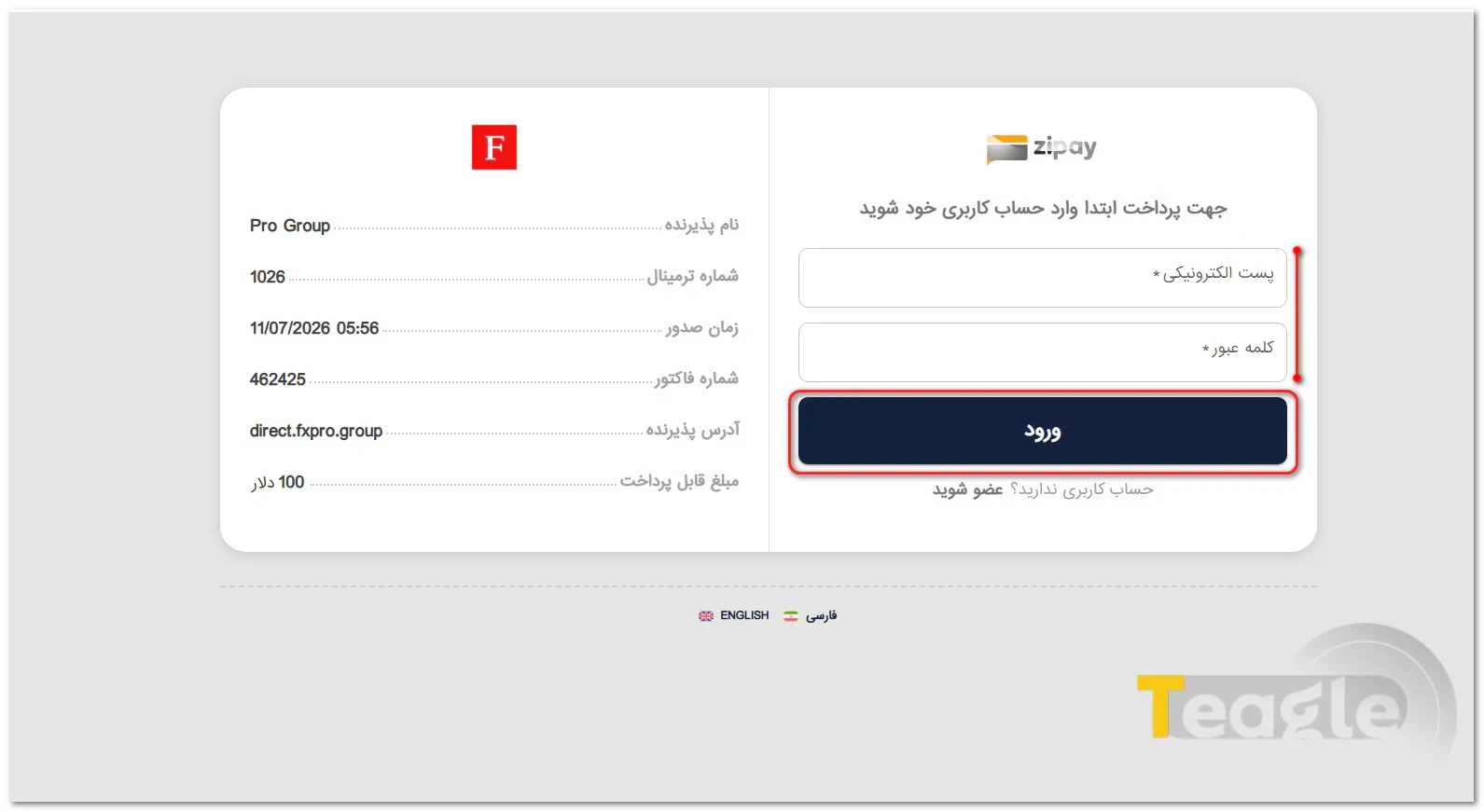
On the new page, you will see information such as the merchant name, terminal number, issue time, invoice number, merchant address and the amount payable. In the box on the right side of the image, select your desired wallet (for example, the Rial wallet) from the drop-down menu and confirm the transaction.
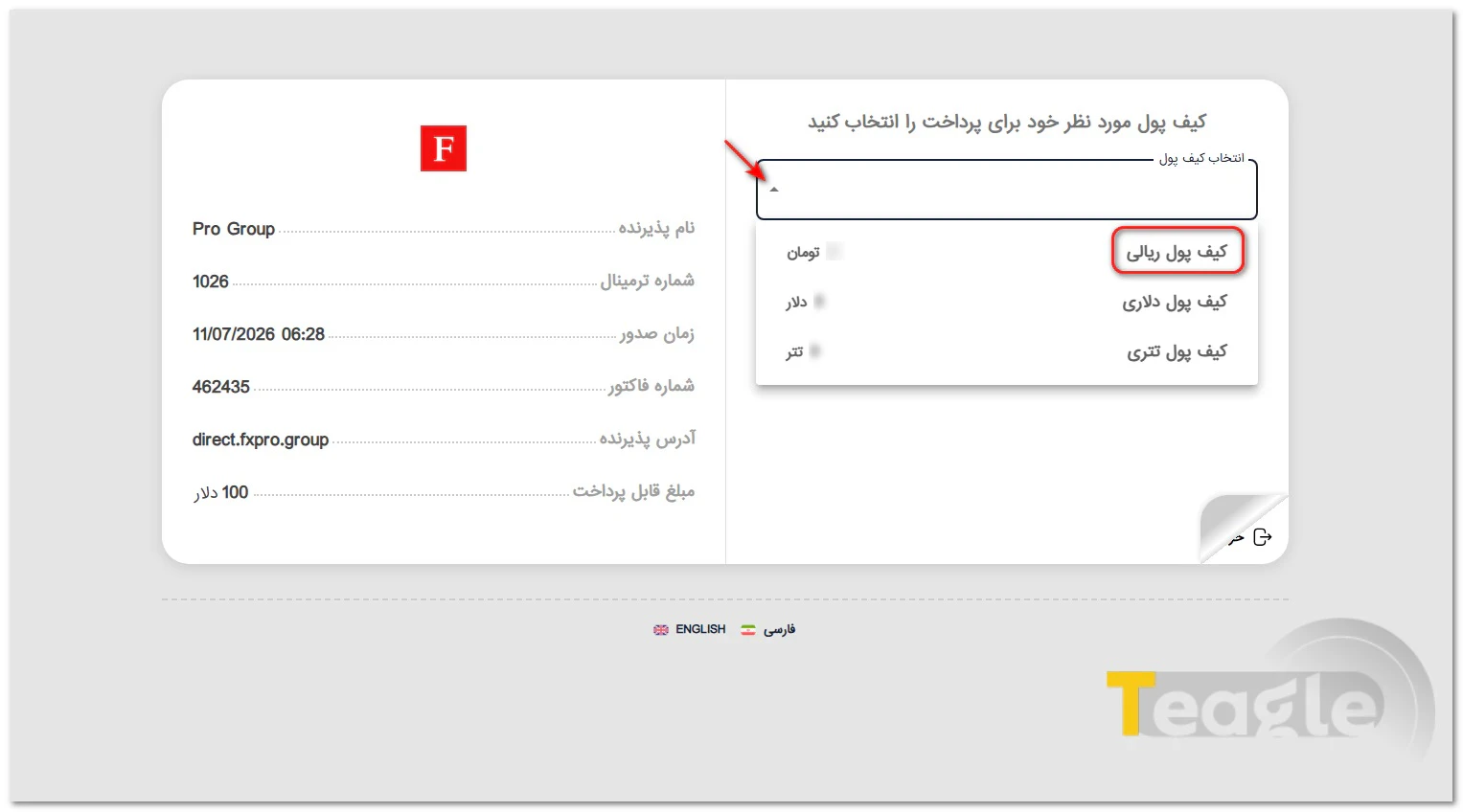
Notably, depositing to an FXPro broker account via the TCPAY platform has also recently become available to users.
Comparing the two common deposit methods for FXPro: which one is better?Both methods we have introduced so far for depositing to an FxPro account are reliable and practical, but they differ in speed, fees, ease of use and the level of user control. Before choosing, you should know the advantages and limitations of each route and in which situations it performs better. The table below will help you with this:
Criterion
ZiPay
Crypto (Tether)
Speed
Medium
Usually faster
Ease of use
Simpler for beginners
Requires basic knowledge of cryptocurrencies
Fees
Depends on the payment intermediary
Depends on the blockchain network
Control over funds
Less
More
Risk of user error
Lower
Higher if the wrong network is selected
How to withdraw funds from FXProWithdrawals at FXPro are made through the broker's internal wallet (FxPro Wallet). After transferring your trading account balance to this wallet, you can submit your withdrawal request. Requests can be submitted 24 hours a day and are usually reviewed by the broker's finance department within one business day.
Since FXPro follows a Refund Policy, withdrawals must be made via the same method you used to deposit. To withdraw, simply log in to your user panel and click the «Withdrawal» option in the «Wallet & Accounts» section. After choosing your preferred method, finalize your request with the verification code sent to your email.
Choosing the right way to deposit to FXPro: the first step toward safe tradingChoosing a deposit method for FXPro is not just a step to fund your trading account; it is part of money management and reducing risk in trading. Given banking restrictions, Iranian users need to choose a method that, in addition to being secure, also suits their situation in terms of speed, cost and ease of use. Using intermediary services such as ZiPay or transferring funds via cryptocurrency each has its own advantages and considerations. So, understanding how these methods work and following security tips when depositing and withdrawing will help you manage your capital with more confidence and start trading without worry.
Contents of this article


Related articles



User reviews

Newest
 Upload image