
Complete Guide to Using the AbanTether Exchange


Users sometimes assume that signing up on a crypto exchange takes only a few minutes, but the reality is that the important part begins after the account is created. Identity verification, enabling security settings, depositing Rials, choosing the transfer network and placing your first trade each involve details that, if not done correctly, can waste time or even lead to the loss of assets.
If you have chosen AbanTether to enter the crypto market, this guide was written precisely for that purpose. Below, we go step by step from creating an account to buying and selling crypto, withdrawing funds, improving account security and using the main features of the AbanTether exchange, so you can start trading on this Iranian platform without trial and error.
How to Sign Up and Log In to the AbanTether Exchange
Registration on the Abantether exchange is designed so that users can create their account in just a few minutes. However, to access all of the exchange's features, such as Rial deposits and withdrawals, buying and selling cryptocurrencies, and higher transaction limits, you also need to complete the identity verification steps. Below, we go through all the steps of registration, identity verification and logging in to your account, step by step.
Step One: Creating an Account
To create an account on Abantether, follow these steps in order:
1. Go to the Abantether website
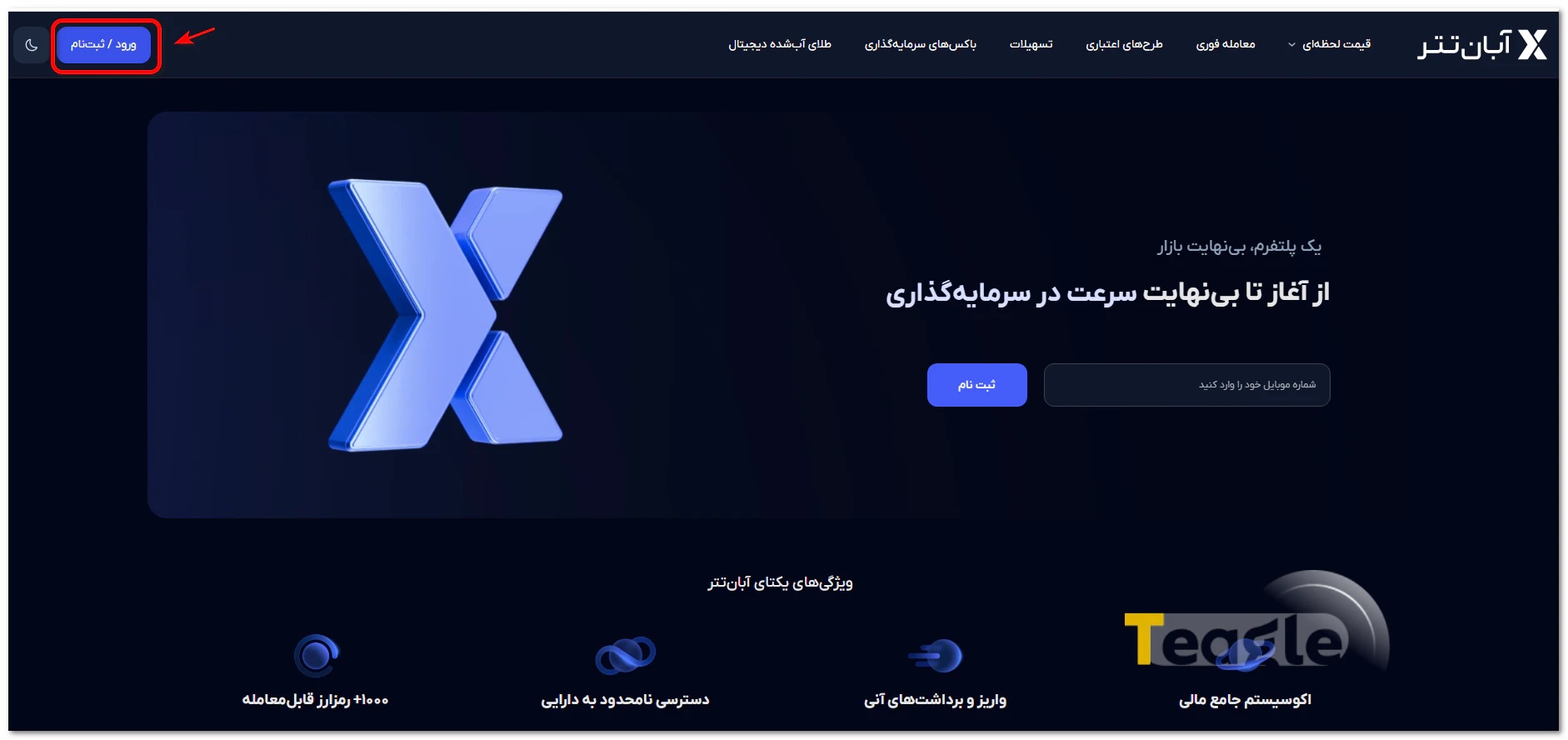
Open your browser and go to the official Abantether website . Then, at the top of the page, click on «Sign Up» or «Log In / Sign Up» .
2. Enter your mobile number
Enter a mobile number registered in your own name. This number is used as the main identifier of your account. By clicking the blue «Get Verification Code» box, a 6-digit code will be sent to you. Enter it in the relevant field and click «Confirm» to verify ownership of your mobile number.
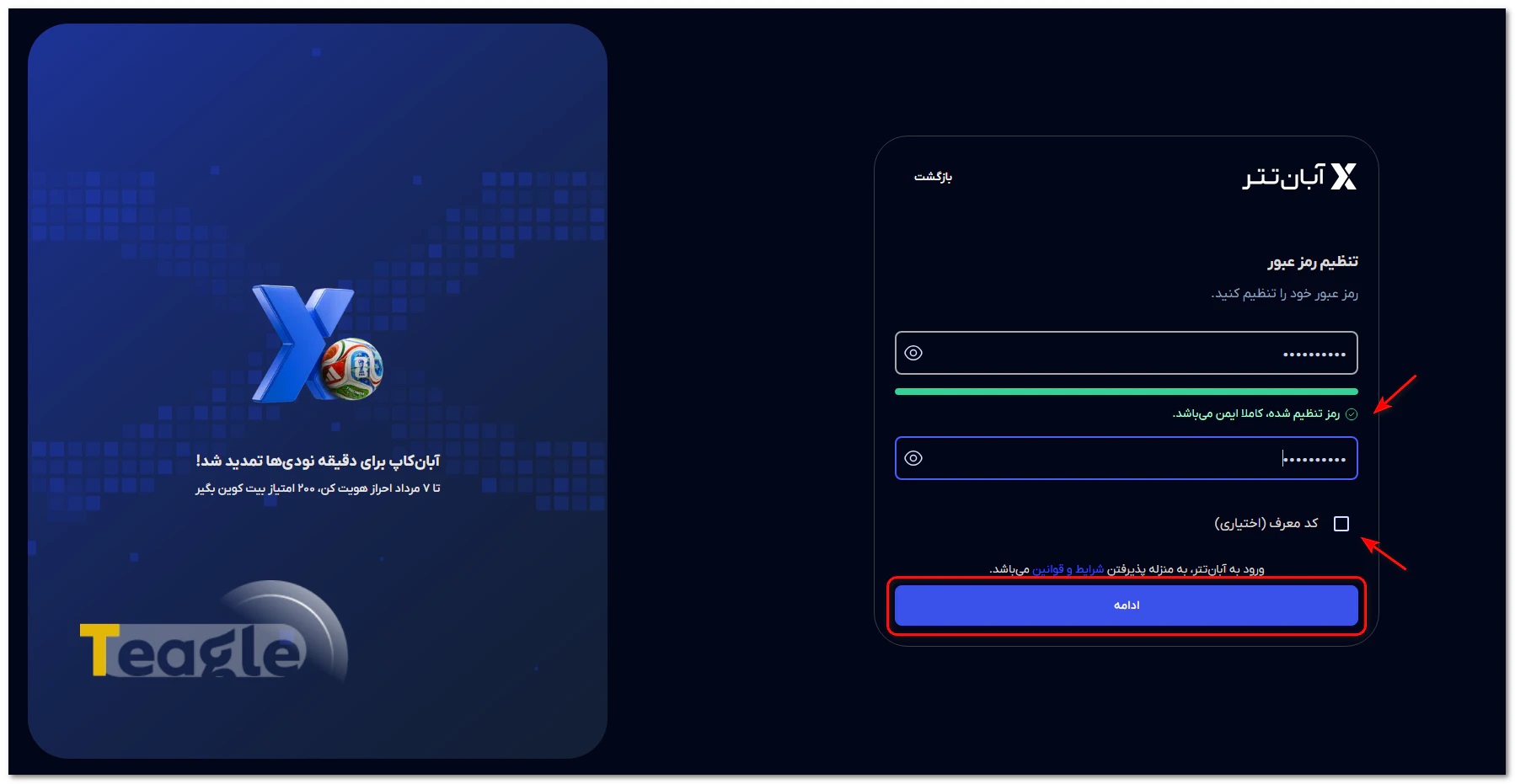
On the new page, choose a strong password. This password must be 8 characters long and include at least one number, one letter and one special character (_ # @ ! $ % ^ & + =). If you were referred to Abantether by someone else, you can enter the referral code at this stage. Entering a referral code usually gives you certain benefits, such as discounts on trading fees.
Step Two: Completing Identity Verification
After completing these steps, you are taken directly to the identity verification page. To use all of Abantether's services, you need to complete the identity verification process. This process is usually done in two levels.
Basic verification
At this stage, you only need to enter your basic identity information, including your national ID number and date of birth. It is worth noting that foreign nationals residing in Iran can also verify their identity on this platform by selecting the «FIDA code» option.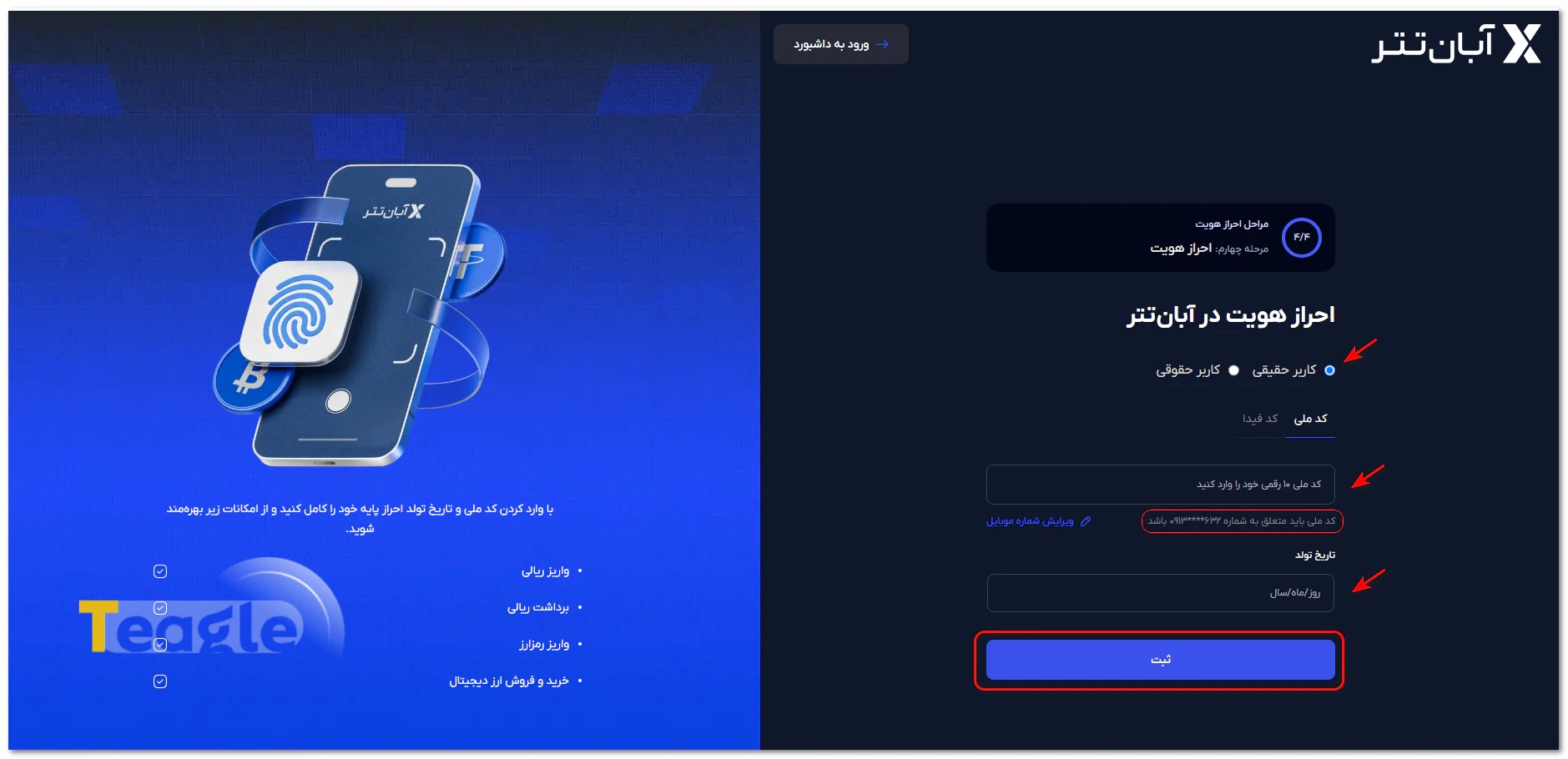
Once this information is approved, buying and selling cryptocurrency as well as Rial and crypto deposits and withdrawals will be enabled for you.
Advanced verification
If you need higher transaction limits or more features, you must complete full identity verification. The steps in this section include the following:
- Uploading an image of your national ID card
- Submitting an image of a handwritten commitment letter following the sample provided on the website
- Registering a bank card number and IBAN (Sheba) number belonging to you
- Uploading a selfie holding your national ID card and bank card
After the Abantether team reviews and approves your documents, your account will be upgraded to the full level.
Important note: All bank accounts, card numbers and IBAN (Sheba) numbers you register in the system must be in the name of the account holder. Using a bank account belonging to someone else can cause deposits to be rejected or blocked.
How to Log In to Your Abantether Account
Once registration is complete, for future logins you just need to follow these steps:
- Go to the Abantether website or app and click on «Log In» .
- Enter the mobile number you used when registering.
- A one-time code will be sent to your number. By entering this code, you will be logged in to your account. If you don't log out, you usually won't need to log in again for several days.
Enabling Two-Step Login
To increase account security, it is best to enable two-factor authentication (2FA) through apps such as «Google Authenticator». In this mode, in addition to the SMS code, you must also enter the code generated by the authenticator app when logging in, to minimize the chance of unauthorized access to your account.
Getting to Know the Different Sections of the AbanTether Exchange Trading Interface
After logging in to your account, you'll see a dashboard that gives you all the features you need to buy, sell, manage your assets and use Abantether's other services. Getting to know the different sections of this panel helps you reach the features you need faster and have a better trading experience on this exchange.
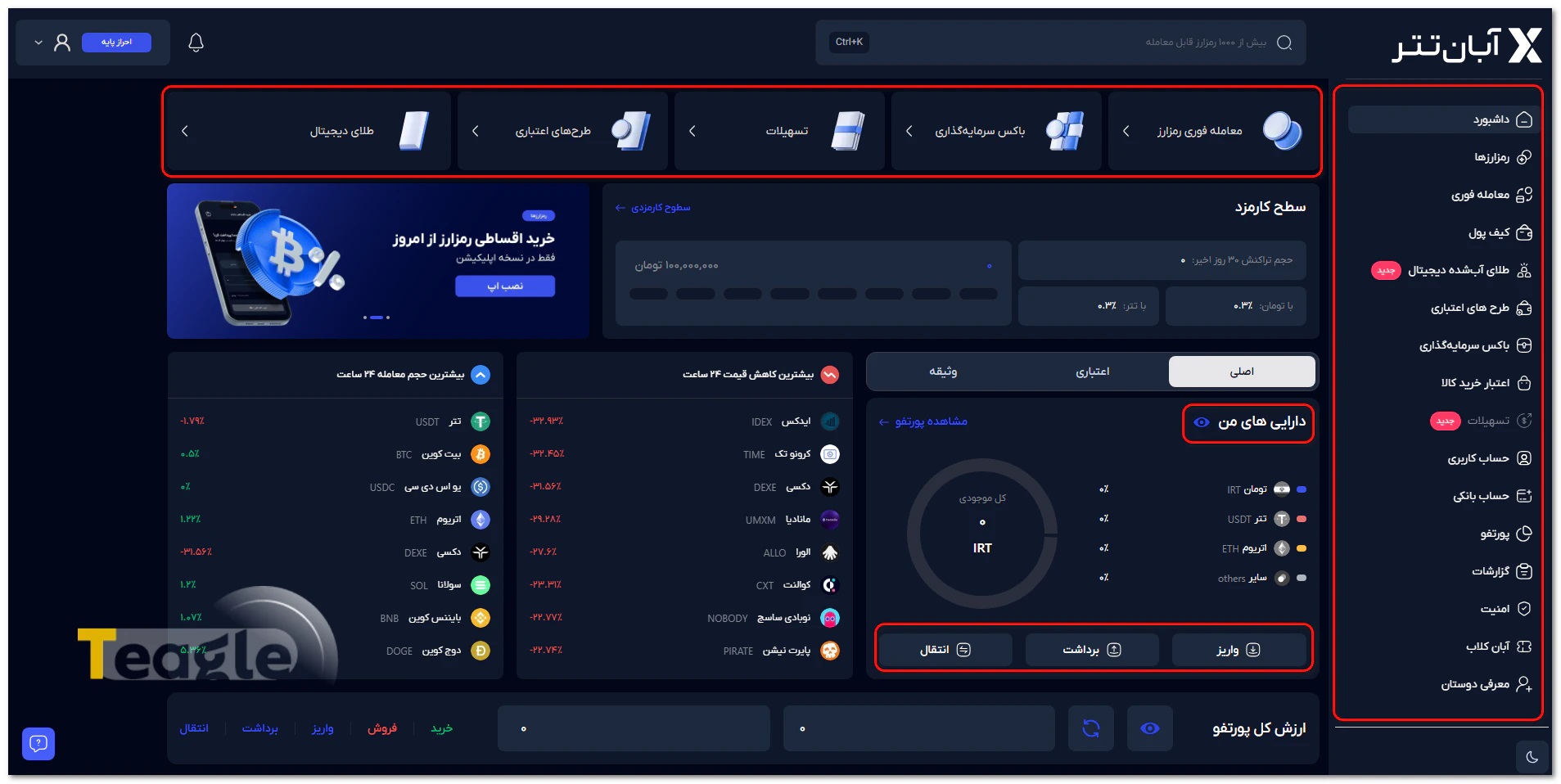
1. Crypto market (Market)
The Market section is the starting point for trading on Abantether. Here you can access a full list of tradable cryptocurrencies and view each asset's information in real time.
The main features of this section are:
- Access to more than a thousand tradable cryptocurrencies
- Viewing prices in the Toman and Tether
- markets, with real-time price, percentage change, trading volume and market cap for each cryptocurrency
- Sorting coins by top gainers, top losers, highest trading volume and new listings
- The market Fear and Greed Index for gauging overall trader sentiment
2. Trading page (Trading)
Selecting any cryptocurrency takes you to its dedicated trading page. This section gives you all the tools you need to place orders. The trading page features include:
- Price chart with TradingView analysis tools
- Fast buy and sell order placement
- Display of the amount paid, amount received and fee before final order confirmation
- Access to leveraged trading and short selling for eligible users
3. Wallet and asset management (Portfolio)
All your rial and crypto assets are managed in the Portfolio section. Here you can:
- View the balance of all your cryptocurrencies.
- Buy, sell or transfer assets.
- Make rial or crypto deposits and withdrawals.
- Check the status and history of all your transactions.
4. Investment and financial services
Besides crypto trading, Abantether offers users several other financial services so they can build a more diversified investment portfolio. Some of these services are:
- Buying and selling melted gold online
- Investment boxes for investing according to each user's risk level
- Aban Loan; get a rial or Tether loan with crypto as collateral and no guarantor required
- Trading shares of foreign companies through the Global Stocks section
5. Profile and security settings
All account settings are in the Profile section. Here you can manage your personal information, identity verification documents, bank accounts and security settings. The most important features of this section include:
- Enabling two-factor authentication (2FA)
- Changing your password
- Managing card numbers and bank accounts
- Viewing your verification level and transaction limits
6. Support and customer club
If you have any questions or problems, you can contact the Abantether support team via online chat or other contact methods. In addition, the Aban Club section is designed for active users and gives access to incentive programs, rewards and special points.
Guide to Using the AbanTether Exchange Markets
AbanTether's trading markets aren't limited to buying and selling a handful of cryptocurrencies. The exchange lets you trade hundreds of different assets in its Toman and Tether markets, and it also offers services such as leveraged trading, gold investment and other financial instruments. Below, we go through how to use AbanTether's markets step by step.
Step 1: Choosing a market and a cryptocurrency
After logging in to your account, click «Instant Crypto Trade» in the top menu to choose the asset you want. AbanTether supports more than a thousand cryptocurrencies and gives users various tools for quicker access. In this section you can:
- View cryptocurrencies in the Toman market or the Tether market .
- Check the live price, trading volume, market cap and price change.
- Use categories such as newest coins, highest trading volume, top gainers and top losers to find trading opportunities.
- Gauge the overall state of the market using the Fear and Greed Index .
Step 2: Funding your trading account
Before placing your first order, you need to top up your account balance. There are two ways to do this: Rial deposit and crypto deposit .
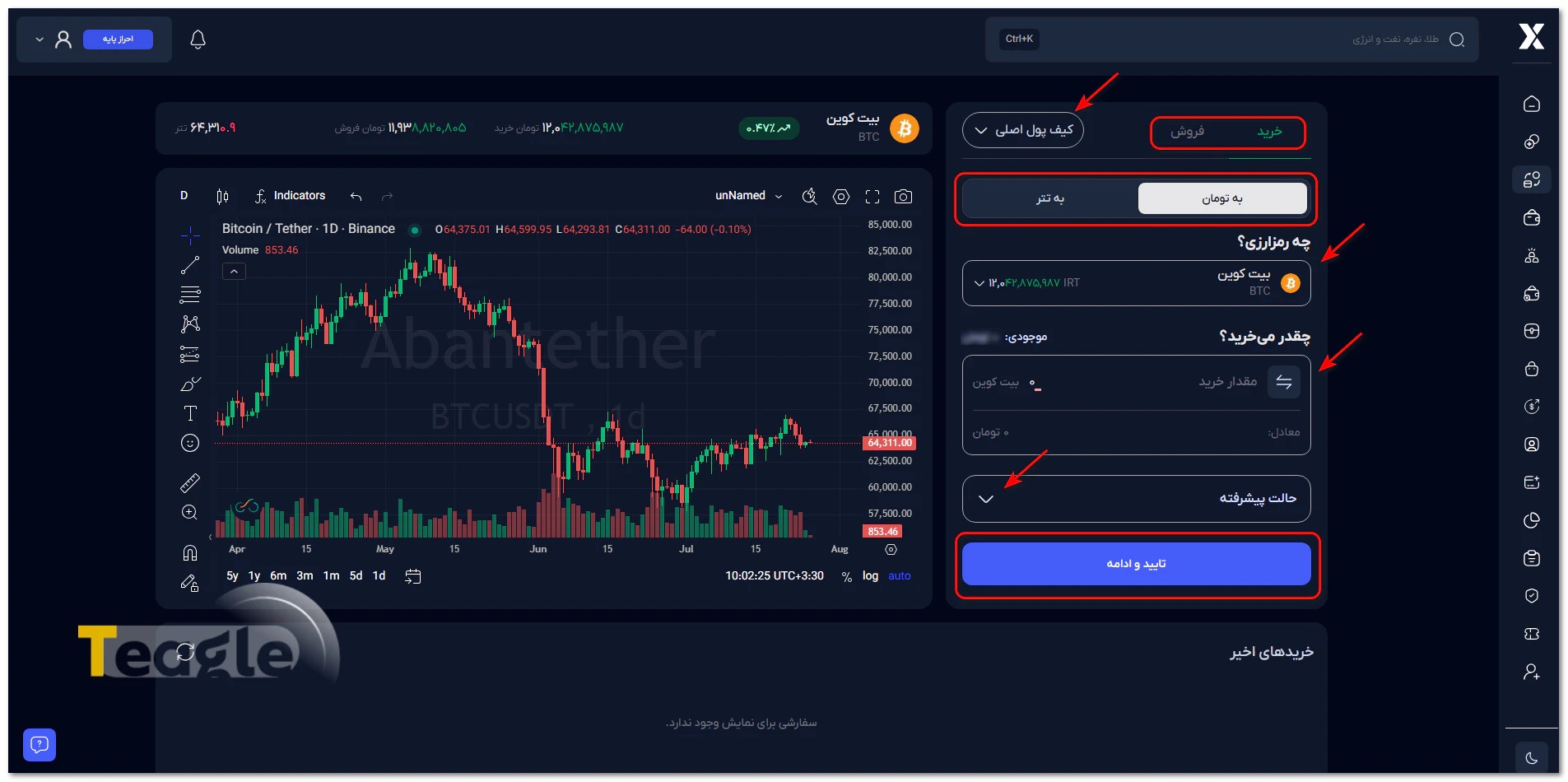
Step 3: Placing a buy or sell order
Once your account is funded, you can start trading. To do this:
- Select the cryptocurrency you want from the market list.
- Click Buy or Sell .
- Enter the wallet, market (Toman or Tether), order type, and the amount of cryptocurrency or the sum you want. Note that this platform also lets you place orders in two ways: automatic market order and stop-loss order.
- Before final confirmation, review the order details, including the amount paid, the fee and the amount received.
- If everything is correct, place your order.
-
Step 4: Using the other trading markets
As mentioned earlier, in addition to the crypto market, AbanTether offers a range of other investment options. These markets include:
- Melted gold market for buying and selling gold online
- Global stock market for trading shares of international companies
- Leveraged trading for professional users, with leverage and short selling
- Investment boxes which offer a basket of assets matched to users' risk level
-
These features let users build a more diversified investment portfolio without leaving the platform.
Creating a Wallet on the AbanTether Exchange
On AbanTether, unlike non-custodial wallets, you don't need to manually create a wallet for each cryptocurrency. After you complete registration and identity verification, the system automatically creates and manages the deposit addresses your account needs. Whenever you want to transfer cryptocurrency to AbanTether, simply get the address for that coin and network from your user account.
How to Deposit Funds to the AbanTether Exchange
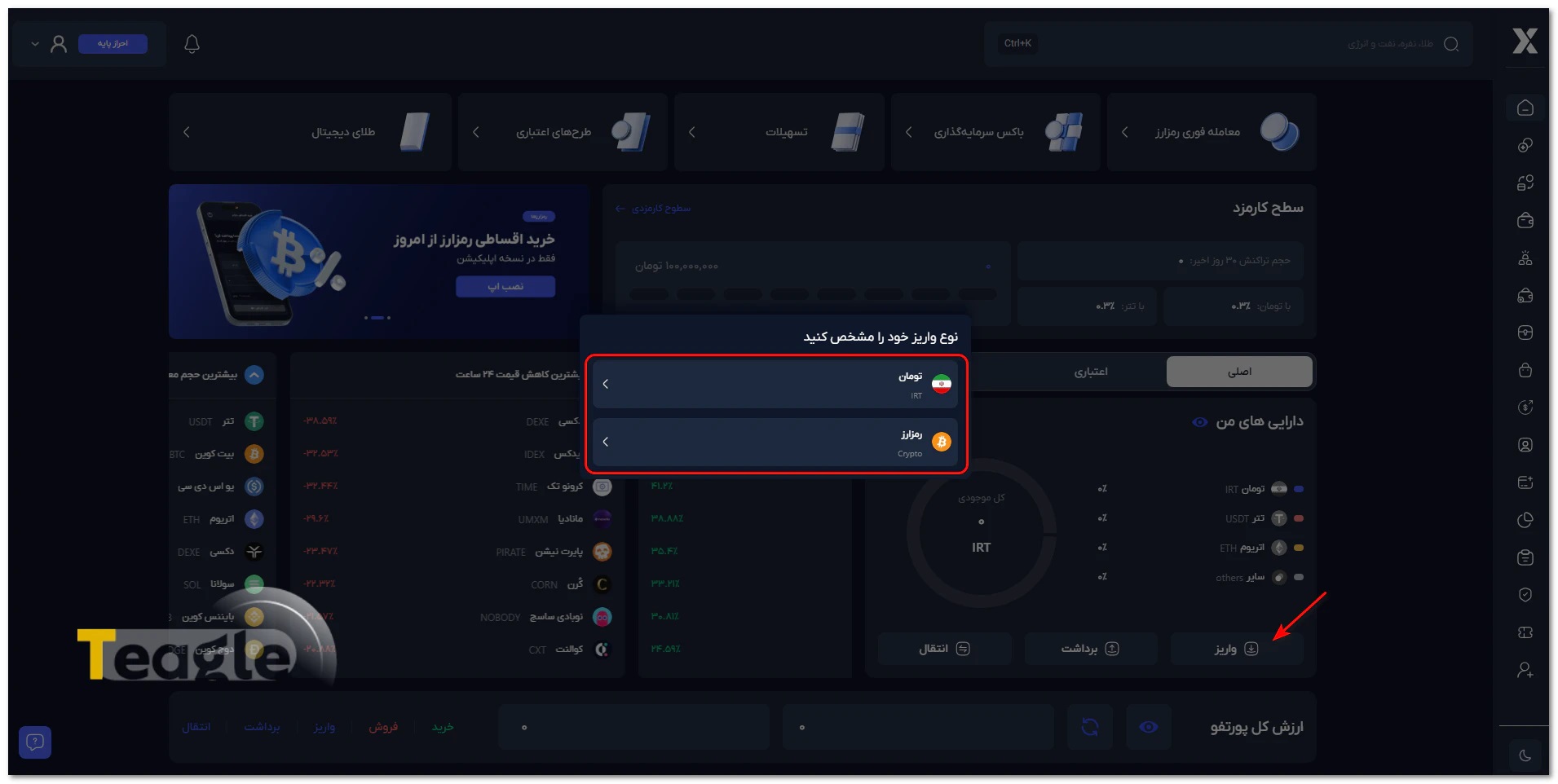
After completing registration and identity verification, you can fund your account with Rials or crypto. Below, we go through the steps for both methods.
How to Deposit Toman
To deposit Rials into your AbanTether account, follow these steps:
- Log in to your account and, in the Wallet section, select the «Deposit Toman» option.
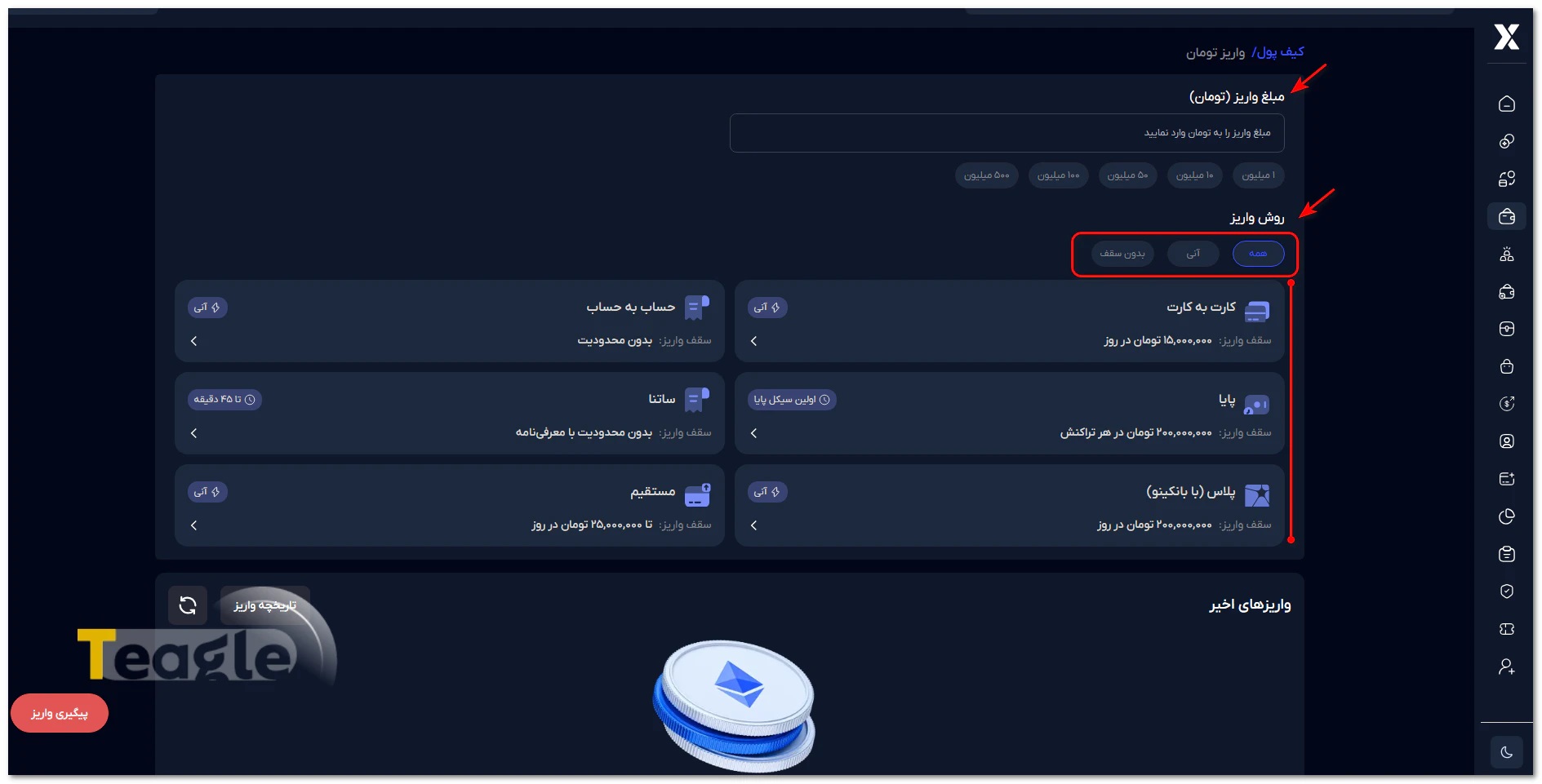
- Choose one of the deposit methods:
- Card-to-card
- PAYA
- SATNA
- Account-to-account
- Plus (Bankino)
- Direct deposit
- Enter the amount you want.
- Make the payment using the bank card registered in your own name .
- Once the payment is complete, the Rial balance is added to your wallet.
-
Note: Rial deposits must only be made with a bank card belonging to the account holder. Using someone else's card may cause the deposited amount to be frozen until it is reviewed.
How to Deposit Crypto
To transfer crypto from another wallet or exchange to AbanTether, follow these steps:
- Go to the Wallet section and click the «Deposit» option.
- Select the cryptocurrency you want.
- Specify the transfer network.
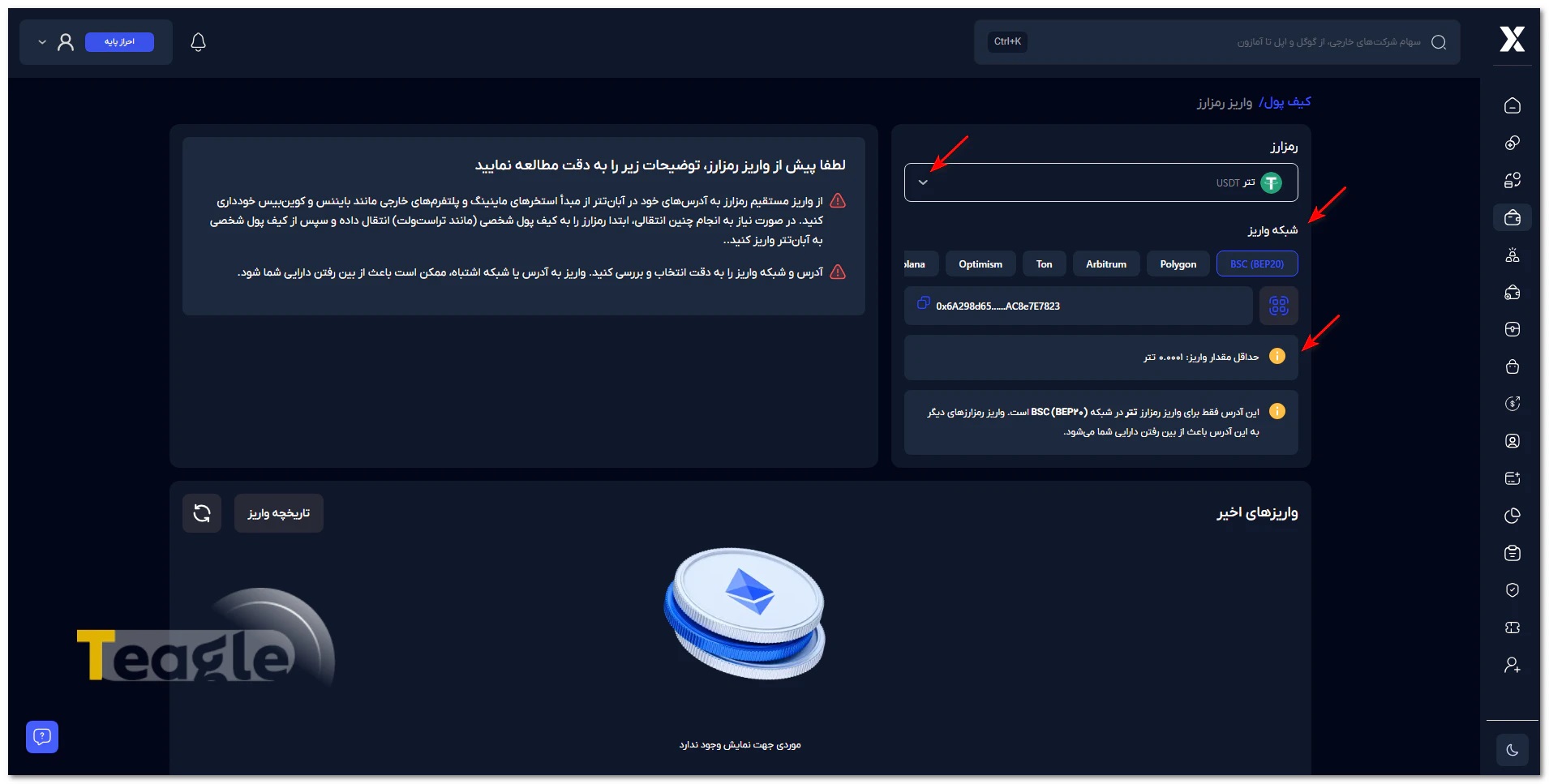
- Copy the displayed wallet address or scan its QR Code.
- Send the crypto to this address from the source wallet or exchange.
- After making the transfer, enter the transaction ID (TxID) and the deposited amount in the relevant section.
- Confirm the request and wait for the blockchain network confirmation.
-
Note: Before transferring, make sure the source and destination networks are the same, as sending assets on the wrong network can result in losing your crypto.
Once the deposit is complete, your Rial or crypto balance is shown in the Portfolio (Wallet) section. You can also view and track the status and history of all your transactions from this same section.
How to Withdraw Crypto from the AbanTether Exchange
On the Abantether crypto exchange, you can withdraw your assets either as cryptocurrency or in Rial. To use either option, you must first complete your account's identity verification.
How to Withdraw Cryptocurrency
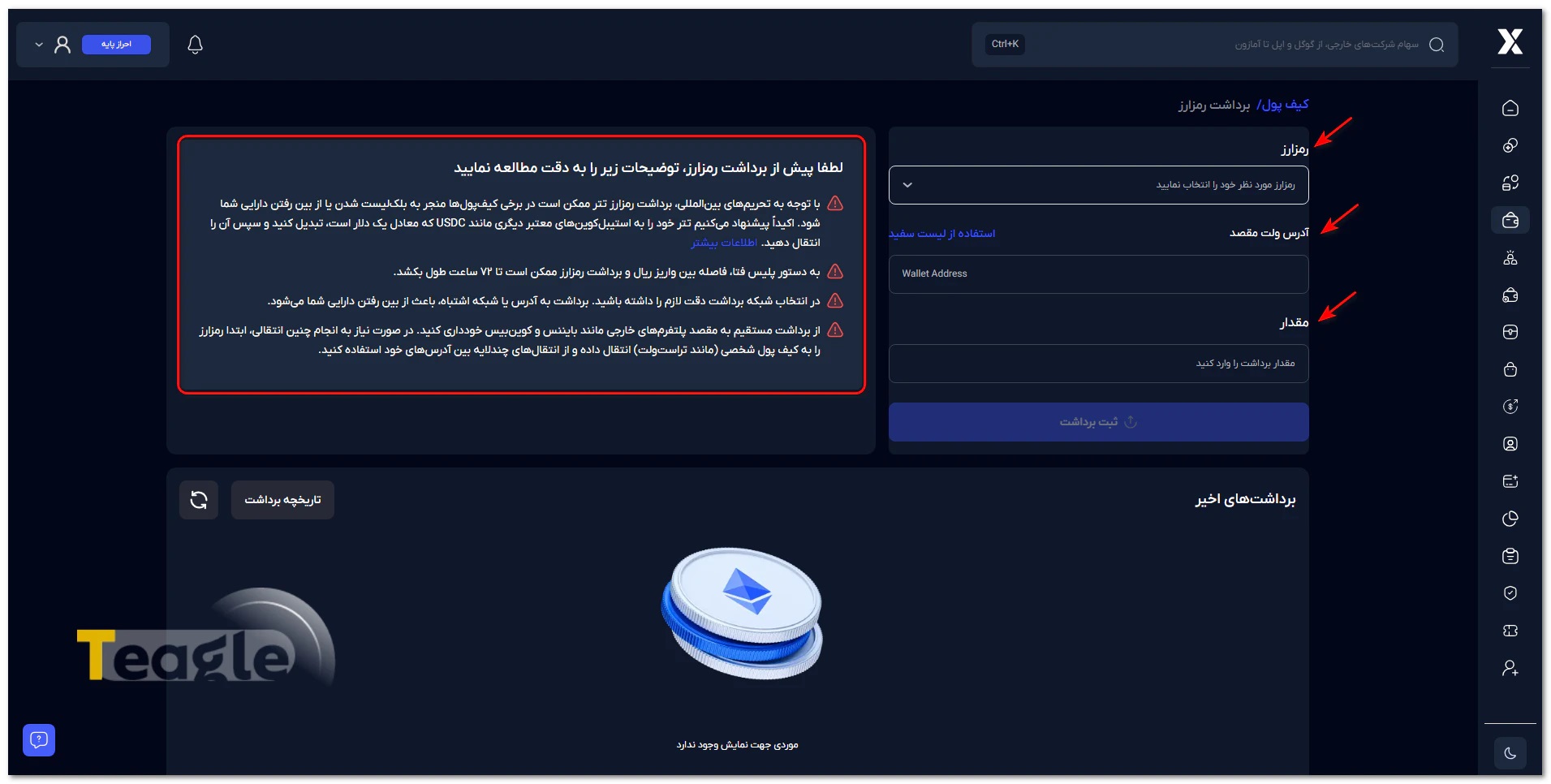
To transfer cryptocurrency from Abantether to another wallet or exchange, follow these steps:
- Log in to your account and click «Withdraw» on your dashboard.
- In the window that opens, select «Cryptocurrency».
- Select the digital asset you want along with the transfer network, and enter the destination wallet address.
- If required, also enter the Tag or Memo.
- Enter the amount of cryptocurrency you want to withdraw and, before confirming, review the transaction details, including the network fee and the final amount you will receive.
- Once you have made sure the details are correct, click «Submit» to register the withdrawal request.
How to Withdraw Toman
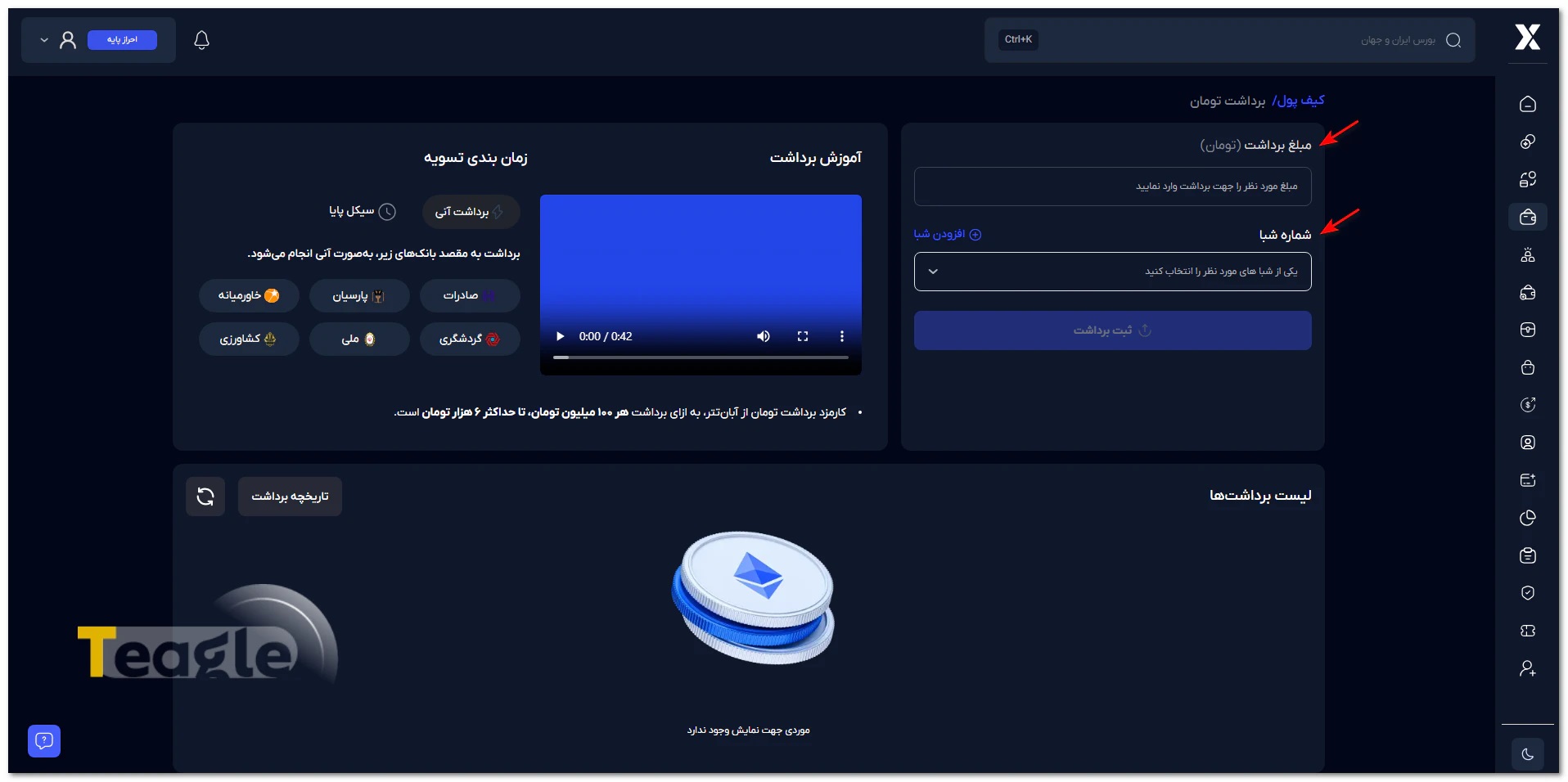
To transfer your rial balance to your bank account, follow these steps:
- Click «Withdraw» and select «Withdraw Toman».
- Enter the desired amount.
- Select the Sheba number registered in your name.
- Submit the withdrawal request.
- Once the request is processed, the amount will be deposited into the selected bank account.
Rial withdrawals are processed instantly for some banks, while for other banks they are settled according to PAYA cycles.
How to Make Internal Transfers on AbanTether
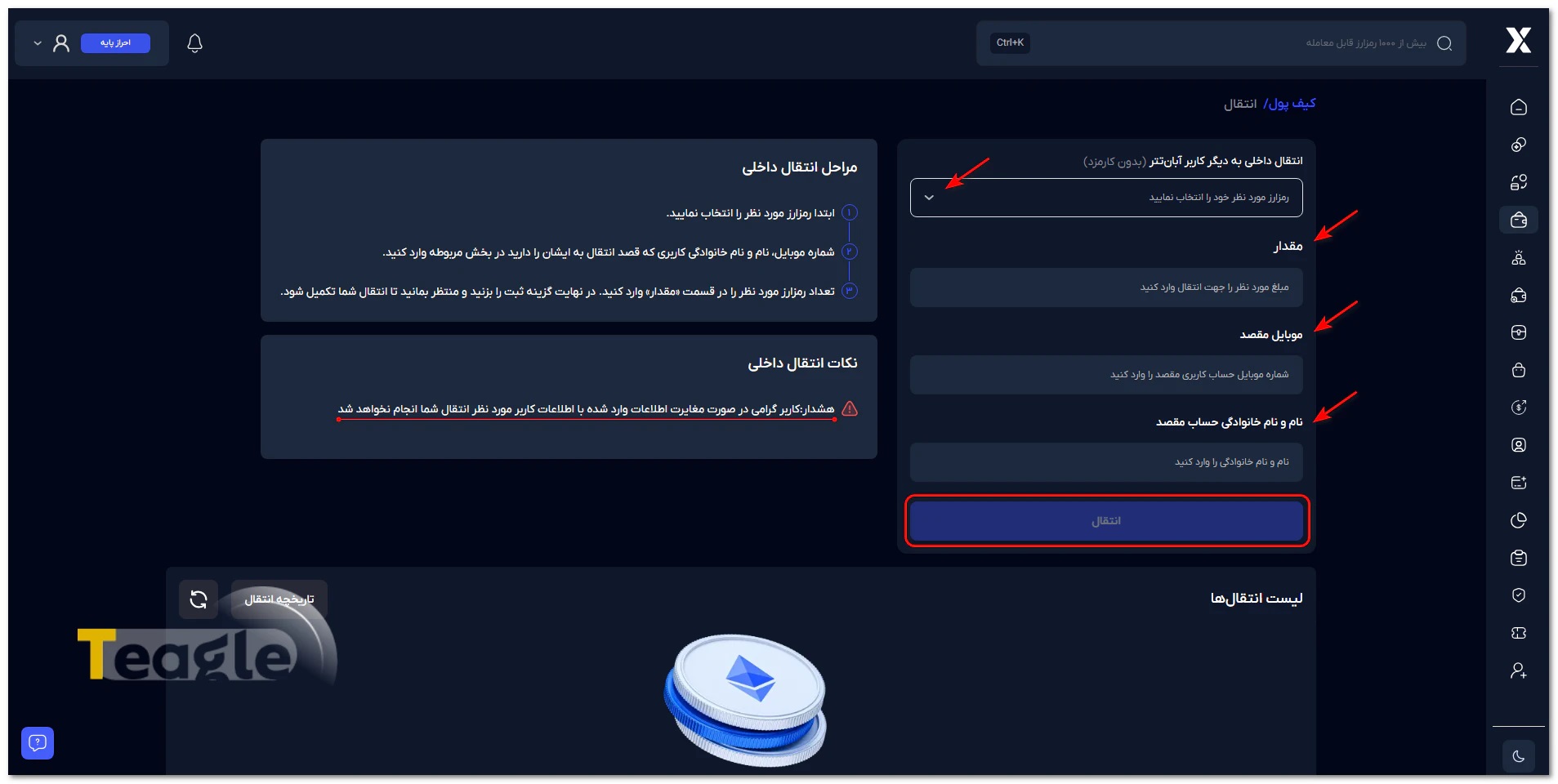
Internal transfer is one of the fastest ways to move assets on AbanTether. With this feature, you can send your cryptocurrencies directly to other AbanTether users' accounts without making a transaction on the blockchain network. The main advantage of this method is fee-free transfers and almost instant settlement. To do this:
- Log in to your account and click «Transfer».
- Select the cryptocurrency you want.
- Enter the destination account ID (usually the user's registered mobile number on AbanTether).
- Specify the amount of cryptocurrency you want to transfer.
- Review the transfer details. This section shows the transfer amount and the zero fee .
- After making sure the details are correct, click «Submit» to complete the transfer.
AbanTether: From Your First Purchase to Professional Asset Management
Working with a crypto exchange isn't limited to placing buy or sell orders; getting familiar with the full process, from creating an account and securing it to depositing, trading, withdrawing and managing your assets, makes for a safer and simpler experience.
By offering a range of trading tools and financial services, AbanTether aims to provide every stage of users' activity in a single, integrated environment. By learning the different sections of this platform, you can make more informed decisions, better manage your trading costs and use the exchange's features in line with your needs and level of experience.
Articles related to the broker
User reviews

Newest
