
How to Use Forex Factory for Market Analysis

Author
Hossein Haghshenas
Published
 2026/09/05
Updated
2026/10/25
Reading time
5 دقیقه


Imagine having a detailed roadmap that tells you which important economic events are coming up and how they could affect the financial markets. For example, if you know that a key interest rate report is about to be released, you can adjust your trading strategy accordingly. Forex Factory is a comprehensive and essential platform for financial market traders that provides fundamental analysis tools and real-time information for making informed decisions. Below, we'll look at how to use Forex Factory.
What Is Forex Factory and Why Is It Essential for Traders?
Forex Factory is a comprehensive fundamental analysis tool that lets traders identify major economic events and their impact using its economic calendar. The platform provides essential information such as event timing, impact indicators and a comparison of forecast versus actual data, which helps traders with risk management and effective planning.
The Forex Factory economic calendar is considered a «compass» for all financial traders in fundamental analysis. It is the most accurate online economic calendar, providing information on economic events, political reports and financial indicators that directly affect currency values. Even technical analysis traders should not ignore the economic calendar, because highly volatile price moves are often caused by «actual» figures that differ significantly from «forecast» figures. Below, we review the main sections of this website.
An Overview of the Main Sections of the Forex Factory Website
Forex Factory is more than a news site; it is a multidimensional tool that provides fundamental data, retail sentiment, community wisdom and personal performance tracking. The platform consists of several key sections, each playing an important role in helping traders.
Economic Calendar: The Most Useful Tool
The economic calendar is the most visited part of Forex Factory and is considered its most important tool. This section displays upcoming economic events along with details on timing, the related currency, level of importance, and forecast and actual results. The economic calendar offers opportunities to take advantage of market moves driven by data releases. By reviewing this calendar, traders can prepare themselves for potential market volatility.
News and Forums
The Forex Factory news section includes articles covering fundamental analysis, such as a seasonal analysis of GBP/USD and the impact of the Iran conflict in April 2026. These articles help traders gain a deeper understanding of the factors affecting the market. The Forums are a place for traders from around the world to exchange views, strategies and analyses. This section allows traders to benefit from each other's experience and gain different perspectives on the market.
The Sentiment Tool or Market Sentiment Indicator
The sentiment tool on Forex Factory offers a view of retail traders' open positions. Forex Factory's sentiment data is accurate for the sample of traders who have connected their accounts to Forex Factory and can be used as a contrarian indicator of retail sentiment. If sentiment is heavily imbalanced (above 75/25), professional traders look for reasons to trade against the retail crowd. This tool can help identify potential market reversal points.
Basic Forex Factory Settings Guide for Iranian Users
To get the most out of Forex Factory, especially for Iranian users, some basic settings are necessary. These include setting the time and filtering news by importance and currency.
How to Set the Forex Factory Website Clock to Iran Time
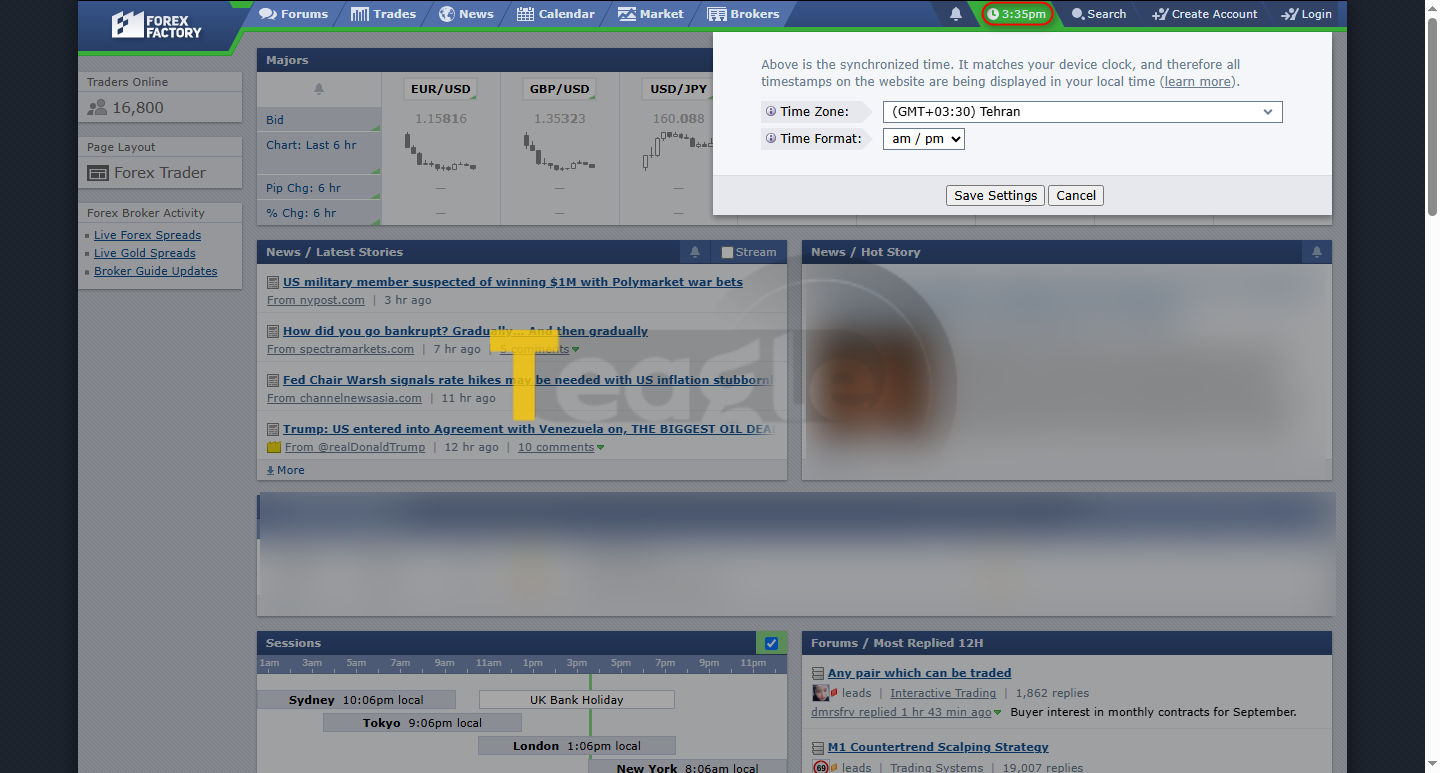
To have economic event times displayed correctly according to Iran's time zone, you need to set the website clock. This is usually done by clicking on the clock shown at the top of the website and selecting the Tehran time zone or a similar time zone with the same offset from GMT as Iran. Making sure the clock is set correctly is vital for planning trades accurately and avoiding missing important news.
How to Filter News by Importance and Currency
Forex Factory lets you filter the economic calendar according to your needs. You can filter by country (to focus on countries related to the currency pairs you trade), impact level (to show only medium- or high-impact events) and data type (such as Gross Domestic Product (GDP), the Consumer Price Index (CPI) or the Non-Farm Payrolls (NFP) report). Filtering out low-impact events or irrelevant currencies helps you focus on critical data. This feature helps you avoid information overload and focus only on the news that has the greatest impact on the currency pairs you trade.
How to Analyze News and Economic Indicators in the Forex Factory Calendar
Effective news analysis on Forex Factory requires a proper understanding of the different colors and columns of the economic calendar. This understanding helps traders anticipate the potential impact of news on the market.
What the Yellow, Orange and Red Colors Mean for News Importance
In the Forex Factory calendar, colors indicate the level of impact of news. These colors quickly show you how much a news item could affect the market:
|
Color |
Impact Level |
|
Yellow |
Low impact |
|
Orange |
Medium impact |
|
Red |
High impact |
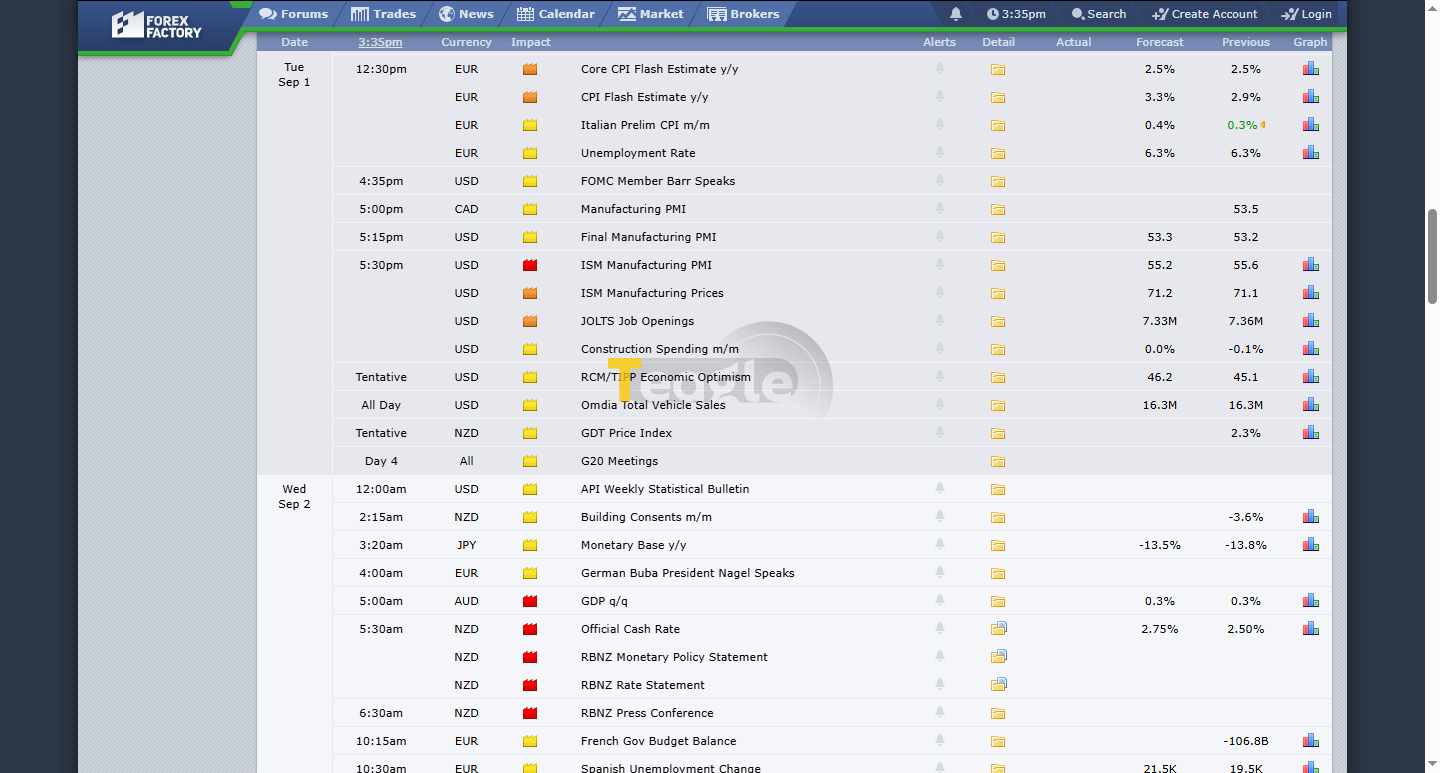
Identify high-impact events such as interest rate decisions, Consumer Price Index (CPI) reports and employment figures. These events have the potential to cause sharp market volatility.
Analyzing Three Vital Columns: Actual, Forecast and Previous
To analyze news effectively, traders should identify important events in the economic calendar, compare forecasts with actual results and combine market sentiment with technical analysis. The 3 main columns in the Forex Factory economic calendar are:
- Previous: This column shows the previous value of the economic indicator released in the last period.
- Forecast: This column shows the average forecast of economic analysts for the current indicator.
- Actual: This column shows the actual value of the economic indicator after the news is released.
A green number in the calendar indicates better than forecast or a better revision, while a red number indicates worse than forecast or a worse revision. Before the news is released, look at the difference between «Forecast» and «Previous»; if the gap is very large, the market is usually already prepared (market sentiment). Forex Factory collects data from official sources, so you can rely on it when reviewing economic indicators and forecasts.
Trading Strategies with Forex Factory News and Risk Management
Trading the news requires specific strategies and precise risk management so you can use sharp market volatility to your advantage and avoid potential losses. At the start of each trading week, check the Forex Factory economic calendar and review the week's events. Note down the events related to your preferred currency pairs or trading strategy.
When news is released, don't enter a trade immediately; system lag and widening spreads can wipe out your account. Wait for the «Actual» figure to appear. After the news is released, analyze the price reaction at support/resistance zones; if the news is very good but price fails to break resistance, this could be a sign of a reversal. For example, the Non-Farm Payrolls (NFP) report is a monthly event with significant implications for the US dollar (USD). The US NFP report, released on the first Friday of the month, can cause swings of hundreds of pips in gold (XAUUSD) and other USD pairs within minutes. Interest rate decisions by the Federal Reserve (FED) in the US or the European Central Bank (ECB) are also always a focal point; rate hikes usually lead to a stronger currency. The Consumer Price Index (CPI) is a measure of inflation and, in the current economic climate, it is key to anticipating central banks' next moves.
What is Persian Forex Factory and what are its advantages?
Persian Forex Factory does not mean a localized or translated Persian version of the original Forex Factory website; rather, it refers to websites or platforms that offer content and tools similar to Forex Factory in Persian. These platforms usually provide an economic calendar, news and forex market analysis for Persian-speaking users.
The main advantage of using these platforms is easier access to information for users who are not comfortable with English. This helps them understand news and analysis without needing a translation and make better trading decisions. However, it is important to make sure Persian sources are credible and accurate, since some of them may not be as comprehensive and up to date as the original Forex Factory.
Frequently asked questions about using the Forex Factory website
Is Forex Factory suitable for beginner traders?
Yes, by providing clear and well-categorized information, Forex Factory is an excellent tool for beginner traders to get familiar with the principles of fundamental analysis and the impact of news on the market.
How can I make the best use of the Forums section?
To get the most out of the forums, you can ask your questions, join discussions and learn from the experience of seasoned traders. Studying trading strategies shared by others can also be very useful.
Does Forex Factory also offer tools for technical analysis?
No, Forex Factory's main focus is on fundamental analysis and economic news. Although technical traders also benefit from its economic calendar, the platform does not offer dedicated technical analysis tools such as advanced charts and indicators.
Is Forex Factory's information reliable?
Yes. Forex Factory collects data from official and credible sources, which is why its information is highly accurate and reliable.
How can I use the economic calendar filters for specific currency pairs?
By selecting the currencies related to your chosen currency pair in the filters section, you can view only the news relevant to that pair. For example, if you trade EUR/USD, you can set the filters to show only news related to the euro (EUR) and the US dollar (USD).
Contents of this article


Related articles

User reviews

Newest
 Upload image