What Is a Market Scanner or Screener in Financial Markets?

Author
Admin
Published
 2026/06/27
Updated
2026/10/25
Reading time
5 دقیقه


Financial markets never pause. Prices move up and down within seconds, and opportunities appear suddenly and vanish just as quickly. In such an environment, relying on manually checking a handful of charts is no longer enough; it is practically like looking for a needle in a haystack.
This is where tools like scanners and screeners come in; tools that can be considered a trader's «second pair of eyes». Eyes that never get tired, never fall prey to excitement or fear, and never get lost in market noise; instead, out of thousands of symbols, they pull out only the ones that are truly worth examining.
By intelligently filtering market data, these tools turn analysis from a time-consuming, exhausting task into a fast and focused process, so that decision-making moves away from emotion toward more disciplined, more precise and data-driven choices. Below, we will get to know this concept better.
What is a market scanner?
A market scanner is an analytical tool that monitors the market in real time and identifies any symbol that has entered an important, unusual or noteworthy state.
Simply put, a scanner is like the market's ever-watchful guard ; it never takes its eyes off the data and immediately reports any change worth attention to the trader, from a volume spike to the break of a technical level.
The main strength of a scanner is that, out of a mass of information, it pulls out only the items that really matter. This ability has made the scanner one of the essential tools for traders for whom speed, accuracy and timely reaction are vital.
How does a scanner work?
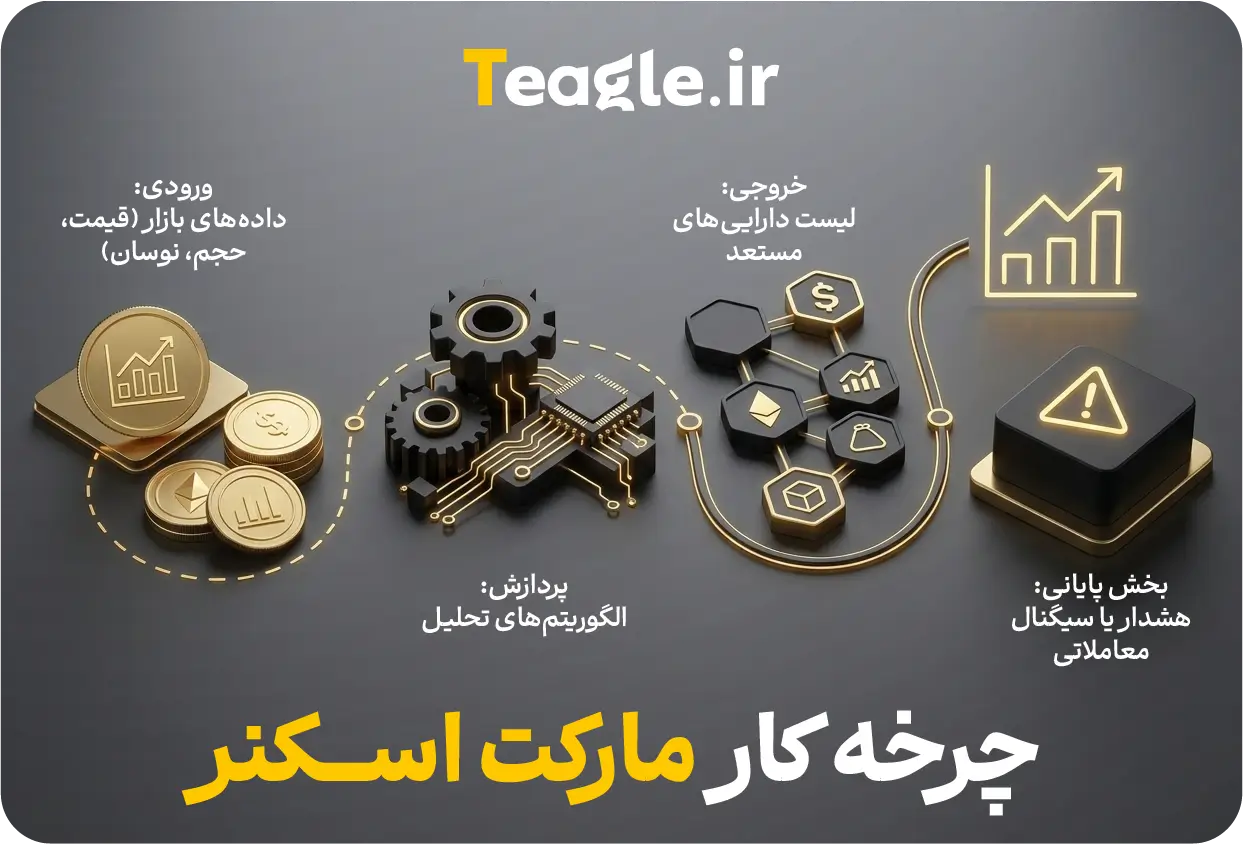
A scanner's operation is built on a simple yet highly efficient structure:
1) Receiving real-time data
The scanner connects to live market feeds and receives information such as price, volume, volatility and orders at that very moment. This data is the raw material of analysis.
2) Processing and applying filters
The scanner's algorithms compare the data against predefined filters;
for example:
«Find symbols whose trading volume is 200% above average and that have broken a key resistance.»
3) Presenting the output
The result of this processing is displayed as a dynamic list or an alert. This output helps the trader quickly focus on important symbols without searching manually.
What is a screener?
A screener is a more analytical and slower-paced version of the scanner . While a scanner focuses on real-time data and reports every small change immediately, a screener is used more for structured screening ; that is, examining symbols based on criteria defined in advance.
A screener usually works with end-of-day (End-of-Day) data or relatively static data and helps the trader build a list of suitable symbols (a watchlist) . For this reason, a screener is a good tool for calmer analysis, comparing symbols and selecting initial candidates for deeper study, not for reacting quickly to real-time market moves.
In Iran, these two terms are often used interchangeably , because many local platforms and even TradingView have combined scanner and screener features into a single tool, and the line between them is not very noticeable to users.
How does a screener work?
Unlike a scanner, which focuses on real-time data, a screener works on a simple, structured process: screening the entire market based on criteria defined in advance.
In practice, a screener follows this path:
1) The user defines the criteria
The trader specifies what kind of symbols they want to see; for example: RSI below 30, annual earnings growth above 20%, or even any combination of fundamental and technical criteria.
2) Searching the entire market based on these criteria
The screener examines end-of-day or static data and separates out the symbols that match the filters. There is no real-time reaction here; the focus is on analysis and selection.
3) Displaying a static, sorted list
The result of a screener is usually an organized, reviewable list;
for example: «Stocks with a price-to-earnings ratio (P/E) below 15 and revenue growth above 20%».
This output helps the trader build a more precise watchlist and find suitable candidates faster before moving on to in-depth analysis.
The difference between a scanner and a screener: why are they seen as the same in Iran?
As we mentioned, in many Persian sources these two concepts are mistakenly used interchangeably. In practice, however, there are several fundamental and significant differences between them. The comparison table below takes a closer look at these differences:
|
Feature |
Market scanner |
Screener |
|
Data type |
Real-time and dynamic |
Static and periodic |
|
Purpose |
Spotting immediate opportunities |
Filtering assets |
|
Responsiveness |
Very high |
Moderate |
|
Suitable for |
Day traders and scalpers |
Medium- and long-term investors |
|
Analysis type |
Signal-based |
Criteria-based |
Why do traders need a market scanner?
In a market where the direction of a trend can change at any second, traders do not have time to search manually through hundreds of charts. Speed of decision-making has become as important as its accuracy, and this is exactly where a market scanner becomes a vital tool; a tool that identifies opportunities before they become «visible» and makes the analysis process several times faster and more accurate. The main uses of this tool for traders can be summarized as follows:
1) Saving time on market analysis
A professional trader faces dozens to hundreds of symbols every day, and checking them manually is both time-consuming and tiring. A market scanner covers this ground in a few seconds and puts only the important symbols in front of you; in other words, instead of spending time finding opportunities, your time goes into analyzing them.
2) Finding trading opportunities that match your personal strategy
A scanner helps a trader see the market exactly according to their own strategy. If your strategy is Breakout , the scanner shows symbols close to a breakout; if you trade Mean Reversion, it finds symbols that have moved away from their average. In the crypto market, it can also instantly detect altcoins with a sudden spike in volume. In short, a scanner filters the market based on your needs and trading style.
3) Removing emotional analysis and improving trading discipline
A significant share of trading mistakes happen when emotions take the place of analysis; fear, greed, excitement or FOMO can derail even the best strategies. A market scanner breaks this cycle, because it bases decision-making on objective data and numerical criteria. When outputs are presented clearly, measurably and without emotional interference, trading discipline increases and the likelihood of emotional decisions drops significantly.
Common types of filters and criteria in market scanners
The real power of a market scanner lies in its filters; the parts that determine what the scanner sees and what it ignores. These filters usually fall into three main categories, each playing a different role in identifying trading opportunities:
|
Filter type |
Example criteria |
Main use |
|
Technical filters |
RSI, MACD, moving averages, trading volume |
Identifying real-time market conditions, spotting trends, entry and exit points |
|
Fundamental filters |
Market cap, P/E ratio, ROE, EPS growth |
Selecting quality companies, fundamental analysis, building long-term watchlists |
|
Price action filters |
Support/resistance breakouts, candlestick patterns (Engulfing, Doji), structural patterns |
Detecting significant price moves, breakout points, reversals and market behavior patterns |
Popular market scanner and screener tools
In this section, we introduce the tools traders use most; from global platforms to more specialized tools. The descriptions are brief, professional and suitable for use in the article.
TradingView Screener
TradingView is one of the most popular and comprehensive analysis platforms in the world; a tool that offers both a powerful screener and features close to a real-time scanner. This combination has led many traders to choose it as their standard starting point.
Main features:
- Extensive filters technical and fundamental
- Support for various markets: stocks, forex, crypto
- A simple, fast yet professional user interface
- Ability to save filters, build watchlists and receive alerts
This tool is an ideal choice for traders looking for an all-in-one, reliable screener.
2) Scanner in the MetaTrader platform (MetaTrader Scanner)
MetaTrader does not have an advanced scanner tool by default, but it is possible to develop and add custom scanners to it. This lets traders who work with MT4 or MT5 build a scanner exactly to fit their trading needs.
Ways to add a scanner in MetaTrader:
- Using scripts written in MQL
- Installing or building Expert Advisorready-made or custom
An important point to keep in mind is that scanner capabilities in MT4/MT5 are more limited than those of specialized platforms, and achieving professional performance usually requires development, programming or installing third-party add-ons.
3) Other free and professional tools
Scanner and screener tools are not limited to TradingView and MetaTrader. Depending on the target market and trading style, traders can use a range of international, crypto and Iranian platforms.
International tools
- Finviz: suited to the US stock market, with powerful fundamental filters and a fast user interface. An ideal option for building fundamental watchlists.
- TrendSpider: an advanced platform with smart technical analysis , automatic pattern recognition and an algorithmic scanner. Suitable for traders who need semi-automated tools.
- Trade Ideas: one of the most professional Real-Time for US stocks. Suitable for Active Traders who need high speed and accuracy.
Crypto-related tools
- CoinMarketCap Screener: A simple, practical screener for filtering cryptocurrencies by price, volume, market cap and daily changes.
- CoinGlass: one of the best-known market analysis tools for crypto derivatives . This platform collects real-time data on Open Interest, Funding Rate, liquidations, trading volume, long/short ratio and capital flows from various exchanges.
- DEX Screener: a specialized tool for tracking trades on decentralized exchanges (DEX). This platform displays data from hundreds of blockchain networks and thousands of liquidity pools in real time, and lets you search for tokens by criteria such as trading volume, liquidity, price changes, number of transactions and trending tokens.
Iranian tools
- BourseTrader: offers technical and fundamental filters for the Tehran Stock Exchange, suitable for building watchlists and initial analysis.
- Chartix: an analysis platform with simple screeners and handy tools for quickly reviewing stock symbols.
- Other local platforms: a set of domestic tools that provide real-time Tehran Stock Exchange data and are suitable for quick market analysis.
- Tehran Securities Exchange Technology Management Co. website (TSETMC): users can use this system's dedicated filter-writing language to filter symbols by criteria such as trading volume, buy and sell queues, buyer-to-seller strength, price changes and other trading variables. Although technically this feature is not a «real-time scanner» in the usual sense, in practice many traders use it to quickly identify promising symbols and daily trading opportunities.
How to use the market scanner in TradingView (step-by-step guide)
In TradingView, the market scanner is one of the fastest ways to find trading opportunities that match your personal strategy. With a few simple settings, you can filter hundreds of symbols in seconds and see exactly the conditions you are looking for. Below, we go through the steps of using this scanner one by one:
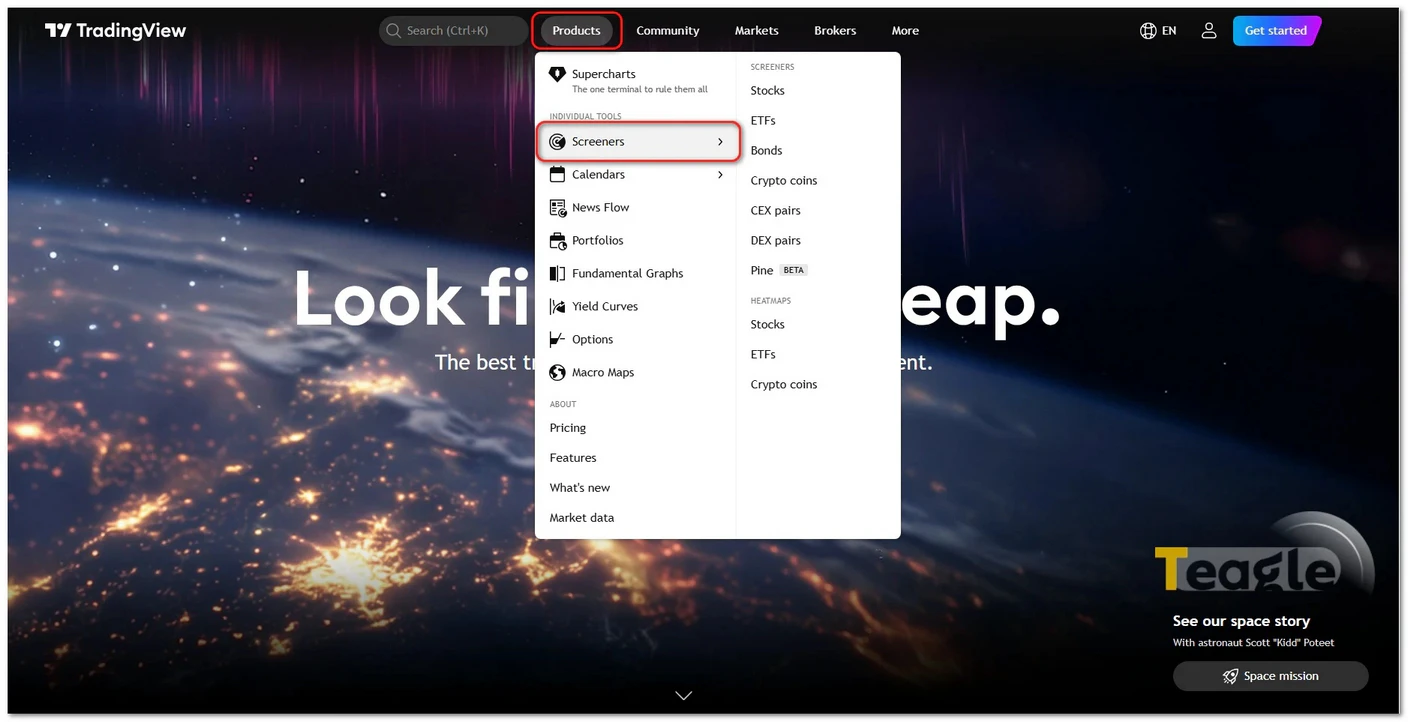
1. Log in to your TradingView account and from the «Products» menu, choose the «Screeners» option.
2. Select the desired market (stocks, forex, crypto, …) from the sidebar.
3. In the «Filters»section, add your preferred criteria such as P/E ratio or price;
4. Sort the results by volume, price change, market cap, etc. and add the important symbols to your personal watchlist.
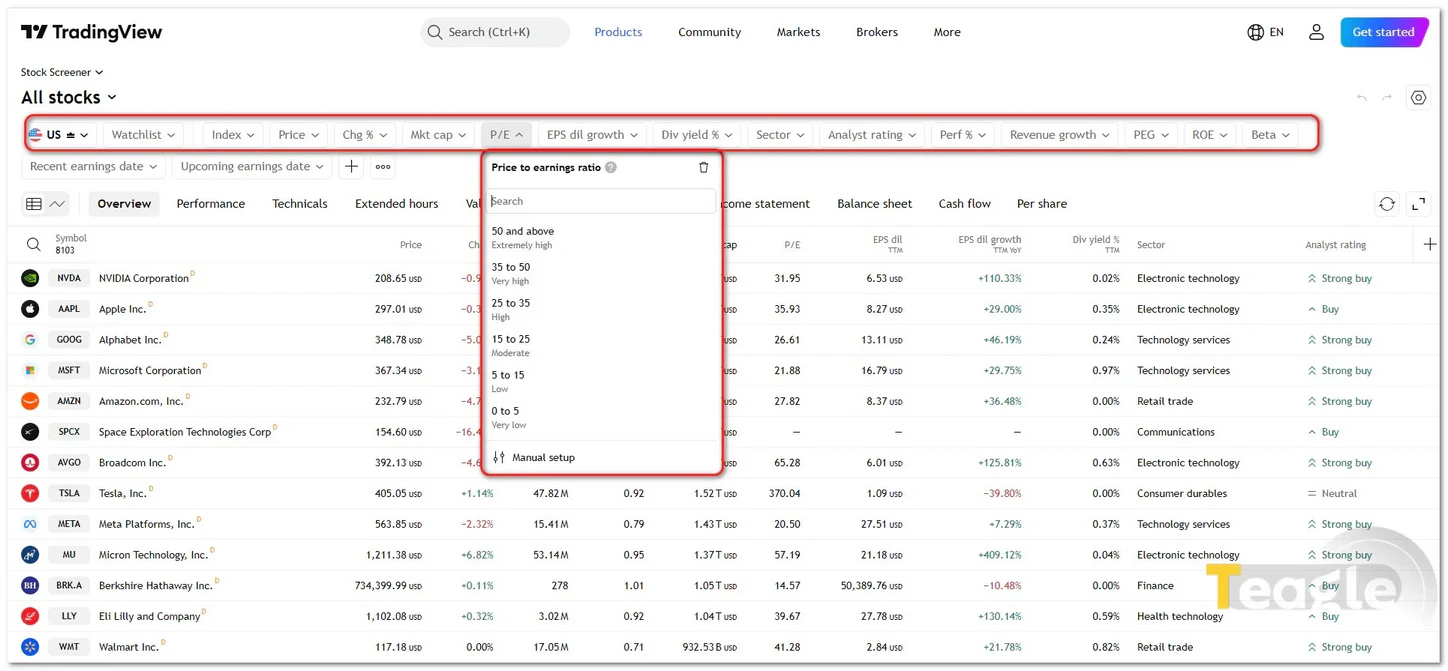
5. Set alerts for specific conditions so you are notified immediately when the filters are triggered.
Keep in mind that by clicking on any symbol you can open its chart and carry out your technical or price action analysis.
Key tips and common mistakes when using a scanner
At first glance, a market scanner seems like a simple tool for filtering symbols; but using it incorrectly can make you miss important opportunities or even lead to wrong decisions. Knowing the common mistakes and following a few key tips will minimize the potential risks:
1) Over-filtering and missing opportunities
Sometimes traders apply such strict filters that practically no symbols are left. A scanner works best when you start with broad filters and then gradually make them more precise. The goal is not to eliminate the market; it is to find real opportunities.
2) Relying entirely on scanner signals without risk management
A scanner is not meant to make decisions for you; it only gives you ideas and alerts . Entering a trade without considering a stop loss, proper position size and risk-to-reward ratio is one of the most common trader mistakes . No scanner is 100% accurate; it is your risk management that shapes the final result.
3) Other common mistakes
- Ignoring news and fundamental events
- Using filters without backtesting
- Not updating filters to match new market conditions
- Ignoring the timeframe
- Using preset filters without customizing them
Final step: turning the scanner into a lasting competitive advantage
Ultimately, the real power of a market scanner becomes clear when you see it not as a side tool, but as part of your trading system. A scanner helps you see, out of a mass of data, only the opportunities worth your attention, and it steers your decisions away from guesswork and emotion toward analysis and discipline. In a market where speed and accuracy come first, the most successful traders are those who can screen data faster and reach opportunities before others. If you want to build a lasting competitive advantage, today is the best time to start using a scanner wisely.
Contents of this article


Related articles


User reviews

Newest
 Upload image